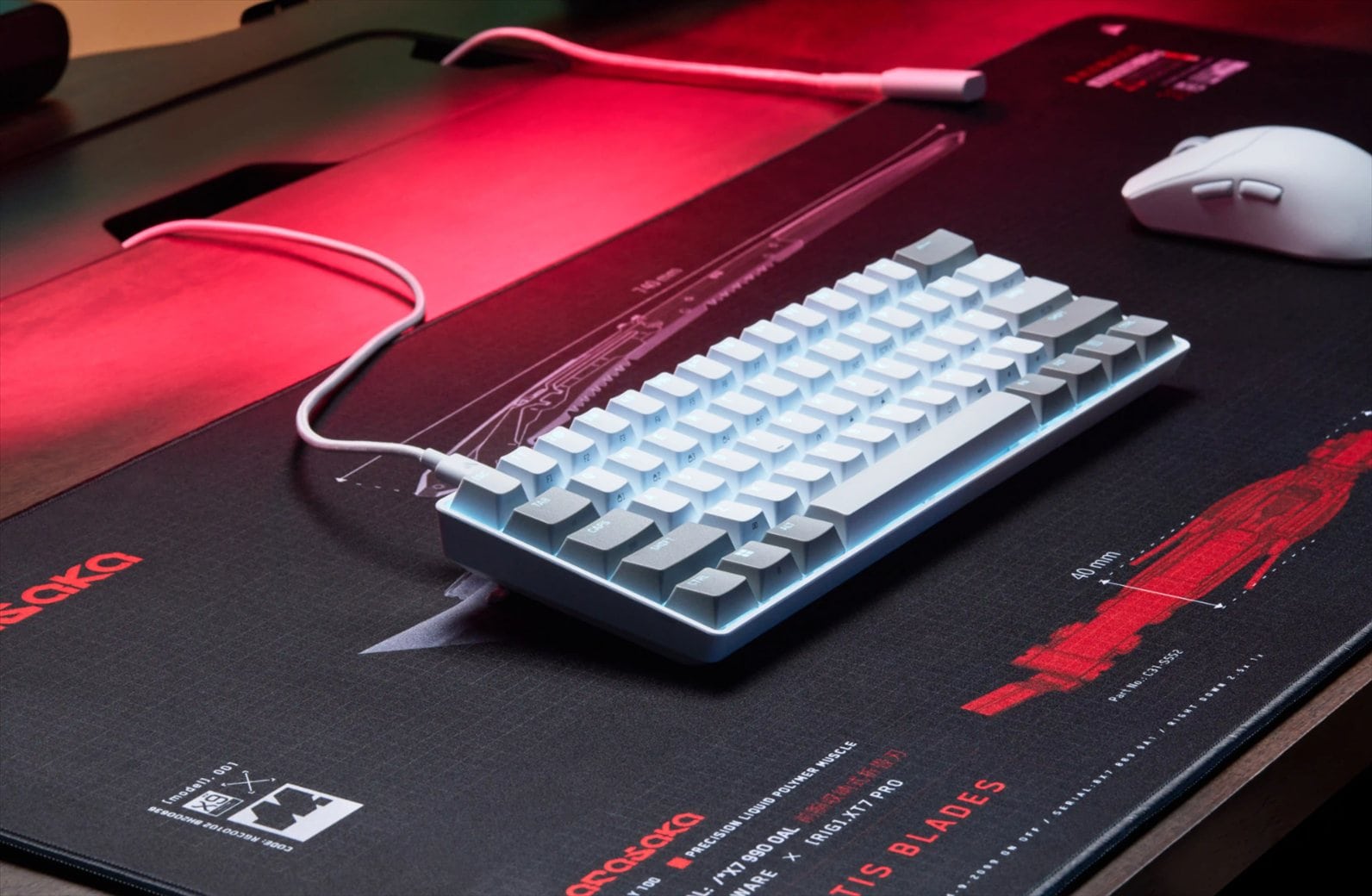
The Razer Huntsman V3 Pro Low-profile Tenkeyless 8KHz is a mouthful of a name, but it also tells you quite a lot about what Razer is trying to achieve here. This is a high-performance, low-profile TKL gaming keyboard aimed squarely at competitive and esports players, combining Razer’s latest analogue optical switches with adjustable actuation, Rapid Trigger, Snap Tap, Snap Flex and true 8,000Hz polling.
It retails for A$399.95 in Australia, putting it firmly in premium gaming keyboard territory. But if winning is the only goal and you want the best of the best, this is it.
Having a high-performing gaming keyboard in both a TKL and low-profile form factor has always been my preference. I like how compact they look on the desk, but more importantly, I find them more comfortable to use during long gaming sessions. With the keys sitting closer to the desk, my fingers feel more connected to the keyboard and there is less unnecessary movement involved.
The Huntsman V3 Pro Low-profile Tenkeyless 8KHz ticks pretty much all of those boxes – and more.
Packaging and Unboxing


Design and comfort
The keyboard looks excellent in person, with a clean and relatively understated design compared with some gaming keyboards. More importantly, it feels very sturdy too. The low-profile design gives it a front height of just 19.5mm, and it makes a noticeable difference during longer gaming sessions. My wrist sits much closer to the desk surface when using the Huntsman V3 Pro Low-profile, so I don’t have to keep it raised or hanging at an awkward angle for hours. Combined with the shorter key travel, the overall position feels more natural and comfortable compared to a standard keyboard.
I’ve been using the keyboard mostly while playing Overwatch and the keyboard feels responsive, but as importantly, I can play for long hours without having some kind of discomfort on the wrist.
Razer uses its Low-profile Analog Optical Switches on this keyboard. They have a 2.8mm total travel distance, a 40g actuation force and an adjustable actuation point ranging anywhere from 0.1mm to 2.8mm. And being able to adjust the actuation point is awesome, because it means you can effectively decide how sensitive every key should be.


If you want the fastest possible response for something like an ultimate ability, you could set it to 0.1mm. At that point, even the slightest touch is enough to register an input. If your finger placement and accuracy are 100% consistent, go for it. But for everyone else, 0.1mm is definitely too sensitive. If you have a tendency to rest your fingers heavily on the keyboard or occasionally press a key unintentionally, you can simply increase the actuation distance until you find the sweet spot.
That’s particularly useful in fast-paced games like Overwatch. You might want your movement keys to react almost immediately, while keeping another key slightly less sensitive so you don’t accidentally trigger an ability at the wrong moment.
That flexibility is one of the biggest advantages of esport-level gaming keyboards like this. Rather than being stuck with whatever actuation point the switch manufacturer has chosen, you can tune the keyboard around the way you actually play. This versatility has always come at a more premium price, though. Some gaming keyboards try to keep the price down by giving this flexibility only to some of the keys.
Rapid Trigger builds further on that by removing the traditional fixed reset point. A key can reset as soon as you begin lifting it, with movement as small as 0.1mm. For games where you are constantly tapping movement keys, stopping and changing direction, this makes repeated inputs feel immediate. Those who play FPS games would want this.
Gaming performance
The Huntsman V3 Pro Low-profile Tenkeyless 8KHz contains pretty much all of Razer’s latest competitive keyboard technology. Snap Tap prioritises the latest input between a pair of keys, while Dual-Keypress Priority is designed to handle situations where multiple movement keys are being pressed at once. Snap Flex can trigger a separate action as you release a key, while Dynamic Keystroke allows multiple commands to be assigned depending on how far you press down.


These are very specific features, and casual gamers are unlikely to make full use of everything available here. For competitive players, however, they offer considerably more control over movement and input behaviour than you would get from a conventional mechanical keyboard.
During my time playing Overwatch, I really like just how responsive the keyboard feels overall. Movement inputs feel immediate, abilities trigger exactly when expected, and the low-profile switches help everything feel quick underneath the fingers. More competitive and professional players would want to adjust more and make use of all these advanced features to the fullest.
Of course, there is only so much a keyboard can do for your actual gaming skills, but the Huntsman certainly isn’t going to be the thing holding you back.
Razer has also gone all-in on response time with true 8,000Hz HyperPolling. Razer quotes an average latency of 0.39ms from its low-profile analogue optical switches combined with 8,000Hz HyperPolling. Whether you can actually perceive that difference compared with a good 1,000Hz keyboard is another discussion entirely, but if your objective is getting the lowest possible latency out of your peripherals, this is about as far as current gaming keyboards can push things.
The keyboard is wired, which makes sense considering its esports positioning. I personally have never had issues with Razer’s wireless technology either, but at this level of competitive gaming, a wired connection removes any potential variable and an esport player knows this.
It is worth keeping in mind that 8,000Hz polling puts additional workload on the system compared with 1,000Hz polling. If you are planning to take full advantage of it, I would pair the keyboard with a reasonably modern gaming PC or laptop.
Despite all the attention placed on competitive gaming, the Huntsman V3 Pro Low-profile is also a very pleasant keyboard to type on. The tactile feedback feels just right to me. Each press feels quick and responsive without feeling stiff, and the keys don’t have that hollow sensation that you sometimes get from thinner keyboards. The low-profile keys also mean your fingers don’t have to travel very far between presses, so typing feels fast and effortless once you’ve settled into it.
There is plenty to customise through Razer Synapse, but various settings can be adjusted directly from the keyboard, including Rapid Trigger and actuation settings. Imagine you are already inside a competitive match and realise the keyboard needs some adjustments for the game you are playing. Rather than leaving everything, opening Synapse and digging through menus, you can make adjustments directly from the keyboard dynamically.
Doing it this way is admittedly trickier than using Synapse because you need to remember the various shortcuts, but the important thing is that the option is there.
The keyboard can store six profiles in total. Two are preset profiles, while four can be customised.


I also really like the multi-function digital dial. By default, it provides the sort of volume control you would expect, but you can customise it for other functions and even macros. The physical feel is good as well. Rotating the dial has a satisfying response to it, and having proper dedicated controls is always preferable to relying entirely on function key combinations.
The RGB implementation is more restrained than the Logitech G512 X 98 I was using previously. Logitech’s G512 X 98 has a front-facing LIGHTSYNC RGB Lightbar that gives the keyboard a much more noticeable glow across the desk. The Razer Huntsman V3 Pro Low-profile does not have anything quite as visually dramatic. Personally, however, I prefer the ergonomics of the Huntsman. It’s also more compact but obviously less flashy.
Razer Huntsman V3 Pro Low-profile Tenkeyless 8KHz Review Conclusion

The Razer Huntsman V3 Pro Low-profile Tenkeyless 8KHz feels like a keyboard where Razer has taken just about every competitive gaming feature it currently has and packaged it into the form factor I personally prefer. You get the adjustable 0.1–2.8mm actuation, Rapid Trigger, Snap Tap, Snap Flex, Dynamic Keystroke, Dual-Keypress Priority and true 8,000Hz polling, all sitting inside a sturdy, compact low-profile TKL chassis.
Not everyone is going to need all of it, though. If you mainly play casual games, 8,000Hz polling and the ability to fine-tune actuation down to fractions of a millimetre are probably unnecessary luxuries. Many people wouldn’t be able to notice going from 1,000Hz to 8,000Hz polling rate. And most would probably argue that the mouse dictates everything. For a more professional player though, it’s the combination of everything: mouse, keyboard, mouse mat/pad, and headset.
While reviewing the Huntsman, I was on the Razer Viper V4 Pro, Atlas Pro mouse mat, and BlackShark V3 Pro headset (check my reviews on those while you’re here) and yes, everything matters. Having the best-performing and most-accurate gaming mouse matters, but your character movements need to be responsive too and you’ll need to be able to hear everything in game if you want to win – the enemy’s positions, incoming flankers, when your enemy is reloading, and more.
After spending most of my gaming time with the keyboard in Overwatch, I’ve come to appreciate it for more than just its specifications. It feels fast and responsive, but the biggest advantage for me is still the low-profile design. My wrist naturally sits closer to the desk rather than being held up for hours, while my fingers feel closer and more connected to the keys. And then, knowing that there are all the technology behind the scene that helps me in getting the most responsive gameplay, performance, and control experience possible.
At A$399.95, it is unquestionably a premium keyboard, but the Razer Huntsman V3 Pro Low-profile Tenkeyless 8KHz packs serious competitive performance into an ergonomic form factor that is really enjoyable to use, and help you to win.
Disclosure: Razer Huntsman V3 Pro Low-profile Tenkeyless 8KHz review unit was supplied for reviewing
Razer Huntsman V3 Pro Low-profile Tenkeyless 8KHz Review
Overall
Summary
A highly responsive, comfortable low-profile gaming keyboard packed with Razer’s latest competitive features and tech
Pros
- Excellent low-profile TKL form factor
- Comfortable wrist position for long gaming sessions
- Sturdy construction
- Fast and responsive feel
- Great typing experience with satisfying tactile feedback
- 0.1–2.8mm adjustable actuation
- Rapid Trigger
- True 8,000Hz polling
- Extensive competitive gaming customisation + many settings can be adjusted without Synapse
Cons
- Premium Price
- Many advanced features are unnecessary for casual gamers
- Onboard adjustments can be tricky without remembering the shortcuts
- No wireless option