The Razer Viper V3 Pro is my most favourite gaming mouse so far. It feels just right on all fronts: weight, weight balance, sensor performance, and comfort. It has consistently delivered exceptional performance across all my games and simply got everything right. So when Razer announced the Viper V4 Pro, I was curious to see how they could possibly improve on what was already a near-perfect competitive gaming mouse.
The answer? They upgraded everything internally without changing what made the Viper special in the first place.
RAZER VIPER V4 PRO REVIEW – PACKAGING CONTENTS


RAZER VIPER V4 PRO REVIEW – DESIGN AND FEATURES
The Razer Viper V4 Pro doesn’t introduce a radical redesign or groundbreaking new features. Instead, the team focused on what matters most for competitive gaming: reducing latencies across the board. This new version is all about pushing performance boundaries in clicks, motion, and wireless connectivity that you might not consciously notice but will absolutely benefit from during gameplay.
It’s amazing how much further Razer has pushed the envelope here because I honestly couldn’t feel any latencies with my Viper V3 Pro. Yet somehow, they’ve managed to drop latency averages to 0.204 ms for clicks and 0.36 ms for motion, representing approximately 2.5 times faster motion latency compared to the previous generation.
There are debates about how the Logitech G PRO X2 SUPERSTRIKE has a groundbreaking Haptic Inductive Trigger System that reduces click latencies. However, during the press briefing, Razer demonstrated that the Viper V4 Pro actually achieves better click latencies even without HITS technology. We can debate specifications all we want, but I’m pretty sure not many players (except for esport and professional players, perhaps) can actually feel the difference in latencies during active gameplay.

The Viper V4 Pro introduces Frame Sync technology that aligns sensor frames with the mouse’s scanning and polling cycle. This minimises motion latency and improves battery efficiency by eliminating redundant sensor updates. It’s a substantial upgrade internally within the new Viper V4 Pro that contributes to the overall performance improvements.
Razer’s HyperSpeed Wireless Gen-2 technology delivers true 8,000 Hz polling in both wireless and wired modes. Through Synapse, you can configure it to automatically switch to a higher polling rate when gaming and drop back to a lower rate afterwards to conserve battery life. This intelligent switching means you get maximum performance when it matters without sacrificing battery longevity during general use.
Speaking of battery life, it has been improved compared to the V3 Pro with up to 180 hours depending on your mouse settings and usage patterns. At 1,000 Hz polling, you’re looking at that full 180 hours, but even at the maximum 8,000 Hz polling rate, you’ll get around 45 hours of continuous use. That’s more than enough to power through intense training sessions and tournament schedules without constantly worrying about charging.
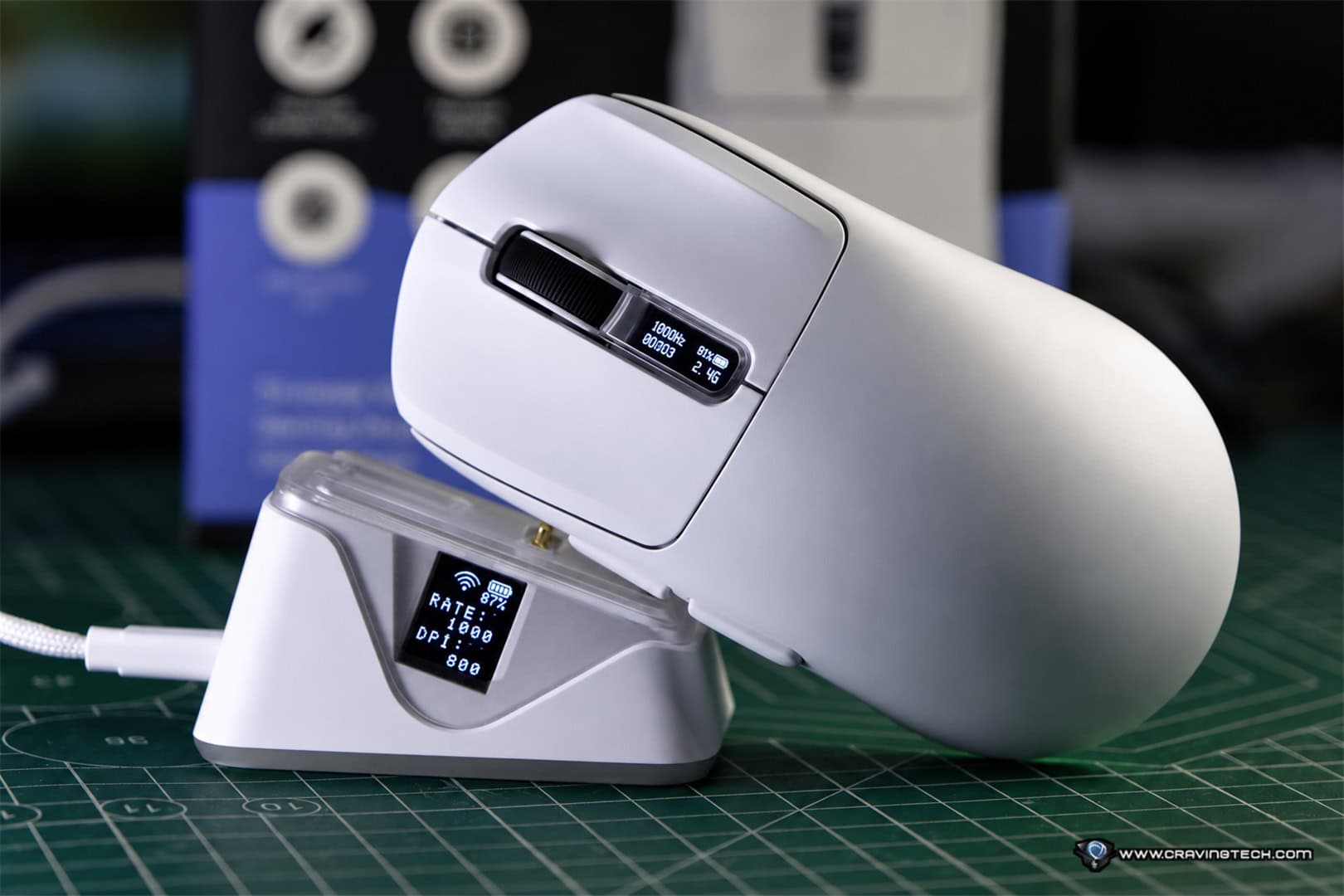
The redesigned hemispherical wireless dongle isn’t just aesthetic improvement. It houses a taller antenna for greater signal strength, and the long cable ensures it can reach from the bottom of my floor (where my PC sits) to the desk, positioning it closer to where my Viper V4 Pro operates. This proximity eliminates wireless latencies even further.

The dongle features three built-in LED indicators showing connection status (green means good signal), battery life, and your current polling rate. It’s a weighted design that stays anchored to your desk rather than being easily knocked around, and those visual indicators let you check your mouse status at a glance without diving into software.
The Viper V4 Pro comes in at under 49 grams for the black edition (50 grams for White – which is my review unit here), making it 9% lighter than the V3 Pro thanks to mechanical optimisations. You may or may not notice this difference immediately, but the weight feels just right. Rather than chasing the title of “most lightweight gaming mouse ever,” the Viper V4 Pro strikes a balance that gives you a degree of restraint and control to land those perfect shots.
The shape feels absolutely right for my small hands and fingertip grip style. Thanks to the contour and weight distribution, it feels effortless to swipe the mouse across the new Razer Gigantus V2 Pro mousepad. The separated side buttons prevent accidental misclicks, and the smooth-touch finish feels soft and smooth yet remains easy to grip even during intense gameplay.
Large PTFE mouse feet provide excellent glide feel across the mousepad surface. The overall build quality feels solid without any flex or creaking, maintaining the premium feel that made the V3 Pro so impressive.
The Gen-4 optical mouse switches are rated for over 100 million clicks and deliver excellent tactile feedback when pressed. These switches eliminate double-click issues entirely and have zero debounce delay, meaning every click registers with flawless precision. Your aim feels identical from day one through thousands of hours of use.
The optical scroll wheel feels fantastic and is claimed to be 3.3 times more reliable than mechanical designs. It provides the crucial tactile feedback required for high-precision gaming, and I particularly love how it feels during gameplay. Each notch is distinct without being overly stiff, making it perfect for weapon switching or ability cycling if you use the scroll wheel for that (I personally don’t).
The sensor is solid (not that the Viper V3 Pro’s wasn’t), and aiming plus tracking in Overwatch 2 feel consistent and reliable. Enhanced with 50,000 DPI, 930 IPS, and 90 G acceleration, the Focus Pro 50K delivers unerring accuracy for competitive play.
Here’s a short Overwatch clip with the Viper V4 Pro:
Through Razer Synapse, you can calibrate the mouse to your exact preferences with features like dynamic sensitivity control, 1-DPI step adjustments for pixel-perfect precision, asymmetric cut-off settings to individually set lift-off and landing distances, and smart tracking that auto-calibrates to maintain consistent lift-off distance across all surfaces. There’s even a sensitivity matcher tool to precisely port over DPI settings from your current mouse.
Razer Synapse provides comprehensive control over the Viper V4 Pro’s six programmable buttons and performance settings. The software includes a smart polling rate switcher that automatically adjusts your mouse’s polling rate based on the game you’re playing. You can also access Razer Synapse Web to fine-tune settings directly from your browser and switch onboard profiles wherever you play.


The mouse features one onboard profile that saves your last-used Synapse settings including DPI stages, button mappings, and performance preferences. This ensures consistent performance even when competing on different systems. The button at the bottom is programmable through Synapse but defaults to power toggle (press and hold for 2 seconds) and DPI switching (press and release), with factory settings at 400, 800, 1,600 (default), 3,200, and 6,400 DPI.
Should You Upgrade from Viper V3 Pro to Viper V4 Pro?
This is the important question. If you already own a Razer Viper V3 Pro and are a bit tight on budget, you shouldn’t feel bad about sticking with it. The Viper V3 Pro is already really good and has given me consistent performance in every Overwatch game I’ve played. The V4 Pro isn’t a massive generational leap in terms of features or design, but it upgrades everything you can think of internally to Razer’s latest technology. That means more battery life, lower latencies, and better performance across the board.
For esports and professional players, this is absolutely a must upgrade. Every millisecond matters at the highest competitive levels, and the cumulative improvements in the V4 Pro could make the difference in critical moments.
If you’re playing games casually, the Viper V3 Pro is already excellent and will continue serving you well. However, if I were contemplating an upgrade, I’d definitely try to sell my Viper V3 Pro and get the new V4 Pro. Who doesn’t want better battery life, better consistency, lower latencies, and improvements in basically everything? Especially if you really love your Viper V3 Pro, the V4 Pro takes everything that made it special and makes it even better.
Razer Viper V4 Pro Review Conclusion

The Razer Viper V4 Pro represents the evolution of an already exceptional gaming mouse. Rather than chasing gimmicks or unnecessary features, Razer focused on meaningful internal upgrades that improve performance where it actually matters. Lower click and motion latencies, improved battery life, enhanced wireless connectivity, and refined sensor technology combine to create what is arguably the best competitive gaming mouse currently available.
Compared to the Logitech G PRO X2 SUPERSTRIKE, I’d definitely pick the Viper V4 Pro – mainly because the Viper V4 Pro has better weight balance across the mouse. Unless you’re a palm grip user, you’ll definitely feel this difference.
The V4 Pro maintains the pro-trusted shape and lightweight design that made the V3 Pro so popular but optimises everything under the hood. The Frame Sync technology, HyperSpeed Wireless Gen-2, and Gen-4 optical switches represent substantial technological improvements that competitive players will appreciate, even if casual gamers might not consciously notice the differences.
For anyone in the market for a new competitive gaming mouse, the Razer Viper V4 Pro is an easy recommendation. For Viper V3 Pro owners, it’s a worthwhile upgrade if you’re serious about competitive performance or simply want the best possible version of what’s already a fantastic mouse.
Razer Viper V4 Pro is available now and retails for AU$279.95.
Disclosure: Razer Viper V4 Pro and Razer Gigantus V2 Pro mouse mats (Balance and Control) review samples were supplied for reviewing
Razer Viper V4 Pro Review
Overall
Summary
The Razer Viper V4 Pro perfects an already exceptional gaming mouse with internal upgrades that deliver 2.5x faster motion latency, true 8,000 Hz polling, improved battery life up to 180 hours, and a flawlessly balanced 49g design that makes it the best competitive gaming mouse currently available.
Pros
- 2.5x faster motion latency and improved click latency compared to V3 Pro
- True 8,000 Hz polling in both wireless and wired modes
- Excellent battery life up to 180 hours at 1,000 Hz
- Frame Sync technology reduces latency and improves efficiency
- Lightweight 49g design with perfect weight distribution
- Gen-4 optical switches with 100 million click lifecycle
- Improved wireless dongle with better signal strength and LED indicators
- Focus Pro 50K sensor delivers consistent, accurate tracking
- Optical scroll wheel with excellent tactile feedback
- Comprehensive software customisation through Razer Synapse
- Pro-trusted shape works perfectly for fingertip and claw grips
- Separated side buttons prevent misclicks
Cons
- Not a significant visual upgrade over V3 Pro for those expecting radical changes
- Performance improvements may not be noticeable enough for casual players
- No RGB lighting for those who want it