Razer Megasoma Review

Razer Megasoma is a hybrid of a hard and a soft mouse mat; If you love the softness of a soft mat but want to have the speed of a hard mat, Razer Megasoma delivers (this is debatable and I guess more like a personal preference). Razer Megasoma sits somewhere in between, combining the best [...]

How to submit blog posts from WordPress to Facebook automatically


by Michael Aulia on 8 September, 2009

in Blogging


submit from wordpress to facebookYou’ve probably known a lot of sites or plug-ins that auto submit blog posts to Twitter (auto tweet the recently published blog posts). How about Facebook? I was trying to find some good WordPress plug-ins to submit my blog posts from WordPress to Facebook automatically. I found and used one called Simplaris Blogcast and I thought that it was already good enough. Then I tried another WordPress to Facebook plug-in called Wordbook (I guess a combination between WordPress and Facebook?).

Wordbook is so much better than Simplaris Blogcast and I’ll tell you why.

How Wordbook works

  • Wordbook will post an excerpt of the post along with a few images detected on the post automatically.
  • Wordbook will post it on your Facebook Wall so your friends can see it easily on their news feed area.
  • Since it’s a wall post, your friends will be able to comment on it straight on your Wall.
  • Wordbook automatically submits the post to your Facebook wall every time a new blog post is published.
  • Wordbook works even if you use post scheduling (woohoo!)

How to install and use Wordbook

  • Go to your WordPress Administration Control Panel – Plugins – Add New
  • Search for “Wordbook” and you will actually see 2 results of the same plug-in name:

    wordbook wordpress to facebook plugins

    Add the one that says “This plugin allows you to cross-post your blog posts to your Facebook Wall. Your Facebook “Boxes” tab will show your most recent blog posts” by Robert Tsai on the description.

  • Activate the plug-in.
  • Now go to Settings-Wordbook to set-up your Facebook login and permissions for the Wordbook plug-in.
  • Follow the instructions (generate the one-time code) by clicking on the Facebook lock icon:
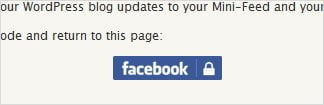
    setup facebook key code for wordbook
  • Continue with the instructions and allow the plug-in to post on your Facebook Wall.
  • Now even when it says it’s done and everything, you’ll notice that the Wordbook plug-in only posts the blog post’s title in one line and not what the author promised. I made this mistake and my Facebook wall showed this instead:

    wordbook post one line title on Facebook wall
    Now according to Wordbook official site, the plug-in supposed to post on the Facebook Wall, a brief excerpt of the post with images like this:

    Wordbook example to post on facebook wall
    So what you need to do, is actually to go back to the Settings-Wordbook options. You will still see that same Facebook padlock icon even though you’ve already done the step before. Click on it again (yes, again) to actually allow the Wordbook plug-in to fully post the excerpt with images on your Facebook wall!

    The option screen shouldn’t show the blue Facebook padlock icon anymore once you’ve fully completed the steps!

  • Now go publish a WordPress blog post and you will see that the plug-in automatically submits the blog post to your own Facebook wall, with excerpt of the post and images! It will also display a nice WordPress icon next to the Wall title!

Here is what it looks like on my own Facebook wall if you do the steps correctly:
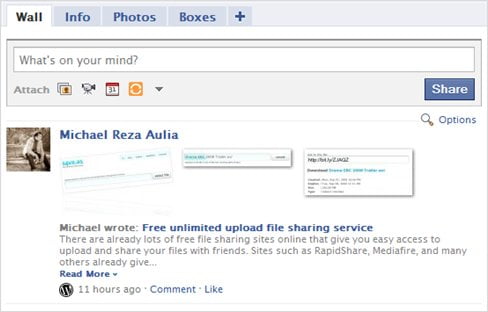
Post WordPress to Facebook with images to the wall

Looks very nice and professional :)

Wordbook plug-in for WordPress is so much better than Simplaris Blogcast that I used earlier. Some people dislike the fact that commenting on the wall doesn’t reflect/sync with the comment on the blog post itself. However, I find it good that the author keeps it separate.

So if you want do some promotion of your WordPress blog on Facebook, take a look at Wordbook :)

PS: Feel free to add me as a friend on Facebook but I mostly use Facebook to connect with my personal friends (non-English backgrounds) so adding me might not be a good idea after all unless you can understand Indonesian :) But if you want to keep up to date with my blog on Facebook instead of subscribing to my feed, feel free to add me in. Just add a comment like “I’m one of your blog readers” when you make a friend request so I know that it’s not a spammy request :)

PPS: And of course, please share this great plug-in to the other bloggers!

Bookmark and Share


Subscribe Now

If you enjoyed this post, feel free to subscribe to be notified of new posts at Craving Tech!

{ 2 trackbacks }

WordPress Plugin – How to Submit Blog Posts to Facebook Automatically~ | M3nghua.com
22 September, 2009 at 6:39 pm
Cross-Posting Mayhem
8 December, 2009 at 2:53 pm

{ 41 comments… read them below or add one }

LetUpdate 8 September, 2009 at 9:24 pm

Wow, it is a great plugin. So, i can try to bait some traffic from my facebook now. :D
LetUpdate´s last blog ..Mobile Blogging My ComLuv Profile

Reply to this comment

Michael Aulia 8 September, 2009 at 10:02 pm

Good luck :D

SteveYu 8 September, 2009 at 9:52 pm

I’ve used this plugin for a while. It’s good to generate a few traffic from facebook. :-) Some of my friends even surprised that I have a blog and earns money from it. :-)
SteveYu´s last blog ..Reorder Taskbar Tabs in Windows XP and Vista with Taskix My ComLuv Profile

Reply to this comment

Michael Aulia 8 September, 2009 at 10:03 pm

Same here, I don’t normally brag about having a blog to my friends but they notice it after seeing lots of new gadgets/items in my bedroom (free review units) lol

Klaus @ TechPatio 8 September, 2009 at 10:12 pm

That’s a pretty slick plugin – very useful for those who wants to promote their posts on Facebook.

It’s not a plugin for me though, I doubt how effective it will be to promote my tech posts to those 100+ friends I have on Facebook as mosth of them are non-tech people. Besides, there’s always the “worlds collide” thing to consider, if one really wants to bring your “blogging life” into your “friend/family life on facebook”.

PS: You have a new RSS subscriber :)
Klaus @ TechPatio´s last blog ..Danish Company Ready With 3D Revolution For Flatscreens My ComLuv Profile

Reply to this comment

Michael Aulia 10 September, 2009 at 12:17 am

I know, that’s what I thought at first. But I guess I still receive a few hits from my friends through the Facebook link :)

Klaus @ TechPatio 8 September, 2009 at 10:12 pm

Oops, did my comment go into the spam queue?
Klaus @ TechPatio´s last blog ..iPhone Commodore 64 Emulator Just Approved By Apple My ComLuv Profile

Reply to this comment

Michael Aulia 10 September, 2009 at 12:18 am

Nah, it went to the moderation, you know the drill :D I also install SuperCache so it might take a while for the comment to show up

Marlene 9 September, 2009 at 6:58 am

This plugin is good! But incidentally, I joined networkedblogs on facebook and it almost has the same functionality – pull the rss feed of my blog and automatically post the recent one to my wall.

Though I would have used this plugin if I hadn’t joined networkedblogs.
Marlene´s last blog ..Sun Valley Spiritual Film Festival 2009 My ComLuv Profile

Reply to this comment

Michael Aulia 10 September, 2009 at 9:44 pm

Hm never heard of networkedblogs before. There are just too many of these social stuffs, it’s mad O_o

Ricky 9 September, 2009 at 2:47 pm

Hey nice find, but instead of using individual plugin to publish to facebook, twitter why cant we use single plugin. Try SPNBabble plugin which plugin.

Reply to this comment

Michael Aulia 10 September, 2009 at 12:19 am

Hi Ricky, I haven’t heard of the plug-in before. Might worth taking a look. Does it post to the Facebook wall as nicely as Wordbook?

Gerri - Ninety Niney Ways 9 September, 2009 at 10:54 pm

Thanks a lot for that. I am thinking of starting up a facebook profile for marketing purposes and this post will come in very handy.
Gerri – Ninety Niney Ways´s last blog ..Your Children and The Concept of Money My ComLuv Profile

Reply to this comment

Himanshu 10 September, 2009 at 5:43 am

I use Networkedblog and Facebook fan pages for this application and they are working fine.
Himanshu´s last blog ..10 bad blogging habits you must avoid My ComLuv Profile

Reply to this comment

India 365 10 September, 2009 at 11:31 am

Hello Michale, thanks for the plugin!! However, it does not seem to work for me. I think I made a mistake though!! I’ll try Networkedblog and Facebook fan pages as himashu told, hope this works.
India 365´s last blog ..ICC Champions Trophy 2009 – Review My ComLuv Profile

Reply to this comment

TechZoomIn 11 September, 2009 at 2:31 am

Hmmm This is something new and never known till now. Great finding dude… I saw so many twitter auto post plugins.But this is simply awesome dude..

Thanks a lot for this and subscribed to you to get more :)
TechZoomIn´s last blog ..Get Your Favorite Icons from Icons Land..! My ComLuv Profile

Reply to this comment

Raju 13 September, 2009 at 6:04 pm

Very nice plugin, but for someone like me who doesn’t wish to publish all my posts on Facebook, it doesn’t provide that flexibility. Or is there an option to turn it off while publishing the post on Wordpress?
Raju´s last blog ..22 Most Popular Google Chrome Extensions My ComLuv Profile

Reply to this comment

Michael Aulia 13 September, 2009 at 6:09 pm

Hm not that I know of. I did this once when I didn’t want to publish a certain post to Facebook: deactivated the plug-in, published the post, then re-activated the plug-in again lol

Sourish Nath 14 September, 2009 at 4:53 am

Hey ,

I just found you out while googling , and this a really nice blog. :)
Expect me to be a frequent visitor here. Will read all your posts
Thanks ,

Regards ,
Sourish
(Admin)
OneTrickADay
Sourish Nath´s last blog ..Take Screenshot of your Nokia Phone My ComLuv Profile

Reply to this comment

Ana 14 September, 2009 at 11:22 am

Hello Michael,

This is a plugin I have been using for a few weeks now, and I must say it is very good. I have noticed an interest of new people coming from Facebook over to my blog, and saying how pleased they are of finding it. I think it does have it’s uses, and the same time I have noticed that if i make a change inside the blog entry itself, or add a new page on my site for instances it will get automatically posted on Facebook. Is this something that can be changed in the settings, do you know?

Other than that it is indeed very useful, and saves me the trouble of sharing it manually.
Ana´s last blog ..Misguided Love; AW Blog Chain, September 2009 My ComLuv Profile

Reply to this comment

Michael Aulia 15 September, 2009 at 12:50 am

Same here. I’ve got 8-10 visits from Facebook a day because of this. It’s not much but every bit of traffic counts :)

Unfortunately I don’t think there are such settings unless you manually deactivate and reactivate the plug-in again :( Hopefully the developers put more options in the future

Margaret 15 September, 2009 at 5:22 am

Hi Michael – It thought facebook had the option of pulling in your blog posts set in your profile. Maybe I am crazy, but I thought I linked to my blog there….
Margaret´s last blog ..Server Migrations My ComLuv Profile

Reply to this comment

Nihar 19 September, 2009 at 12:37 am

Thanks for sharing this….

I haven’t tried posting the post in facebook
Nihar´s last blog ..Download / Watch Gossip Girl Season 1, 2, 3 Episodes via Torrents or Online! My ComLuv Profile

Reply to this comment

kenwooi 22 September, 2009 at 8:29 pm

this is cool…
but im using the rss feature provided by Facebook to update my blog entry as a “note” on Facebook.. =)

Facebook > Own Profile > “Options” below “Share” > Settings > Blog/RSS > Enter Blog Feed

That’s all! =)
kenwooi´s last blog ..Kellie’s Castle My ComLuv Profile

Reply to this comment

Michael Aulia 22 September, 2009 at 9:34 pm

But it doesn’t have pretty thumbnails & short paragraph/excerpt like this one, I assume? :)

Garry 23 September, 2009 at 10:41 pm

Thanks for letting know dude,I did not know this existed.Would try it now.

Reply to this comment

R 25 September, 2009 at 12:22 pm

Is there any way to get this to post to a FanPage instead of your personal page? Or does anyone know of such a tool?

Reply to this comment

Michael Aulia 25 September, 2009 at 4:04 pm

Hm I’ve never heard a plug-in that can do that. Hopefully others can shed some light

Hellas 28 September, 2009 at 8:35 am

I searched for something like this for a long time. Thank you very much.

Hope this will not be big security issue for my facebook password?
Hellas´s last blog ..Oes Tsetnoc down to number two My ComLuv Profile

Reply to this comment

Michael Aulia 30 September, 2009 at 11:28 pm

It shouldn’t be because most of Facebook applications actually don’t have access to your password, just some function calls

kevin 30 September, 2009 at 9:51 am

I got nothing. I go to my plug ins and it says
Status

Hi, Kevin!

Wordbook appears to be configured and working just fine.

If you like, you can start over from the beginning:

I posted on my blog and it did not show up on my facebook personal page or business page. Did I miss something?

Reply to this comment

Michael Aulia 30 September, 2009 at 11:31 pm

Hmm.. I’m not sure, you might want to try going to the official page to see if there are recent replies on the comments of the same problem

kevin 1 October, 2009 at 7:10 am

what exactly is the official page?

jolinarodriguez 6 October, 2009 at 11:11 am

nice information

thanks
jolinarodriguez´s last blog ..Master Degree soaring unto Excellency My ComLuv Profile

Reply to this comment

Mike 4 November, 2009 at 10:05 pm

Thanks for this article.
After a few hours trying to get this to work, going back to the settings-wordbook page did the trick for me.

Reply to this comment

Arafat Hossain Piyada 18 November, 2009 at 3:03 am

I just hunting for this. It save some of my useful time. I now have two option 1. Networkedblogs and 2. Wordbook.
Arafat Hossain Piyada´s last blog ..Fresh Install Windows Movie Maker 6.0 in Windows 7 with Windows Movie Maker Installer My ComLuv Profile

Reply to this comment

mamyaw 24 January, 2010 at 2:35 am

Thanks so much for this tip. XD I have been looking for effective ways to connect my blog to my facebook account and this the job for me. XD More power to you, sir.

~Mamyaw

Reply to this comment

Michael Aulia 26 January, 2010 at 1:06 pm

I actually ended up doing it again manually lol but it’s good if you want to do it automatically. Thanks for coming by

Marlin 3 February, 2010 at 10:06 pm

Thanks for this great info
I was looking for this kind of plugin

Reply to this comment

Suresh Khanal 15 February, 2010 at 1:37 pm

Great plugin to save life. I was using networked blog but it does not display the recently posted article on the wall automatically. Hope this pluggin will automate this.

Reply to this comment

Tim 18 February, 2010 at 4:19 am

It looks like it only posts to personal Facebook pages. It would be great if it would auto-post to the blog’s fan page.

Reply to this comment

Leave a Comment

You can use these HTML tags and attributes: <a href="" title=""> <abbr title=""> <acronym title=""> <b> <blockquote cite=""> <cite> <code> <del datetime=""> <em> <i> <q cite=""> <strike> <strong>

CommentLuv Enabled

Previous post:

Next post:


ss_blog_claim=90a03beb48f2cae080e36591e278f2e0