The EPOMAKER HE75 V2 delivers a wonderfully satisfying, thocky typing experience alongside responsive Hall Effect switches, an 8,000Hz polling rate, and versatile wireless connectivity, making it excellent value for both gaming and everyday use.
Mechanical keyboards have come a long way in recent years, especially when it comes to what you can get without spending a fortune. Features that were once reserved for expensive gaming keyboards, such as Hall Effect magnetic switches, adjustable actuation points, and ultra-high polling rates, are now becoming more accessible.
The EPOMAKER HE75 V2 is a good example of this. It’s a 75% wireless gaming keyboard that combines competitive gaming features with a surprisingly premium typing experience. And while its Hall Effect technology and 8,000Hz polling rate are certainly attractive, there’s something else about this keyboard that impressed me even more: the sound.
I’ve tested plenty of mechanical keyboards over the years, but there’s something particularly satisfying about typing on the HE75 V2. It produces a wonderfully rich, deep, and creamy sound that makes you want to keep typing, even when you don’t have anything important to write.
With a retail price of US$89.99, the HE75 V2 offers an impressive combination of features for the money.
EPOMAKER HE75 V2 Review – Unboxing and Packaging Contents


EPOMAKER HE75 V2 Review – Design and Build Quality
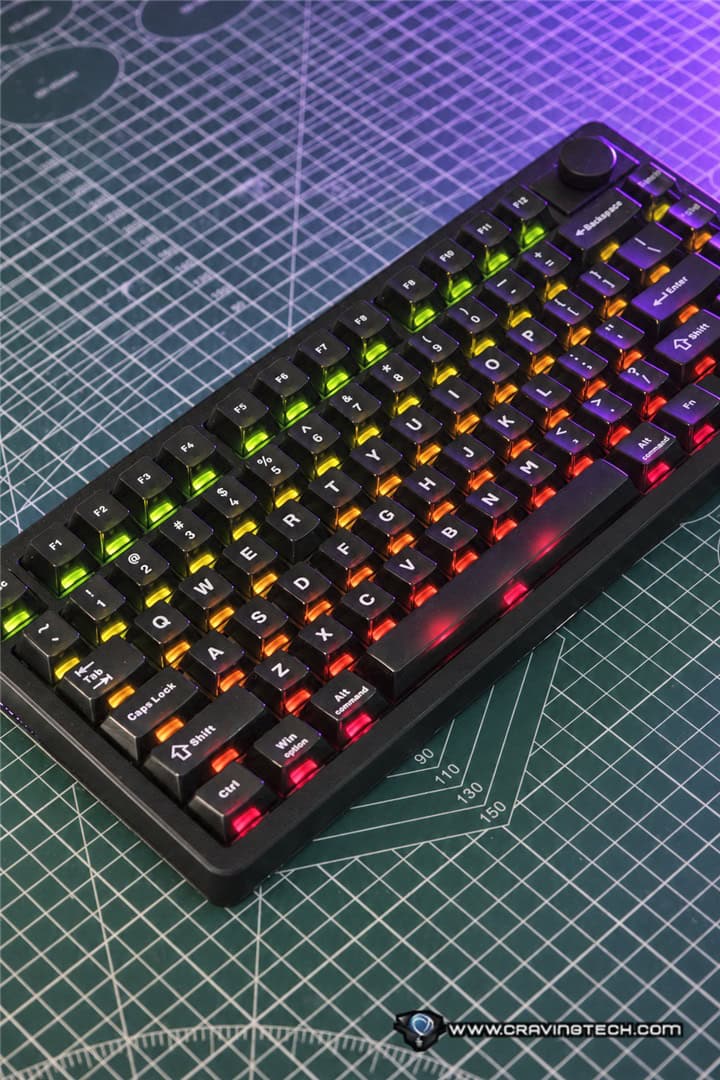
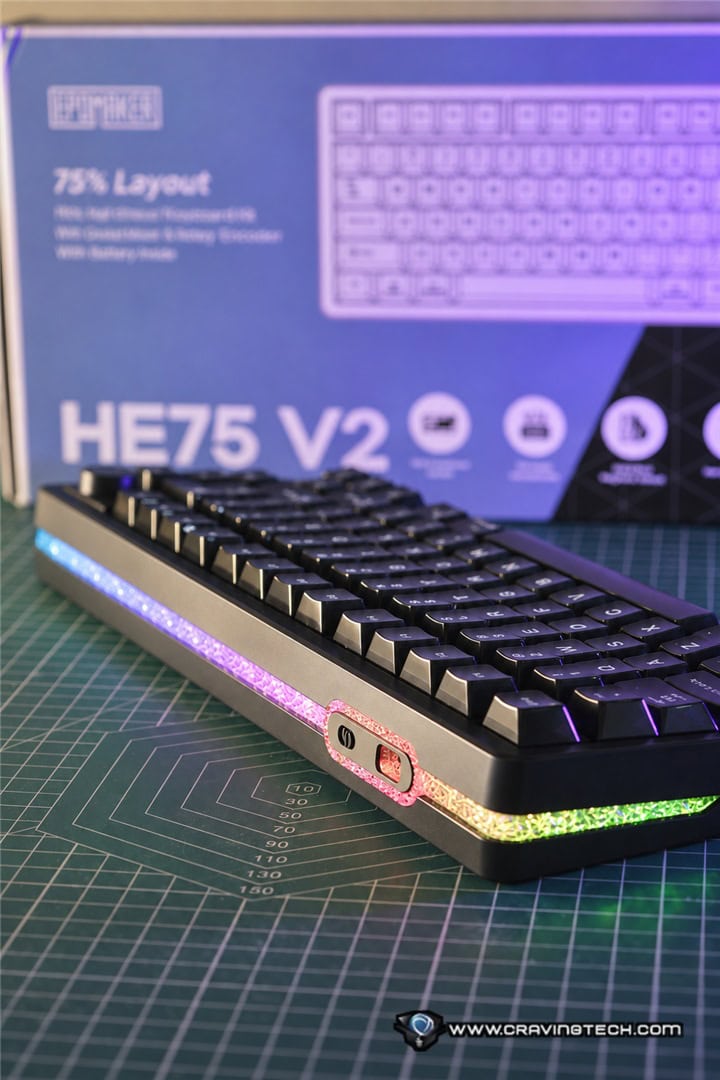
The EPOMAKER HE75 V2 features a compact 75% layout with 80 keys and a rotary knob, giving you a good balance between saving desk space and retaining the essential keys for everyday productivity and gaming.
Unlike smaller 60% keyboards, you still get dedicated arrow keys and a function row. The compact footprint also leaves more room for mouse movement, particularly useful when playing competitive FPS games with lower mouse sensitivity.
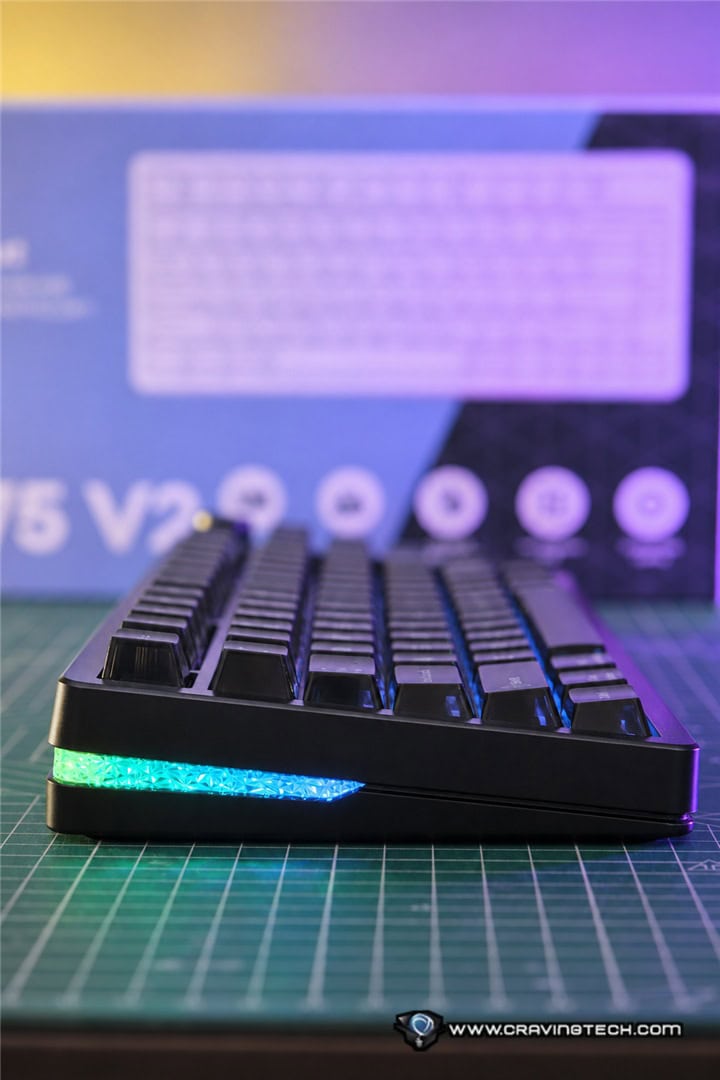
The overall design feels well thought out, especially when compared to its predecessor, the EPOMAKER HE75 Mag. EPOMAKER has made several refinements, including an improved sound-dampening structure, factory-lubed Hall Effect switches, per-key RGB lighting, a front RGB light rail, and well-tuned stabilisers.
The keyboard comes with matte transparent PC keycaps in a Cherry profile, giving it a distinctive appearance while complementing the RGB lighting underneath. There’s also a two-stage adjustable kickstand, allowing you to choose between three typing angles of 5.8, 9, and 12 degrees.
One design feature carried over from the previous generation is the modular rotary knob. By default, the knob provides a convenient way to adjust settings such as volume, but you can also remove it and replace it with two additional switches. It’s great to have options.
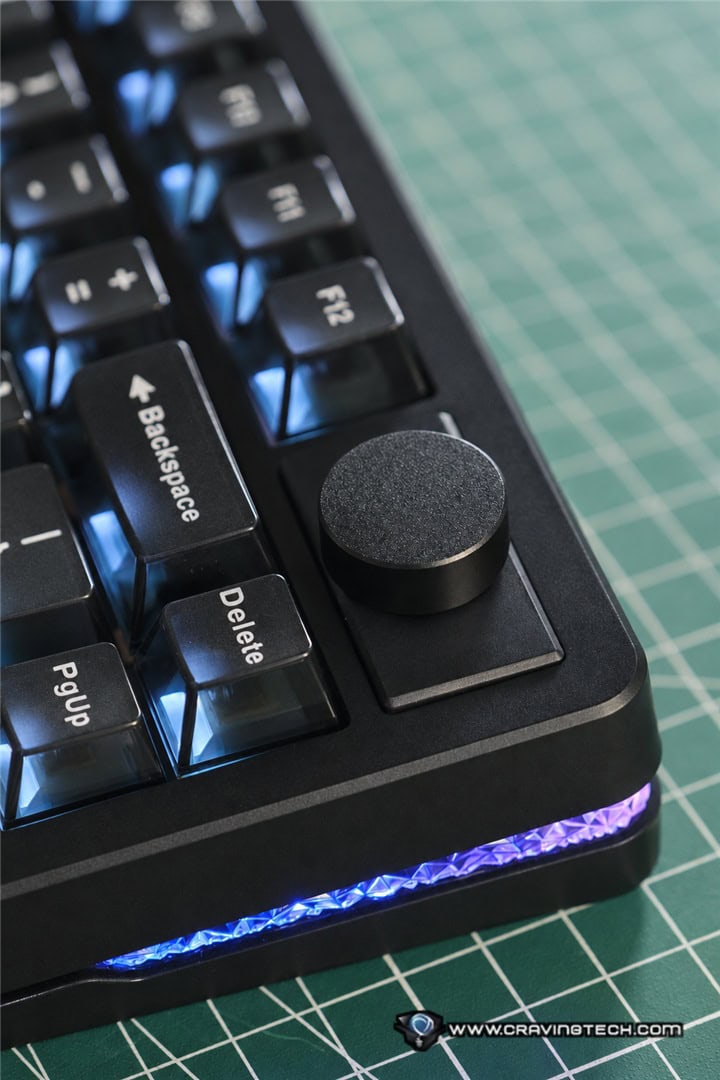
The keyboard also features a hot-swappable PCB, although compatibility is limited to supported magnetic switches rather than conventional mechanical switches. This is worth keeping in mind if you enjoy experimenting with different switch types.
EPOMAKER HE75 V2 Review – Typing Experience and Sound
This is easily my favourite part of the EPOMAKER HE75 V2. The typing sound is simply beautiful. Despite its relatively affordable price, the keyboard produces a deep, creamy, and incredibly satisfying thocky sound that I’d normally associate with more expensive, carefully tuned custom mechanical keyboards.
Every keystroke sounds rich and controlled rather than hollow or rattly. It’s the kind of sound that makes typing feel enjoyable, especially when I’m working during the day and spending hours writing emails, articles, or other documents.
A big part of this comes from the factory-lubed EPOMAKER Creamy Jade magnetic switches. These Hall Effect switches feel exceptionally smooth straight out of the box, without requiring any additional lubrication or modifications. The keystrokes are comfortable and consistent, with a pleasant sound that complements the keyboard’s internal construction.
EPOMAKER has also put considerable effort into the keyboard’s acoustic design. The HE75 V2 uses a gasket-mounted structure with five key elements responsible for its distinctive sound: sandwich foam, a PET sound-enhancement pad, a sponge layer, bottom silicone, and a gasket-mounted plate.
Each layer serves a purpose. The foam and sponge help absorb unwanted vibrations and hollow resonance, while the PET layer helps shape the sound profile. The bottom silicone provides additional dampening, and the gasket-mounted plate helps isolate keystroke vibrations from the keyboard’s case.
The result is a much more refined sound than you might expect from a keyboard at this price.
The stabilisers are also particularly well tuned. I’ve used keyboards where the spacebar produces an unpleasant rattle or noticeably different sound from the other keys, but that’s not the case here. The HE75 V2’s spacebar sounds wonderfully solid and satisfying, complementing the rest of the keyboard.
It’s impressive that EPOMAKER has managed to achieve this experience straight out of the box. You don’t need to open the keyboard, add extra foam, lubricate the stabilisers, or experiment with different switches to make it sound good. For anyone who enjoys the deep, thocky sound of a well-tuned mechanical keyboard, the HE75 V2 is an absolute treat.
EPOMAKER HE75 V2 Review – Hall Effect Switches and Gaming Performance
While the typing experience is one of the HE75 V2’s biggest strengths, this is still very much a gaming keyboard at heart.
The keyboard uses Hall Effect magnetic switches, which detect key movement through magnetic sensors rather than relying on traditional mechanical electrical contacts. This allows the keyboard to offer adjustable actuation points and features such as Rapid Trigger, which can be useful in competitive gaming. With the EPOMAKER Creamy Jade magnetic switches, you can adjust the actuation point anywhere between 0.1mm and 3.5mm, in increments as fine as 0.005mm (which is crazy).
For everyday typing, you might prefer a deeper actuation point to reduce accidental key presses. When gaming, however, you can configure certain keys to activate much earlier with only a light press.
Rapid Trigger takes this further by allowing keys to reset dynamically based on their movement, rather than having to return to a fixed reset position. This can make repeated key presses and quick directional changes feel more responsive.
For competitive FPS games such as Valorant and Counter-Strike 2, where precise movement, counter-strafing, and quick reactions matter, these features can provide a useful level of control.
The HE75 V2 also supports an 8,000Hz polling rate over both USB-C and 2.4GHz wireless connections, alongside a 128kHz full-board scan rate. On paper, this means the keyboard can report inputs to your computer up to 8,000 times per second, compared with the 1,000Hz polling rate commonly found on many gaming keyboards. Of course, an 8,000Hz polling rate alone won’t suddenly make you a better player, and the practical difference may be difficult to notice during casual gaming.
EPOMAKER HE75 V2 Review – Connectivity and Battery Life
Another strong point of the HE75 V2 is its versatile connectivity. You can connect it through a traditional USB-C cable, a 2.4GHz wireless connection, or Bluetooth 5.0. This makes it easy to use the keyboard across different devices and setups, whether you’re working on a laptop during the day or switching over to your gaming PC at night.
For gaming, I’d recommend using the 2.4GHz wireless connection or USB-C to take advantage of the 8,000Hz polling rate. Bluetooth is more suitable for general productivity and connecting to devices where maximum responsiveness isn’t a priority.
Battery capacity has also received a substantial upgrade compared with the previous HE75 Mag. The battery has doubled from 4,000mAh to 8,000mAh, which is a welcome improvement for anyone planning to use the keyboard wirelessly. In my experience, the HE75 V2 lasts approximately three to seven days between charges, depending on how heavily I use it. This includes using the keyboard for work during the day and gaming at night.
Naturally, battery life will vary depending on the connection mode, RGB lighting settings, polling rate, and how many hours you spend using the keyboard. Having twice the battery capacity of the previous generation doesn’t necessarily mean you’ll get exactly twice the runtime under every condition.
Charging, however, is something you’ll need to plan around. A full charge from a depleted battery can take quite a long time, potentially around a day depending on the available power input. Thankfully, the keyboard supports wired operation, so you can continue using it while charging.
There’s also a small battery status indicator located above the arrow keys. It normally illuminates green and flashes red when the battery is running low, providing a convenient reminder that it’s time to recharge.
When the keyboard hasn’t established a wireless connection, you’ll also notice a flashing green indicator around the R key and a small light strip on the right-hand side. These indicators help communicate the connection status until pairing is complete.
There is also an adjustable standby timer, available through the EPOMAKER Hub software. In wireless and Bluetooth modes, you can specify how long the keyboard remains inactive before entering standby. So if you forget to switch off the keyboard after finishing work or gaming, the automatic standby behaviour helps conserve battery life without requiring you to remember to disconnect it manually.
EPOMAKER HE75 V2 Review – Software and Customisation
There are two ways to configure the EPOMAKER HE75 V2. You can use the web-based EPOMAKER Hub through the official website or download EPOMAKER’s dedicated configuration software.
I like having both options, especially the web-based interface, which allows you to access the keyboard’s settings without installing another application on your computer. The interface is relatively straightforward and functional. It doesn’t try to overwhelm you with unnecessary visual effects or complicated menus, making it easy to find the settings you’re looking for.
You can customise the actuation points of individual keys, configure Rapid Trigger behaviour, adjust Hall Effect-related settings, and personalise the keyboard’s lighting.
Having individual key customisation is useful if you want a different typing experience for work and gaming. For example, you could keep a more conservative actuation point on most keys to avoid typing mistakes while configuring your movement keys to respond more quickly during FPS gaming.
The software may not be the most visually sophisticated keyboard utility around, but it gets the important things right. The settings are accessible, the interface is easy enough to understand, and you don’t need to spend ages figuring out how to make adjustments.
For a keyboard that already sounds and feels excellent straight out of the box, being able to fine-tune its gaming behaviour so easily is another welcome bonus.
EPOMAKER HE75 V2 Review Conclusion

The EPOMAKER HE75 V2 is a great reminder that you don’t necessarily need to spend hundreds of dollars to get an excellent gaming keyboard. What I like most wasn’t its 8,000Hz polling rate or its adjustable Hall Effect switches, although those are certainly great features. It was the typing experience.
The HE75 V2 produces a wonderfully rich, deep, and thocky sound that makes everyday typing super enjoyable. Combined with the smooth factory-lubed Creamy Jade magnetic switches, well-tuned stabilisers, and five-layer sound-dampening system, it feels and sounds more premium than its price suggests.
At the same time, you’re getting a capable gaming keyboard with Rapid Trigger, adjustable actuation, triple-mode connectivity, a modular rotary knob, and an upgraded 8,000mAh battery. It’s a combination that makes the HE75 V2 suitable for both serious gaming and everyday productivity.
The long charging time is worth considering, and the hot-swappable PCB doesn’t offer the same flexibility as a keyboard that supports both magnetic and conventional mechanical switches. However, these are relatively minor compromises considering everything else on offer.
At US$89.99 retail price, the EPOMAKER HE75 V2 is an exceptionally competitive wireless gaming keyboard. If you’re looking for a Hall Effect keyboard that performs well in competitive games but also delivers a beautiful typing sound, this one deserves a spot on your shortlist.
Disclosure: EPOMAKER HE75 V2 review sample was supplied for reviewing
EPOMAKER HE75 V2 Review
Overall
Summary
The EPOMAKER HE75 V2 delivers a beautifully thocky typing experience, smooth magnetic switches, responsive Hall Effect gaming features, and versatile wireless connectivity at an impressively affordable price.
Pros
- Beautiful, deep, creamy, and satisfyingly thocky typing sound
- Smooth factory-lubed Creamy Jade magnetic switches
- Excellent five-layer acoustic dampening and well-tuned stabilisers
- Adjustable Hall Effect actuation and Rapid Trigger support
- 8,000Hz polling rate over wired and 2.4GHz wireless
- Triple-mode connectivity with Bluetooth 5.0
- Large 8,000mAh battery and configurable standby timer
- Modular rotary knob and attractive RGB lighting
- Excellent value for money
Cons
- A full battery charge can take a long time
- Hot-swapping is limited to compatible magnetic switches