Ready for Internet Explorer 8 Beta 2?

by Michael Aulia on 28 August, 2008 in Application Reviews

Microsoft Internet Explorer 8 Beta 2Microsoft has just released Internet Explorer 8 (IE8) Beta 2 on its site. If you have IE8 Beta 1 installed on your computer, then I’d suggest upgrading to IE 8 Beta 2 as it is more stable and gives more nifty features.

So what’s new?

Microsoft Internet Explorer 8 Beta 2 Changes
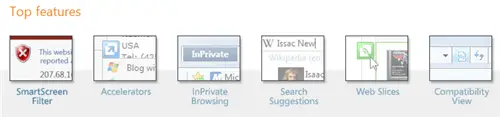
Microsoft Internet Explorer 8 Top Best Features

IE8 Top Features

You can see the whole list of features explanations on the MSDN blog, but I’ll try to cover a few on this post based on my own impressions.

IE8 InPrivate Browsing Feature

Similar to Safari’s Private Browsing feature, Internet Explorer 8 is introducing “InPrivate” browsing. According to this MSDN blog post, this is what InPrivate Browsing does:

  • New cookies are not stored
    • All new cookies become “session” cookies
    • Existing cookies can still be read
    • The new DOM storage feature behaves the same way
  • New history entries will not be recorded
  • New temporary Internet files will be deleted after the Private Browsing window is closed
  • Form data is not stored
  • Passwords are not stored
  • Addresses typed into the address bar are not stored
  • Queries entered into the search box are not stored
  • Visited links will not be stored

This feature will be useful especially on demo computer shops and libraries where you may want to hide your cookies, session keys, passwords, and URLs away from other people who may use the same public computer that you are using at that time.
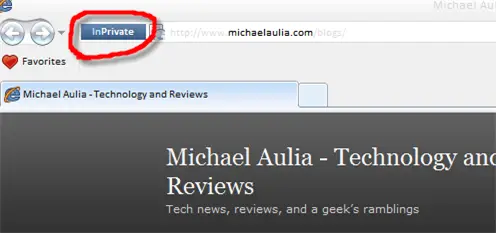
IE8 InPrivate Browsing

A nice tag to let you know that you are browsing in private mode

Turning it off is a bit hard, though. You have to close the whole browser and open a new one. Wish we can simply click on that “InPrivate” tag to turn it off easily.

IE8 Auto Tab Coloring

No, this is different than Mozilla’s Firefox ColorfulTabs Extension. IE8 will actually color the tabs according to its “functionality”. It will be colored and grouped based on how that new tab is created and linked to each other. So for example, if you type in a URL directly, it will be colored Blue (default). However if you open the tab from a search on Google, it will be colored Green, etc. See screenshot below:

IE8 new Colorful Tabs

The first 2 tabs are directly typed (My Blog)

As you can see, they are colored differently (the darker green tabs are created from search engines). The funny bit though, if I move a tab around, it seems to change color based on the previous tab. It makes this feature kinda funny/useless.

So if I moved my 2nd tab (that I directly typed on the URL bar), the color is not supposed to change:

IE8 Tab Coloring

The color changes even though it's not supposed to

It still is a welcome feature and I’m sure they are going to tweak it to be better on the final release! Moving on!

IE8 Suggested Sites Feature

This is a great feature, if it works all the time. I tried this feature about 5 times and only managed to get 1 successful attempt. Basically, if you are browsing on a site, you can click on the “Suggested Sites” button on the IE8 toolbar and it will suggest you on other similar sites that you are currently viewing.

Sometimes it suggests sites based on your previous browsing experience (I went to Google Analytics before to check my blog stats and it seems that IE8 still thinks that I have it opened)
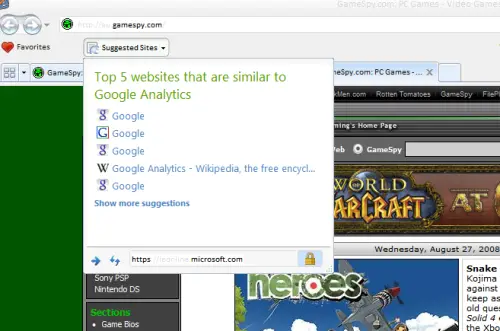
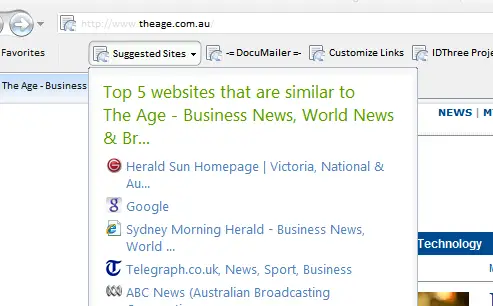
Still has a bug here and there

Still has a bug here and there

Microsoft Internet Explorer 8 Suggested Features

But the feature is great when it works!

For other complete list of features and explanations, feel free to go to the MSDN blog page that I told you earlier on this post.

Should you upgrade to Microsoft Internet Explorer 8 Beta 2?

If you have IE8 Beta 1 installed, then the answer is a definite yes. If you are still using Internet Explorer 7 and you think that it doing its job for you, then you may want to reconsider. It does give you more features, stable, and secure, but if you are a non-techie person who doesn’t like to install Beta programs on your computer, then don’t. Although IE8 has a “Compatibility” feature (turn on IE7 “emulation” mode), you may just want to be safe by staying with IE7.

Beware though, if you have installed IE8 Beta 1 prior to updating your Windows XP to Service Pack 3, once you install IE8 Beta 2, you can’t uninstall it anymore. You will be able to upgrade it to the final, but you can’t uninstall it. More details here.

If you are using other browsers (I use Mozilla Firefox 3), then you can give IE8 Beta 2 a try, but I don’t think it will make you move (you can also read my post on why I think Firefox is still better than Internet Explorer).

Download Microsoft Internet Explorer 8 Beta 2 here


Don't miss out winning these great giveaways currently running at Craving Tech:

Handy Backup Giveaway


{ 13 comments… read them below or add one }

Better Interpersonal Communication August 29, 2008 at 1:12 am

Wow, another great tech post. I gain most of my tech news by visiting this blog!!!

Better Interpersonal Communications last blog post..Tips for Giving Effective Constructive Criticism

Reply to this comment thread

Feabioinsu August 29, 2008 at 6:12 am

Well, firstly, I have to say that I have long given up on Explorer and switched to Mozilla long ago. But seeing good new features featured on Explorer is cool too – though it will never beat Mozilla’s handy never ending list of cool add-ons!

Still, great post. Really useful for people who aren’t sure if they want to get the second beta or not! :D Dugg it, buzzed it, reddited it, and of course, stumbled it! xD Check it out:

Digg: http://xrl.us/oorhb
Buzz: http://xrl.us/oorg9
Reddit: http://xrl.us/oorgv
Stumble: http://xrl.us/oorg3

Feabioinsus last blog post..Two free domain names? I’m sorry, I meant THREE!

Reply to this comment thread

leri August 29, 2008 at 1:48 pm

Do we really need a new version of IE? :D
Not a big fan of IE so never pay attention on their development

Reply to this comment thread

jviegas August 29, 2008 at 2:17 pm

IExplore 8 really looks great. But been using firefox for so long that it is really hard to use another browser now. Giving it a try :)

Reply to this comment thread

wiehanne August 29, 2008 at 5:57 pm

I hardly use IE except to check the newly-code-wordpress-theme. But I guess I’m still looking forward to the newer version. :P

wiehannes last blog post..I want a new theme

Reply to this comment thread

Paul August 29, 2008 at 10:56 pm

I use IE on occasion, but mainly use Firefox. It seems people really like applications that allow you to customize with plugins or mods.

I read somewhere that IE 8 is more closely following the HTML standards than previous versions. I’m not sure if this is true or not, as I haven’t tried IE 8.

Pauls last blog post..How I Converted from Blogger to WordPress

Reply to this comment thread

Michael Aulia August 30, 2008 at 1:36 am

Thanks for the compliments.

Well IE8 won’t stop me using Firefox 3, unfortunately. But again, since I already have IE7 installed on my Windows anyway, might as well update it to IE8. It doesn’t hurt ;)

Reply to this comment thread

Gossip August 30, 2008 at 4:04 pm

I am using FF3 and IE8 Beta2 together, see which is better, :)

Gossips last blog post..Barack Obama Attacks Sarah Palin

Reply to this comment thread

Darwin August 31, 2008 at 5:10 pm

Using IE7 & FF3, never tried IE8B1.

I am still comfortable with FF3. I may try IE8B2 one day and see if it has gotten better.

Thanks for the tip.

Cheers!

Darwins last blog post..Mushroom: The Mighty Fungus

Reply to this comment thread

Michael Aulia September 1, 2008 at 11:33 pm

No need to be excited about, guys, if you are already using Firefox 3 :D (I’m still using FF3 as my primary browser)

I’m quite surprised though, that about 80% of my readers who are using Internet Explorer, are still using IE 6… O_o

Reply to this comment thread

Gossip September 2, 2008 at 4:29 am

To Michael, IE6 is classical, :) I like it as well.

Gossips last blog post..Gorgeos Jason Statham in Transporter 3

Reply to this comment thread

thunderror September 6, 2008 at 7:10 am

IE8 is so damn slow compared to firefox, forget Chrome, with chrome to switch to, I wouldn’t even think about the switch…but then, I did upgrade…there’s no harm in upgrading, right?

thunderrors last blog post..Customizing your Desktop: changing your Windows Vista theme

Reply to this comment thread

Michael Aulia September 6, 2008 at 9:40 am

Well at least IE8 is fast to open, compared to Firefox :D

But yeah as you said, Chrome > IE8

Reply to this comment thread

Leave a Comment

CommentLuv enabled.

  Subscribe to future comments on this post

Previous post:

Next post: