Creative Zen X-Fi Style Review

by Michael Aulia on 9 June, 2010 in Gadget Reviews

Creative Zen X-Fi Style Review

Michael Aulia

Creative Zen X-Fi Style is a pocket sized media player, delivering high audio quality, thanks to the X-Fi Crystallizer and X-Fi Expand technology. The way you navigate through the lists may not be the best in the market but it’s completely outweighed by the rich experience in music listening.

My rating: 4.0 stars
****

Creative Zen X-Fi Style Review
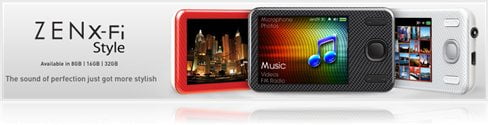
With the world of mp3 players primarily dominated by iPods, it’s always a fresh thing to see a player which doesn’t have an “i” tag in front of it. Creative Zen X-Fi Style is such player, the latest media player by Creative, available in 3 different sizes (8GB, 16GB, and 32GB) and 3 different colors (Red, Black, and White). How does it compete with the other media players out there? Let’s take a look closer in this Creative Zen X-Fi Style review post.
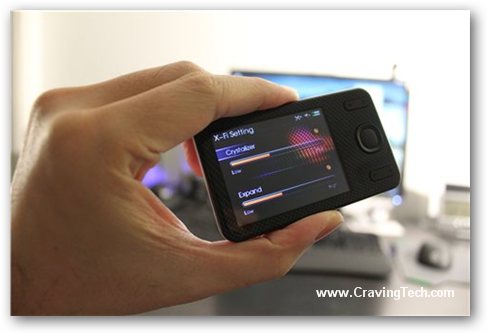
Creative Zen X-Fi Style Review- X-Fi Technology

Creative Zen X-Fi Style Review – Audio quality

What makes the Creative ZEN X-Fi series special is definitely the audio quality, powered by the X-Fi technology. In the computers’ market, the Creative Sound Blaster X-Fi series have delivered great audio qualities for years. This technology is now accessible on a mobile media player for pure music listening. The X-Fi Crystallizer (can be disabled/enabled on the player settings) feels like a cheat as it magically enhances your music to the next level. There is also the X-Fi Expand technology that allows you to experience sound staging in headphone audio. These settings can be adjusted to your liking – I set mine to less than a half as I found that it started to sound funny on higher levels. There is also a built-in speaker but the volume is so small that you need to crank the volume up if you want to use it – best is to plug your earphones to listen to it. The audio quality is definitely better than my iPod Nano 4th Gen and more noticeable when the Bit rate of the audio file is high enough (preferably greater than 128 kbps). The sample music files that come with it serves well to satisfy your ears (192kbps Bit rate) and to show off the high fidelity.

Creative Zen X-Fi Style Review – Appearance and design

In terms of appearance, ZEN X-Fi Style is meant to be the stylish version on the ZEN series but apart from the colors and the patterns on the body, the X-Fi Style does look similar to the other ZEN players.
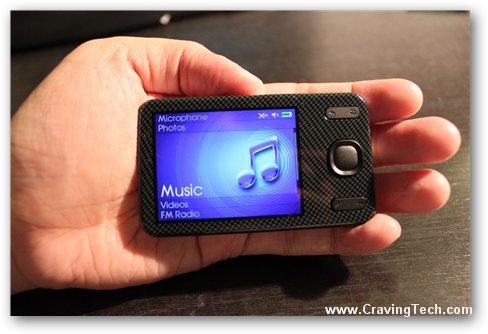
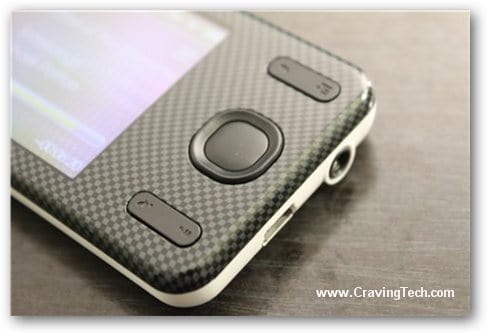
Zen X-Fi Style Review - PlayerThe Zen X-Fi Style’s LCD screen is 320 x 240 pixels, capable of producing 262,000 colors. It’s not touch screen though like the Zen X-Fi2 so you interact with it by pressing the hard buttons on the player. Interface navigation and certain functionalities are done via the navigational D-pad on the front of the player using your thumb. There is unfortunately no dedicated volume control button on the player. This is fine because when your music/video is playing, you can press the up and down button to adjust the volume. However, if you are on the other menu, you need to press a few buttons to adjust the volume, which can be annoying when a loud music is next on your current playlist.

Because you need to use the D-Pad to browse and interact with the player, it can be quite tedious if you have lots and lots of music files in the player. Fast forwarding a song or a podcast is done by pressing and holding the right button and scrolling through a list of music is done by the up or down button. I have to admit that I’ve started to miss my iPod Nano’s wheel that allows me to scroll faster if I want to. Thankfully, you can browse using the first letter to narrow down the search before you scroll through the list.
Creative Zen X-Fi Style Review- Navigation

I like the fact how you can actually customize the menu on the player (whether you want to include or exclude certain menu and also the order of the menu). This makes the X-Fi Style more personal as you can put what you want to access the most on the top of the screen and remove the stuffs that you don’t need.

Speaking of a playlist earlier, what I love about the Creative Zen X-Fi Style is that you can simply drag and drop your music files to the player using the Windows Explorer. The files will also be stored as plain files so you can copy, move, or delete them easily. A software called Creative Centrale can help you in managing your media, playlists, and all that but it’s not really required if you don’t want to. This is a big plus especially to those who hate using iTunes on their computers.
Zen X-Fi Style Review - Audio and Video formats

Creative Zen X-Fi Style Review – Other features

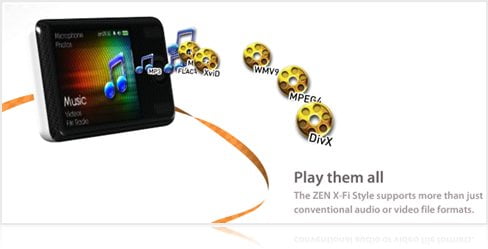
Apart from being able to play conventional audio and video formats, the Zen X-Fi Style also includes extra features such as:

  • RSS reader (download the feed when you connect to your computer through the USB)
  • Voice Recorder
  • Video/Audio Out (need to buy the cables separately though)
  • Photo albums/viewers
  • Organizers: Clock, Alarm, Calendar, Task, Contacts

I personally find features like the RSS, photos, and organizers are a bit too much as I already have my phone or computer to cover that, thank you very much. It doesn’t hurt to have them, though (some might like/need it) and you can always remove them from the menu altogether if you think that you won’t ever need it (don’t worry, you can re-enable them back).

X-Fi Style can go to a ScreenSaver mode, Sleep, and complete Shutdown. If you lock the player, it seems to go to a screensaver mode (screen turned off but audio still playing) after a while. If you turn the Sleep mode on, the player will be turned off but it will remember the state where it’s left off (good for listening long podcasts). If you turn the Shutdown mode on or manually shut it down by holding the power button, the player will be turned off and you have to listen to a track from the beginning. I wish it has a way to manually set it to Sleep because at the moment, it has to be automated (ex: Sleep after 15 mins) – meaning it will go to sleep all of a sudden after 15 minutes, even when you are still listening to a music or a podcast!

Creative Zen X-Fi Style Review – Conclusion

Creative Zen X-Fi Style delivers high quality sound, in fact, much better than the iPod Nano I have. The X-Fi Crystallizer feels like a cheat as it magically enhances your music and the player is also very light and compact in size. The fact that you don’t need an iTunes or even any software to manage your music files is a big plus.

The way you navigate using the D-pad is unfortunately quite standard and can get tedious if you have a large music collection. You might also have a hard time in navigating the D-pad if you have a very large hand. There are also no dedicated volume control buttons on the Zen X-Fi Style but assuming that you are always on the “Now Playing” screen, you can use the Up and Down to tweak the volume.

All in all, if you are looking for an alternative to iPod, Zen X-Fi Style is definitely for you. You will miss the navigational wheel that does all but you will be welcomed with a higher quality sound and more music to your ears with the X-Fi technology.

NOTE: Review unit provided by Creative. Photos were taken with Canon EOS 500D.

Creative Zen X-Fi Style Review Pros

+ Compact
+ High quality of audio
+ X-Fi technology
+ Don’t need to sync to any software
+ Can become an audio recorder (equipped with a mic)
+ Video out

Creative Zen X-Fi Style Review Cons

- Might be too small to navigate if you have a big hand
- Not too intuitive
- No dedicated volume button

If you have other impressions you want to add, feel free to do so on this Creative Zen X-Fi Style Review’s post comment form below.

List Price: $99.99 USD


{ 29 comments… read them below or add one }

Mariano July 20, 2010 at 10:16 pm

I want to know if i can turn the volume up and down, and change the songs with the keypad like in the first creative zen.
Thanks

Reply to this comment thread

Michael Aulia July 20, 2010 at 11:16 pm

Hi Mariano,
Yes, you can use the keypad to go to prev/next song and also pressing up and down to change the volume, but only if you are on the “Now Playing” screen.

Mariano July 21, 2010 at 12:24 am

Thank You, that was the only thing that i needed to know to buy it, because i read “There is unfortunately no dedicated volume control button on the player” and thats annoying like in the touch screen players.

Reply to this comment thread

Michael Aulia July 25, 2010 at 11:17 pm

Yeah, it is. Not sure how much more the manufacturing cost would be if they add 2 tiny volume control buttons on the sides of the player though

Dan July 31, 2010 at 7:51 am

I’m torn between getting this and the X-fi 2. Do you know if the sound quality is comparible between the two players? I’ve heard the touchscreen on the X-fi 2 can be a bit unresponsive, but the controls on the X-fi style don’t look especially easy to use; is it easy to scroll thow artists quickly or is this difficult? Any thoughts on ease of use between the two would be really useful. Thanks.

Reply to this comment thread

Michael Aulia August 3, 2010 at 8:49 pm

Unfortunately I don’t have the X-Fi 2 so I can’t make an opinion on that but the scroll is not really intuitive. It’s like pressing the down or up button, hold it while the thing scrolls. Or you can go to the A-Z to quickly get to a specific alphabet with the down/up button

DW October 19, 2010 at 4:15 pm

This might be a little late, but maybe it will help someone else.

I bought a Zen X-Fi2 to replace my old Zen V Plus and promptly exchanged it for the Zen X-Fi Style.

The X-Fi2 looks nice and has good sound quality, but the interface is horrible. Using a touchscreen to navigate through an MP3 player introduces an entire host of problems from false clicks, unresponsiveness, enormous physical size (it’s larger than my mobile phone and difficult to carry in my pocket or hand) to requiring both hands to operate comfortably and the inability to use play/volume controls without taking the player out and looking directly at it. When I’m out for a walk or run, I don’t want to stop and fumble around with both hands on a touchscreen.

The Zen X-Fi Style resolved all of my major problems because it, like my old Zen V Plus and all previous players, has physical buttons. I generally like to carry MP3 players in a pocket or around my neck with a lanyard and adjust play/volume control purely by feel and that is something I can do with the X-Fi Style. Size wise, the Style is also a much more compact player than the bulky X-Fi2 and therefore more pocket or palm friendly.

As far as sound quality goes, I wasn’t super impressed by the X-Fi2 or X-Fi Style. They both have comparable sound quality to my V Plus, which is to say they both sound good, but they aren’t really any better. The whole “X-Fi Crystalizer” filter is really not that good and often times makes music sound worse.

Niclas August 5, 2010 at 9:45 pm

Hi!

I was wondering if you’ve tested the voice recorder and if it is any good?
//Niclas

Reply to this comment thread

Michael Aulia August 8, 2010 at 7:18 pm

I had and it was quite good. I only tried to record my voice inside my bedroom though, so I’m not sure how it is if you want to record a lecture, say

xava rose August 6, 2010 at 1:06 pm

Hi Michael. Great, really thorough, review on this model. Do you know if it has a “Bookmarks” line choice in the main menu (like on the Zen MX, if you’re familiar with that one…click on it and there are 8 glorious bookmarks hiding within). The MX has everything I need, I love it, except the interface buttons don’t work for me to easily navigate through the menus while on the fly, i.e., not looking. They’re too indistinctive and close together.
The main button on the X-Fi Style looks like it has a nice raised edge around it to help instantly orient one’s fingers to up, down, left, right. Top and bottom little rocker buttons are far enough away from middle one, which is good. I can’t function without Bookmarks, though, and it’s hard to find out that detail. I actually have the X-Fi Style right next to me but so do not want to chop up the boxing in the usual opening massacre…already have to send Amazon back the MX with a destroyed plastic thing. I just wish I could see what’s on the main menu! Hoping that you can tell me if the be-all/end-all for audiobooks listeners is there. Thanks.

Reply to this comment thread

xava rose August 7, 2010 at 5:15 am

Sorry, I made a mistake re location of bookmarks. In the Zen MX I mentioned, they’re not on the main menu but in sub-menu of Music. I imagine that’s where they would also be if the X-Fi Style also has them. So forgot all that “main menu” talk.

Reply to this comment thread

Michael Aulia August 8, 2010 at 7:21 pm

Hi xava, have you found the answer to this yet on other reviews or sites? I stored my X-Fi Style somewhere inside the boxes with all my other review items when I cleaned up my room last time

xava rose August 9, 2010 at 3:26 am

Hey Michael,
Someone on creativefansite says that “the bookmark feature is standard” on all their mp3 players…so I guess I need to take that as a yes. Put question on X-Fi Style section of their different models forum, so the answer may actually be becoming from someone who has it.

Please don’t bother trying to dig it up. Thought perhaps you’d recall seeing it in the music menu…although I imagine it would be waaay down at the bottom of choices, below audiobooks, podcasts, gremlins….so you probably didn’t even scroll down that far.

I really appreciate your response. Thanks.

Reply to this comment thread

Sarah September 26, 2010 at 6:38 am

hi, just wondering if you know the difference between the zen style and the zen x-fi, besides the appearance? thanks.

Reply to this comment thread

wilber October 25, 2010 at 2:24 am

Heya! I’ve been using Zen X-fi style for a few months now and I decided to share my thoughts.

I’m not sure if its only me, but in my opinion this device is way too slow; when you turn the device on, it takes almost 1min before its ready to use. Browsing a track aint that smooth as it could be; when you trigger the pad, up or down, the device doesnt respond instantly.
Video playback is anything but smooth, I’ve tried multiple codecs/formats yet .wmv seems to be the only one thats working fine.

I chose Creative, because their products have always been plain simple, user friendly and long lasting devices.

It is a shame that you cant browse folders with Zen X-Fi Style, you are forced to use their software instead and only to set up playlists, otherwise all your tracks are in one big “playlist” and its a pain in the ass when you try to find a specific track from it. Ofc its not a problem if you dont care what you are listening.
If their software would be good, this thing would be tolerable.. but no, Creative Centrale is so slow and buggy that it can take about 5-15mins untill you manage to put a track to the playlist.

Audio quality is impressive, just get a good pair of headphones and you are good to go. Battery life is also nice(25h audio and 5h video playback).
Dedicated volume control buttons are useless, cause you can control it from the pad thingy.

Conclusion: Cheap but unfinished, clumsy product from Creative(fixable with a good firmware upgrade tho)with nice audio quality and battery life.

Reply to this comment thread

Dan October 30, 2010 at 4:12 am

My player (the 16gb with about half the memory used up) normally takes about 5-10 seconds to power up, and this is with a lot of music loaded onto it so I’d suggest going into recovery mode and performing a disk clean-up or updating to the latest forware if you haven’t already. I find the responsiveness of scrolling up/down to change tracks is pretty instantaneous on my player unless you have the background set to a photo with a large filesize or something, this seems to slow it down a bit, so I tend to stick with the themes already preloaded onto the player.

I haven’t tried creating playlists yet so I can’t really comment on that, I normally listen to random play all or a specific album/artist and I find it’s really quick to find a specific song on the player. You don’t need to use creative centrale, other media organising software work with it too, I wonder if you can create playlists using media player or something and then import that playlist into the player? You might have already tried this so ignore that if you already have. Anyway, I hope some of what I’ve said is useful, I’m really happy with the player myself after about 2 months of use.

hasanka October 31, 2010 at 8:10 pm

Hi i decide to buy creative x-fi style mp3 player ,i want to know ,is it have good base sound in it .

Reply to this comment thread

Gomez November 9, 2010 at 7:53 am

Is the Zen X-Fi (8G) plug and play ready? I bought this device with the intention of using it in my car (my radio has a USB connection), but won’t work. Any advice?

Reply to this comment thread

Simona January 28, 2011 at 10:09 pm

Hi Michael : )
I need an advice …I bought this player 3 days ago …Everywhere is written 25 hours for audio and 5 hours for video playing …I have tested mine and I was dissapointed ….Audio 13 hours and video 3 and a half … I know it depends on the way I use it in the case of audio listening, but I think the video I can t influence ….I wonder if it is normal or my creative zen x-fi style has a wrong battery ….could u help me please? I would like to know if I should make a claim …..thank you.

Reply to this comment thread

Michael Aulia January 28, 2011 at 10:40 pm

Hm I’m not sure.. it’s better that you contact Creative support yourself, Simona. It might be a faulty battery or the estimation was assuming that you have the screen turned off while listening to the audio

Simona January 29, 2011 at 8:28 am

OK , thanks for your answer , and can I ask u how long does your player can go? I would like to compare it with mine

Reply to this comment thread

Carmen June 5, 2011 at 8:01 am

Hi,
Do you remember the old zen stone with a built-in speaker? The speaker was quite powerful for a little device. I am looking for a new mp3 player with such a speaker. Did you test it?

Reply to this comment thread

jim smith August 22, 2011 at 5:16 am

I have a problem charging my zen x-fi style 8gb.
It charges ok through the usb in my computer, but i cannot get it to charge through a mains usb charger that i bought for the zen.
I have even tried charging through the usb cable to a portable plug but this does not work.
Am going on holiday soon and would like to have problem solved as i am only able to use for about one day without battery going flat.

Reply to this comment thread

Thomas Moonspice October 12, 2011 at 5:38 am

Pros: Good quality audio, compact, Built in speaker.
Cons: Video playback poor (keeps skipping about), Headphone jack in the wrong and gets in the way of using controls, Slow connectivity, PC software rubbish and poor durability (broke after about 6 months of use).

Reply to this comment thread

Aminiesta November 15, 2011 at 4:56 am

I bought this mp3 two weeks ago.In average it is really good mp3 player except few things.It don’t have volume buttons,sometimes it not very smooth and I cannot add any song to the existing playlist while song playing(I can make it in Creative Centrale).

Reply to this comment thread

Cruz December 15, 2011 at 7:19 am

I’ve bought this player too, and i’m pretty much satisfied. Let me just add that you could edit this review and make a change to the negative “no dedicated volume button”. The player has a “shortcut button” capable of being the “dedicated volume button”, just needs a setup on : system\ player settings \ my shortcut button/ and choose volume.

Ha! I forgot to thank you, cause your review made my choose the player, and what a great choice!

Best Regards From Portugal

Reply to this comment thread

Michael Aulia December 16, 2011 at 12:04 am

Hi Cruz,
It’s great to know that someone read my review, bought the product because of the review, and satisfied with it :) thanks for letting me know!

Robert May 14, 2012 at 6:57 pm

Hey there, I have a question, I just got my x-fi style and are satisfied with it, except for one thing…
I had an ZEN MX earlier, and i loved the podcast system with the “Zencast Organizer”, I liked that my podcasts were in a separate folder.
I’ve found the RSS-synchronizer, but have not found a way to synchronize audio-podcast with it… I only get text with information about the file. Only XML files, no mp3 files.
Is there a way for me to sort my podcast in a “zencast”, “RSS” or “podcast” folder?
Have been looking around the internet for an answer.

Reply to this comment thread

Michael Aulia October 20, 2010 at 8:20 pm

Hi DW, I really appreciate you coming here and share your opinions on the X-Fi media players. I have to agree that the interface can be better so let’s hope that they release a better X-Fi model in the future!

Reply to this comment thread

Leave a Comment

CommentLuv enabled.

  Subscribe to future comments on this post

Previous post:

Next post: