“Redesign your blog/website” contest

The guys over at Buy Templates are nice enough to sponsor prizes for this contest. I know a few of you have just started a blog or a website, so I’m sure it’ll be great if you can win some good quality templates, logo, and banners for your new blog/site. Everyone who participates will also [...]


DestroyTwitter Review

I wrote a post last week about Tweeting with TweetDeck and how it actually makes the life of tweeting easier to manage and more powerful to handle. One of my readers, Abhinav, suggested trying DestroyTwitter as it has similar functionalities like TweetDeck, only faster. I decided to give DestroyTwitter a try, despite of the weird application name.

The end result, I now use DestroyTwitter instead of TweetDeck! Find out why.

DestroyTwitter Overview

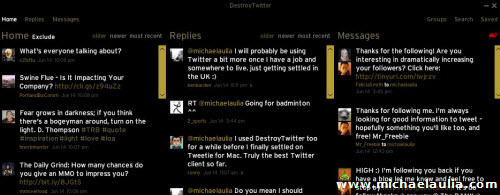
DestroyTwitter is an Adobe AIR application and you have to install it on your operating system in order to use it. DestroyTwitter by its default setting is quite minimalist and have a look-and-feel of an instant messaging application like Windows Live Messenger. It will show the most recent tweets of the people you are following on its default setting. I tweaked the settings so that DestroyTwitter shows Replies and Direct Messages as well on the main screen.

From the login screen until you start tweeting with DestroyTwitter, you will experience its smoothness and eye candy. All actions are animated well but thankfully the developer is not overdoing it. DestroyTwitter looks good and the smooth experience you are having will make you want to use it more. I know that sounds awkward but I’m having fun myself just by looking at and using the application.

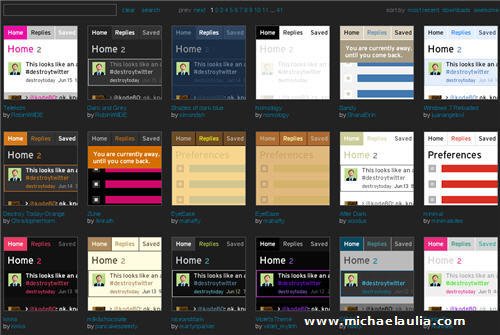
Even if you are not happy with its default look or coloring, you can download and change DestroyTwitter themes with ease. Simply go to DestroyTwitter Themes page, browse hundreds of themes available, and download the theme of your liking. Once you click on that download link, DestroyTwitter will automatically install the theme and apply it to DestroyTwitter. This makes switching and installing new themes so easy.

For example, here is an orange-y theme look:

destroytwitter orangey theme

or the Bleen theme:

destroytwitter bleen theme

If you don’t like the dark background look, there are plenty alternatives on the Themes page:
destroytwitter review - themes

destroytwitter tweet API calls settings

DestroyTwitter Settings and Features

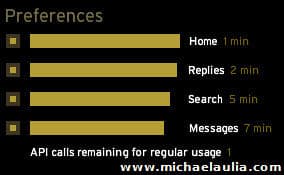
On DestroyTwitter preference window, you can specify how long you want it to refresh the tweets. You need to adjust it to make sure that DestroyTwitter doesn’t run out of allowed Twitter API (Application Programming Interface) calls. In simple terms, Twitter allows a third party application to grab information from its server but it has to make sure that the program is not abusing Twitter’s server. Twitter only seems to allow 100 API calls in 1 hour and DestroyTwitter will calculate it smartly based on your settings.

DestroyTwitter allows you to customize these yourselves according to your ways of Tweeting. For example, since I seldom get a direct message from someone, I set the refresh longer to 7 minutes. By adjusting these values, you can see the number of API calls remaining to be considered as safe by Twitter. If you go over the limit, you will be suspended for a few minutes before you are able to receive any Twitter updates (so you better re-tweak the settings again).

I also like how DestroyTwitter allows you to “Save” the tweets. Did you see a great tweet? You can save that tweet and access it later on the “Saved” tab. Very handy especially if you want to re-read or reply to that tweet later on.

DestroyTwitter also has a search feature just like any other Twitter applications, so nothing exciting here.

Just like TweetDeck, it also has a Grouping concept, so you can group up certain people (I group some people that I find interesting or people that I want to connect with). If you go to the “Groups” tab, you can see tweets that only come from the group. You can also exclude seeing certain people tweets on your Home tab so if you think a particular person is spamming, you can exclude his/her tweets rather than unfollowing him/her. So if you post 5-7 tweets of your own blog posts in a row, you’ll probably find yourself on my exclusion list :)

One thing that I hate on TweetDeck is the slowness of the avatar being displayed on screen. This makes scrolling up and down a pain and a hindrance. On DestroyTwitter, it’s just like browsing a web page. Once the startup loading is completed, the application is a blast!

DestroyTwitter also has a pop up notification (either on the top right or bottom right of your desktop) and you can set it not to show all of your friends’ tweets (which gets annoying once you’ve followed hundreds or thousands of people). I set it to only show my Group’s tweets, Replies, and also Direct Messages.

DestroyTwitter vs TweetDeck

It may take a while for you to adjust using DestroyTwitter if you are already familiar with TweetDeck. At my first glance, I felt that I loved TweetDeck more. However, familiar yourself with it for a while, change the default theme, and also tweak some settings. Use it to reply tweets and to post a tweet. You’ll find that although it looks and works a bit different compared to TweetDeck, you’ll love using DestroyTwitter! It also seems that DestroyTwitter is updated quite often compared to TweetDeck, which is good.

DestroyTwitter feels smoother and more polished compared to TweetDeck. I just wish though that I can see the Group tweets without clicking on the Group tab first (on the Wide layout screen preference). Or even better, to be able to show what I want to see on the main screen and also the tab order.

So, if you are using TweetDeck and want to try DestroyTwitter, don’t forget to share your experience here after switching to DestroyTwitter. Don’t forget to re-tweet this post to your Twitter’s friends so they can tweet more effectively.

If you haven’t followed me at Twitter, go ahead and follow me. I’ll definitely follow you back and hopefully we can connect more on Twitter :)

Visit DestroyTwitter Official site.

Bookmark and Share


Subscribe Now

If you enjoyed this post, feel free to subscribe to be notified of new posts at Craving Tech!

{ 26 comments… read them below or add one }

bbrian017 16 June, 2009 at 12:49 am

Hahaha it’s so funny I still haven’t even had a chance to use Tweet Deck let alone Destroy Twitter. But I guess that’s a good thing seeing you’re saying Destroy Twitter is far superior. I’m so busy with other personal related project I still haven’t found time to try ether of these programs.

If anything I will do as you say and run the Destroy Twitter when I get a chance! I like how it installs on your desktop like an actual pc application

Nice review Michael

Reply to this comment

Michael Aulia 17 June, 2009 at 12:08 am

Haha that’s good for you then. Less things to do especially when things might be left over by the Windows Registry when you install/uninstall things

Tim 16 June, 2009 at 1:30 am

I was just about to tweet you to tell you I have been using DT for some time now I love it. I will use Tweetgrid some for searches, but I stick to DT for the most part. Thanks for the review!
twitter.com/t100acres

Reply to this comment

Michael Aulia 17 June, 2009 at 12:08 am

Haven’t heard or tried Tweetgrid yet but I’m pretty happy with DT

Kevin Eklund 16 June, 2009 at 6:44 am

Have you tried out Nambu or Seesmic yet? I’m curious to know your favorite and why.

Reply to this comment

Michael Aulia 17 June, 2009 at 12:09 am

No I haven’t. Although Seesmic Desktop is quite popular as well. Based on the screenshots though, I think DestroyTwitter is sexier but looks like Seesmic has good features in it

Alan 16 June, 2009 at 6:58 am

I often don’t like flash on websites, but it works well (fast) on your landing page, had the sound on though, so it did startle me.

Back to Twitter Destroyer, I have been thinking of trying it, but still haven’t yet. I have tried Seesmic Desktop and Tweetdeck and did like both of them.

Reply to this comment

Michael Aulia 17 June, 2009 at 12:11 am

Sorry about that, I hate sites that have sound without any warnings too. I was using a free Flash template and forgot to take it out when I modified it. It’s gone now :)

I don’t like TweetDeck because of the slowness when displaying people’s avatars

George Serradinho 19 June, 2009 at 6:44 am

I used TweetDeck some time ago, but will give this a go. It looks better than TD already from your screen shots.

BTW, a nice detailed post about DestroyTwitter

Reply to this comment

Michael Aulia 19 June, 2009 at 8:09 pm

Thanks for the comment, George. If you are happy with TD’s speed in loading the display profiles, then feel free to stick with it :)

George Serradinho 19 June, 2009 at 6:46 am

Hi again,

I see you have CommentLuv installed, but it does not place the last blog post beneath the comment. You might want to have a look at that :)

Reply to this comment

Michael Aulia 19 June, 2009 at 8:10 pm

Hm it’s probably because of my AntiSpam bee plug-in randomizing the comment form variables :( I’ve tweaked it a little bit but need to wait until someone else comments on my posts to see it working or not. Thanks for letting me know

Abhinav Sonkar 20 June, 2009 at 5:35 am

Didn’t realize there were theme options as well !! Guess I can do better with a lighter theme. Will check it out.
Abhinav Sonkar´s last blog ..Guitar Chords: Hai Junoon, New York [Movie] My ComLuv Profile

Reply to this comment

Michael Aulia 20 June, 2009 at 8:06 am

That’s one of the thing that I like about it. I can switch to a different theme when I get bored :)

Piyush Shekhar 24 June, 2009 at 2:00 am

Cool post about DestroyTwitter.
Btw, I am a first time reader here.

Reply to this comment

SF 24 June, 2009 at 3:23 pm

I do love DestroyTwitter very much – only wish it supports multiple accounts.

Reply to this comment

Michael Aulia 25 June, 2009 at 10:48 pm

SeesmicDesktop supports multiple accounts, if you really need it. I’m trying it at the moment

SF 25 June, 2009 at 11:21 pm

Am using an old iBook so anything heavy like TweetDeck will cause slight lagging, haha :) DestroyTwitter uses so little real estate! Using HootSuite for multiple accounts at the mo.

Reply to this comment

Ching Ya 5 August, 2009 at 3:48 pm

Another reason a search tab should be installed in a blog: I found this post effortlessly. yay!

Great to know some of the features here. The basic features are there, just like any other desktop clients, except the ‘tweet-exclude’which might come in handy though. I still enjoy the ‘filter’ that Tweetdeck has for each column. Who knows? I may give DT a try sometimes too. Thanks for the brilliant review.

@wchingya
Social/Blogging Tracker
Ching Ya´s last blog ..12 Ways To Reveal Suspicious Shortened URLs! My ComLuv Profile

Reply to this comment

Michael Aulia 7 August, 2009 at 1:06 am

Yeah :) I thought it’d be impolite for me to put a link on my comment at your blog post.

Andrys 11 August, 2009 at 3:34 pm

I really like TD. Especially love, besides, groups, the option to hide or unhide those, when you want, who are sending one thing after another. Best is you don’t need to ‘unfollow’ to get that benefit.

But I can’t, for the life of me, find how to Post a Tweet :-) I can reply of course.

The documentation says it’s under “Composition” but I can’t find that either. Go figure. It must be staring right at me.

UPDATE: I finally found it. What an idiot. I had avoided the “Away” icon so didn’t even notice the balloon icon!

Reply to this comment

Michael Aulia 11 August, 2009 at 7:50 pm

Almost going to post a reply with a screenshot on how to tweet. Glad you’ve found the answer yourself :D

Emma 12 December, 2009 at 11:32 pm

I have been a long time user of destroytwitter and really like it. One thing I always have trouble with are the settings, should you leave quite a lot for regular usage? or less?

Other than great, I love Destroytwitter, great application.

Reply to this comment

Michael Aulia 12 December, 2009 at 11:55 pm

Well as long as you adjust it so that it’s “safe”, it’s all up to you. I put mention more than others because I think it’s more important. I rarely get Direct Messages so I set that as low.

Jenny 1 January, 2010 at 3:20 am

Hi, it’s my first time posting here. I was using Tweetdeck but having heard about DestroyTwitter, I had wanted to give it a try, but was unable to install the program.

When I clicked on the .air file, it gave an error msg “\DestroyTwitter172B.air is not a valid Win32 application”. I had previously been able to install Tweetdeck so I don’t think it’s a problem with Adobe AIR, but I may be wrong.

I am pretty novice with all these Twitter clients, so would really appreciate if someone can help me out here =) Thanks all!

Reply to this comment

Michael Aulia 1 January, 2010 at 3:29 am

Hm weird.. normally you should have just double clicked on it and it will install. Perhaps try reinstalling Adobe AIR again? Maybe it gets corrupted

Leave a Comment

You can use these HTML tags and attributes: <a href="" title=""> <abbr title=""> <acronym title=""> <b> <blockquote cite=""> <cite> <code> <del datetime=""> <em> <i> <q cite=""> <strike> <strong>

CommentLuv Enabled

Previous post:

Next post:


ss_blog_claim=90a03beb48f2cae080e36591e278f2e0