You finish a shoot, copy the card to a portable SSD and promise to sort everything out later. A few projects on, the drive is nearly full. Another contains the previous job, while a folder on the desktop holds the only copy of a client’s changes. Buying more storage is easy. Remembering which copy matters is the difficult part.
That is where a NAS can earn its place in a creative setup. It gives completed projects and shared source files a consistent home on the network. An AI-enabled model such as the iDX6011 also introduces another possibility: searching a collection by what is in it, rather than relying entirely on filenames. Before choosing either kind, it helps to map out how a project moves from camera card to archive.

Give every stage of a project a home
Start with the ingest. Copy a camera card into a clearly named project folder, then make a second copy before formatting the card. A simple naming convention using the date, client and job is easier to maintain than a system with dozens of nested categories. Keep original media separate from exports so that a finished JPEG cannot be mistaken for the only copy of a photograph.
For editing, a fast local SSD remains useful. The NAS can hold a second copy of the source media and, later, the completed project. This arrangement does not require you to change every application or immediately start editing across the network. It gives the NAS a manageable first job while you establish a reliable routine.
When the work is finished, archive more than the final video. Keep the project file, source clips and any assets needed to reopen it, subject to your licensing terms. Include a short note explaining the software version and what you delivered. Six months later, a request for a different crop should not turn into an afternoon reconstructing the original edit.

Decide whether you need faster transfers or better retrieval
These are different frustrations. Waiting to copy a large project is a transfer problem. Knowing a useful clip exists but not being able to find it is a retrieval problem. More network bandwidth helps with the first; it does very little for the second.
If your priority is organising shared storage and moving large files, the DXP4800 Pro provides a practical reference point. Its published specification includes four SATA bays, two M.2 NVMe slots, an Intel Core i3-1315U processor and both 10GbE and 2.5GbE networking. For a photographer or small creative setup, those are relevant features to weigh against the size of the archive and the network already in place.
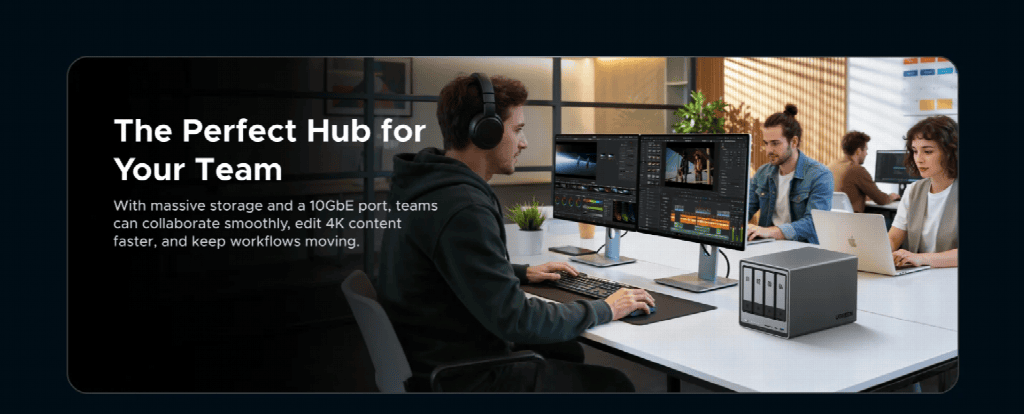
The iDX6011 takes a different emphasis. The linked 32GB version uses an Intel Core Ultra 5 125H processor, with six SATA bays, two M.2 slots and two 10GbE ports. UGREEN describes its local AI tools as supporting universal search, file questions and answers, and media organisation. Those functions make it a candidate for collections that are becoming difficult to navigate, rather than simply difficult to fit on a drive.
Neither specification tells you how quickly your particular project will open. Drive choice, RAID layout, network equipment and file size all affect the result. A sensible comparison begins with the task you repeat every day, then asks what hardware or software would remove the delay.
Treat AI search as a way back to the original
Imagine trying to find a photograph of a red delivery van outside a workshop when you cannot remember the shoot date. That is the sort of retrieval task worth trying with a local AI search system. It is an example to test with your own material, not a guarantee that every description will produce the right result.
Before relying on it, check which file types the installed software can index and allow time for the initial processing. Try several searches where you already know the answer. Include awkward examples, such as scanned text, similar photographs and filenames that offer no useful clues. That will tell you more than a polished demonstration.
Keep meaningful folder names even if search improves. When using a file question-and-answer tool, open the source document before acting on the answer. For client work, also check permissions and the processing settings. Local processing can be useful, but it still needs to sit within the way you have agreed to handle a client’s material.
Finish the workflow with a recovery test
An archive is not finished when the progress bar reaches the end. If the NAS holds the only remaining copy of a project, it is primary storage, not a backup. Keep an independent copy, with one copy away from the location where you work. Drive redundancy inside the NAS does not cover every kind of loss.
Choose a completed job and practise restoring it somewhere else. Open the project, check for missing media and play the final export. A successful test makes the whole arrangement easier to trust.
For a creative workflow, the right NAS is the one that solves the recurring problem: a dependable home for projects, faster access where the network supports it, or better ways to rediscover old material. Get the ingest, archive and recovery routine working first. Then add the features that make your working day easier.