Win 10 BitDefender Total Security 2010 licenses

Bit Defender AU

The team at BitDefender is giving away 10 copies of their award-winning Total Security 2010 software suite. BitDefender Total Security 2010 provides comprehensive proactive protection against all Internet security threats, along with system maintenance and backup, without slowing down your PC. To develop even better solutions for everyone, BitDefender is keen to hear what you [...]


WordPress’ Fluency Admin gets a new update

by Michael Aulia on 22 September, 2009 in Other Tech News


fluency admin 2.1

Fluency Admin is a WordPress (this blog’s blogging platform) plug-in that beautifies and also increases your productivity somewhat as a WordPress blogger (less clicking to get to a certain area on your Administration panel). It’s been a while since we had the last update so I was quite excited to see the plug-in update notification on my WordPress administration interface.

The previous Fluency Admin worked well in our latest WordPress version but this new update (Fluency Admin 2.1) makes it even better with a newer ‘exotic’ look-and-feel.

What’s new in Fluency Admin 2.1

New Fluency Options on the Settings
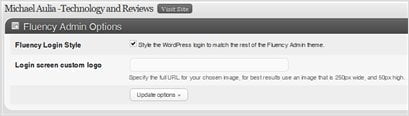
fluency admin 2.1 settings

Not so exciting but expect more stuffs here in the future

Fluency Admin Blue Theme is now supported

Although I love the gray-ish look of the default one, I can now have the blue theme on my other blog, Write For God :)

fluency admin blue theme

More hotkeys (keyboard shortcut) support

Never realized this before but I can actually press a keyboard shortcut to access the menus.
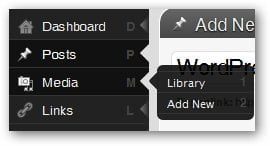
fluency admin 2.1 keyboard shortcut

To access my Library, I can simply press ‘M’ and then ’1′ on my keyboard. Oh okay, I guess I can just use my mouse if you think this feature is lame.

More polished fonts and colors overall
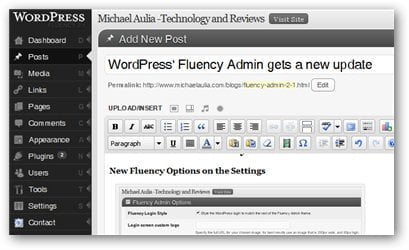
fluency admin 2.1 style

fluency admin 2.1 comments section

fluency admin 2.1 new button style

Full changelogs of Fluency Admin Version 2.1:

  • Updated css to work with slight changes introduced in WordPress 2.8.x
  • Updated menu script to fix bug with long submenus disappearing off screen.
  • Updated hotkeys to work with submenus longer that 9 items
  • Added support for collapsing/showing side menu.
  • Added Blue/Classic color scheme (based on user preference).
  • Added option to disable the Fluency style on the login screen.
  • Added option to specify a custom logo to be show on the login screen.
  • Added function to add Akismet menu item to the Comments submenu (if Akismet is activated)

So if you are getting bored looking at your WordPress Administration control panel and searching for a new & fresh WordPress Administration’s “theme” , try Fluency Admin and hopefully it will encourage you to write more posts on your blog :P

Fluency Admin plug-in

Bookmark and Share

{ 7 comments… read them below or add one }

Megaphase.info September 22, 2009 at 12:14 pm

I will definately have to give this plugin a shot.
Megaphase.info´s last blog ..Battlefield 2142 My ComLuv Profile

Reply to this comment

MichaelR September 22, 2009 at 3:44 pm

This is cool! But how would I know if I’m using too many plug ins now? I’m worried my blog will slow down with too many plug ins.

Reply to this comment

Michael Aulia September 22, 2009 at 9:31 pm

I’m not sure how WordPress plug-in works, but this is supposed to be loaded only on the Administration interface. So it shouldn’t affect the load of your visitors. I’m using 30 plug-ins overall now and my host doesn’t complain even one bit ^^

Harsh Agrawal September 23, 2009 at 1:39 pm

Michael this plugin seems to be good.. but I use Windows Live writer and spend less time now on My wordpres dashbaord.. More over don’t you think this will increase more no. of plugins??

Reply to this comment

Khuram Malik September 23, 2009 at 11:05 pm

I also have to agree with the person directly above. I’ve found Windows Live Writer to be the saving grace regards spending too much time in the dashboard.
Sadly, it doesnt cover everything, i still do have to visit the dashboard once im ready to publish and what not, but for the actual content production it helps me to stay away, which helps.
Khuram Malik´s last blog ..How I make my blogging life easier My ComLuv Profile

Michael Aulia September 24, 2009 at 9:20 am

Hm.. I used to use Windows Live Writer. Not too sure why I haven’t written on it anymore.

There was an update last month to the application so I might be keen to use it again. I admit that storing and uploading images are made easier with Windows Live Writer

Khuram Malik September 24, 2009 at 6:13 pm

Some of the plugins can be quite useful too ;-)
Khuram Malik´s last blog ..How I make my blogging life easier My ComLuv Profile

Reply to this comment

Leave a Comment

CommentLuv Enabled

{ 1 trackback }

Previous post:

Next post:


ss_blog_claim=90a03beb48f2cae080e36591e278f2e0