Razer Megasoma Review

Razer Megasoma is a hybrid of a hard and a soft mouse mat; If you love the softness of a soft mat but want to have the speed of a hard mat, Razer Megasoma delivers (this is debatable and I guess more like a personal preference). Razer Megasoma sits somewhere in between, combining the best [...]

Why you should care with the image ALT attribute


by Michael Aulia on 7 August, 2008

in Blogging


I notice significant traffic drop from the search engines (mainly Google) lately. I’m not an SEO expert but I can certainly tell if something goes wrong! I’m focusing on my next few weeks to dig this problem deeper.

One of the problems that I found has something to do with the ALT (alternate text) attribute on your images. That’s basically what people will see when they can’t see or render the image. It will also be used as keywords when people are searching for images on Google.

However, I’ve found something interesting with how Google uses the alternate text for something more.
Google Search Result

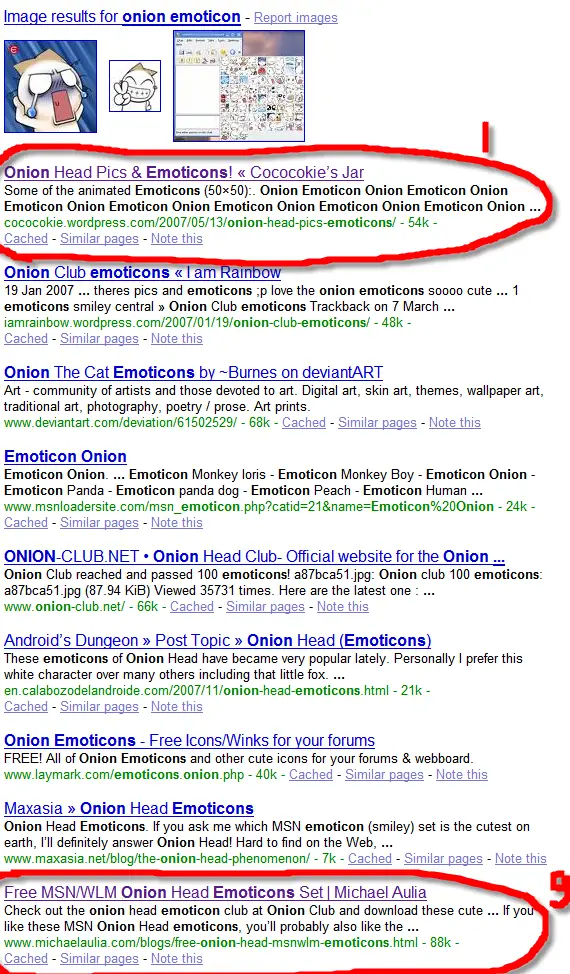
One of my posts about the MSN Onion Head Emoticons has given me quite a lot of hits for the past 6 months. Until recently, I notice that there are not so many visitors to the post anymore.

So I tried searching for it in Google by typing “onion head emoticons” as the keywords, and I was shocked to see that my blog’s post was ranked #9!

Curious, I’ve decided to analyze the first result that came out to find out what it has that my blog has not.

If you look at the result closely, there are so many occurrences of “Onion emoticons” as keywords coming up on the result page:

keywords Why you should care with the image ALT attribute

So I was wondering whether this guy (or girl) is trying to “cheat” Google by stuffing keywords somewhere on the page. I opened the page and peeped (heh heh) at its HTML source.  I found out that these keywords are actually part of the Image ALT attributes!
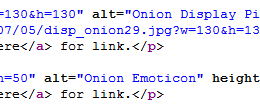
Image Alternate Text

A "legal" but smart way to add keywords on your post

I also realized that I had my search engines traffic decreased after I upgraded to WordPress 2.6. I remembered that the WordPress developers made a change to the way it handles alternate text. Previously, by entering the Title of the image, WordPress will produce the same alternate text of the image. Since WordPress 2.6, however, you have to insert the alternate text on a different input field yourself. This made all my old alternate texts obsolete!

So I double checked my images on the Onion Head Emoticon post. Found out that all images have alternate texts such as “img249.gif”, “img241.gif”, and so on, Grrr!

This proves how important the alternate text is on your images! I think for the next few days or so, I’ll slowly edit my popular posts one by one and make sure that every image has a good alternate text on them. You should do the same too if you are serious in getting some search engines traffic.

I thought that the alternate text will only be used by Google if you are searching images. Apparently, it’s also being used for searching texts? Have you found out about this before? Any comments from you regarding this will be much appreciated.


Bookmark and Share


Subscribe Now

If you enjoyed this post, feel free to subscribe to be notified of new posts at Craving Tech!

{ 1 trackback }

15 SEO Tips for Beginners
28 August, 2008 at 1:57 am

{ 24 comments… read them below or add one }

Margaret 7 August, 2008 at 7:33 pm

Michael — do you use the SEO friendly image plugin? That might help alleviate your issues with alt text on images.

I’ll have to take a look at mine to see what they’re showing. I usually do change the name from the file name to something more meaningful.

ê¿ê

Margarets last blog post..Greatest American Dog

Reply to this comment

Arnold Aranez 7 August, 2008 at 9:27 pm

Michael while using ALT text for images is important that may not be the only reason why your page slipped…another possible reason besides some good SEO work that the site did is that it is a Wordpress.com-hosted blog. It could be leveraging from the strength of the Wordpress domain itself?

Reply to this comment

Nihar 7 August, 2008 at 10:11 pm

I always do this and as you mentioned. I get lot of traffic because of alt text. In july out of whole traffic 75.87% visits is from search engines :)

Reply to this comment

Michael Aulia 7 August, 2008 at 10:18 pm

@Margaret: I already gave that a try, but it forces all images to have the post title as the alt text.. wish there’s a plug-in where you can easily tag all of your images on one screen like the SEO Title Tag plug-in

@Arnold: It’s possible. I guess I need to more SEO work on my posts from now on :) Thanks for the insight

@Nihar: Yeah, I envy you Nihar. Believe me, visitors from search engines are much more worth it than social bookmarking traffic

Reply to this comment

Mike Farho 7 August, 2008 at 10:32 pm

Good point Michael and Arnold. Thanks for the info about WP 2.6 image posting as well. Have to keep an eye on that issue if or when I upgrade from 2.5.

Reply to this comment

wiehanne 8 August, 2008 at 12:49 am

Er, I use the complete html code from my Flickr account instead of insert url and the image name in wordpress. So, I suppose nothing is affected (?)

wiehannes last blog post..Convert Traffic into Money with Paid-To-Promote.Net

Reply to this comment

windra 8 August, 2008 at 1:08 am

It’s your lucky day michael…….

Check this http://www.prelovac.com/vladimir/wordpress-plugins/seo-friendly-images

But i’m not sure if working fine for 2.6, i used it for previous version of WP. But manually set your image tag is trully the best way to improved your SEO.

Reply to this comment

sailor 8 August, 2008 at 1:22 am

Lots of food for thought here. I for one, will have to pay more attention to this side of things. I do think that this effort will be worthwhile as I would love to increase the visitors from search engines on my site.

sailors last blog post..Adding Images to our Content

Reply to this comment

Alfred Saforo 8 August, 2008 at 2:44 am

Thank for the heads Up on this one michael. I need to do some tweaking

Alfred Saforos last blog post..Then the Alien’s Invaded!

Reply to this comment

Nihar 8 August, 2008 at 12:47 pm

Michael,

But on referring sites and social bookmarking front i have to do something. my traffic is too low from that side.

Nihars last blog post..July 2008 Statistics

Reply to this comment

An American in France 8 August, 2008 at 4:42 pm

I originally came to your site to leave a drop from entrecard and saw this post. Thank you so much for this information. I saw something about how I should edit my alt tags for SEO a few weeks ago but I never did because I wanted to know WHY. I don’t like to do things unless I have a good reason why!

I am going to go ahead and do the same as you — edit images in my more popular posts. Furthermore, I am going to add images to posts that don’t have them.

An American in Frances last blog post..Busted! Common Myths About the French

Reply to this comment

An American in France 8 August, 2008 at 4:44 pm

Also, there is a great tool for telling the number of images on your site that don’t have ALT tags. Send along a message if you’d like mt to give you the site name. It’s bookmarked on my laptop which isn’t readily accessible at the mo’

An American in Frances last blog post..Busted! Common Myths About the French

Reply to this comment

Blog Tips for Beginners 8 August, 2008 at 5:34 pm

Good point. I haven’t really paid much attention to the image ALT but then I haven’t really used much of image on my post either.

Yan

Reply to this comment

JulesPCaut 8 August, 2008 at 8:29 pm

THANKS for this. I wasn’t really paying attention to this and now, checking my previous posts, I realize that these were all missing on my posts indeed. Looks like it’s going to be a busy afternoon putting ALT texts!

JulesPCauts last blog post..How to Make Firefox Ask You to Remember Passwords… Again

Reply to this comment

Hye Munar 9 August, 2008 at 12:59 am

Hmmn, thanks for the tips. I don’t know SEO either and I think this is another lesson learned for me.

Reply to this comment

roffi 9 August, 2008 at 10:28 pm

Alt tags is vey important! And when you blog with wordpress 2.6, it much more easy for use to enter alt attributes on images.

Reply to this comment

VMOptions 10 August, 2008 at 5:35 am

Alt tags are very important, especially in sites that use graphics heavily. Always use a keyword rich name for the image and alt text as well. It’s very useful for Google’s image search. :)

Reply to this comment

jeflin 10 August, 2008 at 6:18 pm

Michael, I am happy and yet sad at the same time to read this post.

It means I also have to go into each of my posts and alter the alt text. My weekend is burned.

Reply to this comment

Michael Aulia 11 August, 2008 at 7:28 pm

Looks like most of us have to re-edit our posts to add the ALT attributes :)

I’ve tried that SEO Friendly Images plug-in before. Though it is good for SEO purposes, it’s bad for your readers (because all ALT attributes will be the same as your post title!)

Reply to this comment

Guttu 12 August, 2008 at 1:00 am

I came to know about this last month. But I knew his before that and never implemented it. Last month after changing to a new domain I am trying every way to get search engine traffic. This was one of the method I started using.

Guttus last blog post..Winner of Talking Picture 01

Reply to this comment

nich 12 August, 2008 at 7:04 am

I was too lazy to input any alt field in every image I put.. :) )
thanks anyway for the information, will use it one day ;)

nichs last blog post..I have a dog

Reply to this comment

Feabionsu 19 August, 2008 at 4:58 am

Oh yeah, I knew this handy little thing back when I was first starting to learn HTML via this website: http://www.html.net. It was really simple, for beginners – but that’s what made it perfect. On top of all that, it didn’t just say put at the top – it explained everything why you should do it and how it works. Great website.

So yeah, the ALT attribute really is supposed to be important, and I’m glad you’re blogging it to let other people know. Of course, the ALT attribute is pretty handy for people for whom images actually don’t show up – but for other purposes, tags are definitely the reason.

The only thing I don’t get is how can your images have any ALT text at all if you didn’t put it yourself – does your blog just take the title of the image and makes it the ALT text as well? Well – that’s just another reason why some people build their websites from plain HTML instead of FrontPage or Dreamweaver… :D

Reply to this comment

Work From Home Opportunity 12 November, 2008 at 10:40 am

This is a very informative post for me as I am presently focussing on improving the keywords in my image alt attributes with respect to anchor text.

Everything that I have read recently confirms what you are saying – namely, that it is very important to do this properly.

Reply to this comment

Michael Aulia 12 November, 2008 at 9:56 pm

Glad that the post helps! I know how lazy we are sometimes to do these simple things!

Leave a Comment

You can use these HTML tags and attributes: <a href="" title=""> <abbr title=""> <acronym title=""> <b> <blockquote cite=""> <cite> <code> <del datetime=""> <em> <i> <q cite=""> <strike> <strong>

CommentLuv Enabled

Previous post:

Next post:


ss_blog_claim=90a03beb48f2cae080e36591e278f2e0