Why becoming a product reviewer is not as easy as you thought – Part 1

I had a bit of discussion with a friend of mine a few days ago. She said how lucky I am (because I’ve been getting those wonderful gadgets to try and review on) and how easy it is to review those “free” review products. I tried to defend myself and told her that it wasn’t [...]

Tiny YouTube Converter Review


by Michael Aulia on 19 January, 2010

in Application Reviews


Tiny Youtube Converter review

Tiny YouTube Converter is a free new tool to convert YouTube videos to mp3 (grab the audio of a YouTube video and then save it as an mp3 file to your computer). While there are already online tools that do this sort of things, it’s always handy to have such a tool installed in your computer (especially if you are going to do this very often).

Tiny YouTube Converter Installation

Installation is fairly easy. You just have to download the application and double click on the file to install it. The setup file is free of virus and trojans (according to my Norton 360) so it’s safe to install and use it in your computer. No confusing setup or settings. Just install and run.

How to use Tiny YouTube Converter to convert YouTube videos

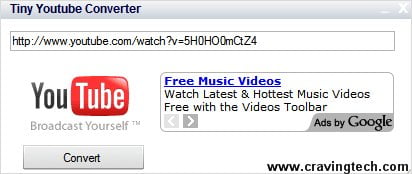
Tiny Youtube convert youtube videos to mp3

  1. Download & install Tiny YouTube Converter
  2. Open Tiny YouTube Converter
  3. Open the YouTube video that you want to save with your web browser (I was trying it on a video that I created myself)
  4. Highlight the video URL, copy, and paste it into Tiny YouTube Converter (see my first screenshot)
  5. Click on the Convert button and choose where you want to save the audio/mp3 file.
  6. Wait until it finishes converting and downloading (you’ll get an “Mp3 File Saved” notification).
  7. Listen and enjoy :)

Now, all of these sound good BUT unfortunately on a few tests that I did, some of the mp3 files couldn’t be played (I’ve tried opening them with WinAmp, Windows Media Player, and even with VLC). Tiny YouTube Converter is in fact still in Beta, so it might be some time before we’re able to get a bug-free application and a 100% successful conversion rate. Nevertheless, it works but not always.

Tiny YouTube Converter Review Conclusion

Tiny YouTube Converter is a new tool in the market to convert YouTube videos to mp3 files. Use this tool at your own risks and I’m pretty sure there will be copyright written all over the videos that you want to convert from. I don’t see any problems if the videos are yours or your friends’ though. Tiny YouTube Converter is simple, free, and easy to use. You might get a successful conversion and at other times you might not. The application is still in beta so you might want to wait longer to get all the bugs fixed.

Meanwhile, if you can’t convert a video, use the freely available YouTube video online converter such as Vixy or VidToMp3.

Tiny YouTube Converter Pros
+ Small in file size
+ Free
+ Easy to use

Tiny YouTube Converter Cons
- Doesn’t work for all YouTube videos
- Has an advertisement on the app but not intrusive
- Copyright issues?

Bookmark and Share


Subscribe Now

If you enjoyed this post, feel free to subscribe to be notified of new posts at Craving Tech!

{ 8 comments… read them below or add one }

Lee | Money4Invest 19 January, 2010 at 4:10 pm

Just wondering about the quality of converted songs from Youtube. Will it be the same quality with youtube sound?

Reply to this comment

Michael Aulia 20 January, 2010 at 9:02 pm

When I tested it, it does. But I’m not really an audiophile so I couldn’t tell that much unfortunately

Dmytro Muzychenko 20 January, 2010 at 1:20 pm

I use DVDSoft’s awesome free collection of programs – very simple YouTube to MP3 converter that works beautifully. Also love theirs YouTube to Video (basically just gives you an .avi or .wmv video file so you can store the YouTube video on your own computer). Check out Michael!

Reply to this comment

Michael Aulia 20 January, 2010 at 9:03 pm

Thanks for the info, Dmytro. I might, after a bunch of review “homework” that I need to do lol

Uttoran Sen 20 January, 2010 at 5:26 pm

why not just download them as video and then convert them to mp3 using a desktop tool, there are so many converters already…

Reply to this comment

Michael Aulia 20 January, 2010 at 9:05 pm

Well, you save bandwidth and time, I guess. And not all people have video to mp3 converters on the desktop installed :)

Rohit Sane 24 January, 2010 at 3:00 pm

Its good… It will help in saving the unwanted bandwidth which goes wasted in downloading the video Part! And everyone know that there are a lot of video songs on youtube so we can download those as MP3 files, legally now..But will this software allow downloading and converting these videos?
Rohit Sane´s last blog ..Tech-Freak Stuff has moved to a Premium Web-Host after a poor time at a Free Web-Host My ComLuv Profile

Reply to this comment

Michael Aulia 26 January, 2010 at 1:09 pm

Not sure whether it’s legally allowed through the software, but I guess it depends on which videos you are downloading

Leave a Comment

You can use these HTML tags and attributes: <a href="" title=""> <abbr title=""> <acronym title=""> <b> <blockquote cite=""> <cite> <code> <del datetime=""> <em> <i> <q cite=""> <strike> <strong>

CommentLuv Enabled

Previous post:

Next post:


ss_blog_claim=90a03beb48f2cae080e36591e278f2e0