
Today, we are going to talk about how to clean up WordPress plug-in left overs / uninstall a WordPress plug-in completely.
Do you know that deactivating and removing a plug-in doesn’t necessarily mean removing its table entries on WordPress database? These tables and also record entries are cluttering your WordPress database and I’m sure it has an effect to your WordPress blog, even if not much.
I’m using a plug-in called “Clean Options” and a few manual ways to clean these up. So if you have installed/uninstalled a plug-in in the past (which I’m sure you have!), then check this post out.
WordPress Plug-in leftovers
With the help of a plug-in in which I will explain in more details later, I found out that there were table entries related to these past plug-ins that I used:
- Gravatar plug-in
- All in one SEO pack
- alinks
- Defensio
- Download Monitor
- Social Dropdown
- Featurific
- Genki Announcement
- Global Language Translator
- Mighty Search
- My Dashboard
- PostRatings
- Social Bookmark Plugin
- SEO Friendly Images
- Sociable
- Social List
- WP-SpamFree
- SezWho Comment
- TanTan
- Admin Management Extended
- Easy Uploader
- Enhanced WordPress Contact Form
- One click updater
Crazy, eh? So here is how you can find out which plug-in leftovers are lingering in your WordPress’ database.
How to Uninstall WordPress plug-in completely
- Install a plug-in called Clean Options. The plug-in will look for truncated/orphaned entries on the wp_options table.
- Follow the instructions to identify options that are no longer being used by your blog (the plug-in detects this by analyzing whether there is any plug-in linking to the options).
- On the last step, you will be presented with the list of all orphaned options. Look at it one by one carefully and make sure that you really don’t need them anymore. Tick the ones that you want to remove.
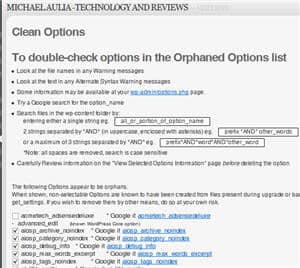
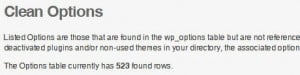
- After running the Clean Options plug-in, the entry on the wp_options table was down from about 1200 entries to 523 entries (meaning, there were about 700 unused entries/left over from uninstalled plug-ins!!)
- Now, use your PHPMyAdmin application on your cPanel (or other application) to analyze your WordPress database (usually named _wrdp1 but it can be different on yours).
- Read through all the table names and find out tables that sounded like your old plug-ins or old themes that you no longer use. Tick and drop the tables (remove them)! If you are not sure, then don’t remove them. It’s better to leave unused entries there than removing a used entry accidentally!
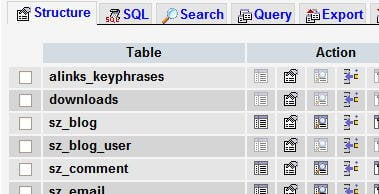
In the screenshot above, I can see tables left behind by alinks and SezWho commenting plug-ins. There were others but it won’t fit on the screenshot :)
These tables and unused entries can clutter your database. Since reinstalling a plug-in will install these tables back, it is safe to remove them (even if you are planning to use the plug-ins again one day). I’m not sure though whether removing these entries have any impact on the CPU usage but it’ll definitely have a bit of performance impact when your blog needs to grab these information from the options table.
Also, it will reduce the time and space needed when you are backing up your blog since you no longer need to backup these unused entries.
Check out my entire reducing WordPress CPU Usage series on my blogging guide series page.




Comments are closed.