Razer Megasoma Review

Razer Megasoma is a hybrid of a hard and a soft mouse mat; If you love the softness of a soft mat but want to have the speed of a hard mat, Razer Megasoma delivers (this is debatable and I guess more like a personal preference). Razer Megasoma sits somewhere in between, combining the best [...]

How to insert the post title in a Feedburner email subject field


by Michael Aulia on 3 July, 2009

in Blogging


RSS Feedburner email

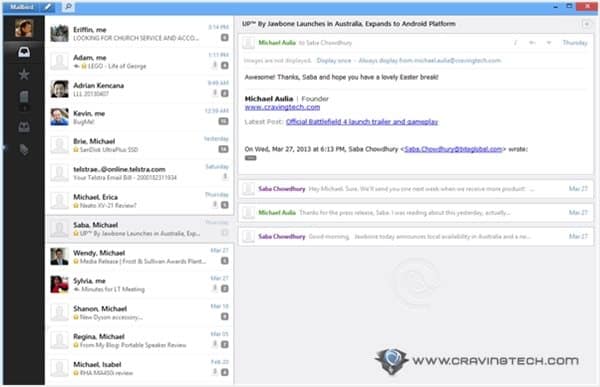
If you’ve already subscribed to my email feed (or other site’s email feed), you’d normally see the same annoying email subject on every new post delivered to your email inbox. Normally it would show my blog’s name on every email you received. Well, no more! Starting from today, you’ll see the post title on the email subjects, allowing you to save and quickly identify your favorite posts from my blog.

If you are a blogger, you might want to keep reading this post as I’ll guide you on how to insert post title in a Feedburner email subject.

How to insert post title in a Feedburner email subject

  1. Go to your own Feed at Google’s Feedburner.
  2. Go to the Publicize tab on the top.
    rss feedburner email options
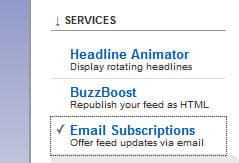
  3. Go to Email Subscriptions from the left menu.
    feedburner custom email subject
  4. You’ll see an “Email Branding” option on the expanded Email Subscriptions menu. Click on it.
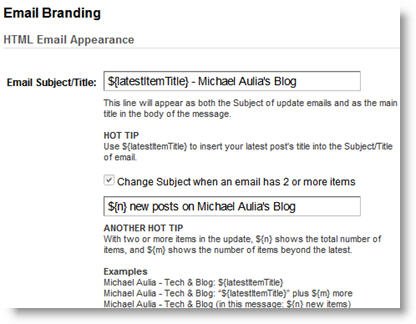
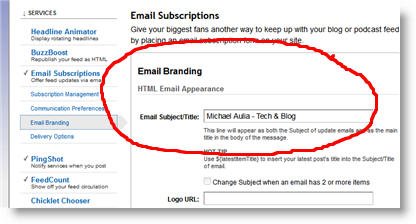
  5. Have a read on how to insert a custom email subject on the Feedburner email page. Follow the instructions or you can also copy mine from the screenshot below (I use a “Post title – My Blog’s title” but feel free to use whatever you prefer).Previously, you can only put a static text on the email subject, which was quite lame.
    where to insert post title in Feedburner email feed

    Now, you can put the post title dynamically on the Feedburner email subject!

    how to insert post title in Feedburner email feed
    There is also a new option to display a different subject if the email feed has more than 1 email available on the feed. Nifty!

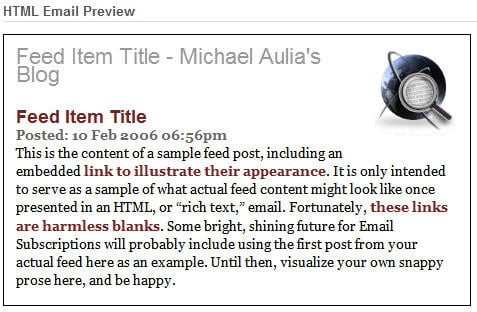
  6. Save and preview your new settings!
    RSS Feedburner email preview

Kudos to Google Feedburner dev team to make this into a reality. It’s long overdue but it’s always never too late to change!

Want a test drive? Why don’t you try subscribing to my blog through your email inbox and see this example live? (and yeah, it’s an incentive for you to subscribe to my blog :) ).

Bookmark and Share


Subscribe Now

If you enjoyed this post, feel free to subscribe to be notified of new posts at Craving Tech!

{ 8 comments… read them below or add one }

Mariuca 4 July, 2009 at 12:21 am

Oh cool, thanks for the tip Michael! :)
Mariuca´s last blog ..Tip-Top Tokyo My ComLuv Profile

Reply to this comment

Michael Aulia 4 July, 2009 at 12:36 am

You’re welcome, Mariuca :)

Tycoon Blogger 6 July, 2009 at 9:07 am

Thanks for the useful tip. This should help increase the amount of readers as I would think that a well written title would grab their attention in a reader or email. I will have to update my feedburner info as this is new information to me.
Tycoon Blogger´s last blog ..Twitter Voyeurism My ComLuv Profile

Reply to this comment

Laurence @HostNexus 23 August, 2009 at 2:12 pm

Found this post by a simple Google search of “post title in feedburner email”. Was top of the pile. Thanks for the tip, been bugging me for ages!

Reply to this comment

Michael Aulia 24 August, 2009 at 11:55 pm

Wow, that’s good to know. Haven’t felt any surge of traffic for being ranked 1 on that search term though lol. Glad my post helped

Kath Dawson 7 December, 2009 at 1:15 am

Thanks for your post Michael, I found your post through this link http://forum.bytesforall.com/showthread.php?t=4396 after a search for “blog titles not displaying in google blog search” its solved a problem that has been bugging me for a while with email titles.. how easy it is when you know where to look!

I want to make sure post titles are displayed in google blog search too so I’ll check all the other available settings now.

Thanks,
Kath

Reply to this comment

Michael Aulia 7 December, 2009 at 8:36 pm

That’s great to know, Kath! Wasn’t aware the post made it to the forums and all

ileane 28 December, 2009 at 10:40 pm

Hi Mike,

I’m backtracking through some posts on Blog Engage about Feedburner. This is a good one that I may end up referencing on a HubPage.

Thanks for the info.
@Ileane
ileane´s last blog ..Fun Twitter Promotions for Your Blog My ComLuv Profile

Reply to this comment

Leave a Comment

You can use these HTML tags and attributes: <a href="" title=""> <abbr title=""> <acronym title=""> <b> <blockquote cite=""> <cite> <code> <del datetime=""> <em> <i> <q cite=""> <strike> <strong>

CommentLuv Enabled

Previous post:

Next post:


ss_blog_claim=90a03beb48f2cae080e36591e278f2e0