
 Have lots of custom emoticons on your MSN/WLM Messenger and wondering how to backup messenger? When you reformat or reinstall your Windows, you will lose all your custom emoticons and display pictures. If you’ve made a backup of every single emoticon files, then you can reimport them back to your new messenger 1 by 1. A very painful process.
A nice free program called “Windows Live Messenger Emoticon Migration Tool” (WLM Migrate) can make this pain to go away and backup Windows Live Messenger easily.
You can backup messenger emoticons and restore them easily with a few clicks!
Windows Live Messenger Emoticon Migration Tool is a single executable file (you don’t need to install anything). You simply click on it to run the same program to backup and to restore your emoticons.
You simply point to a folder where you want to store your custom emoticons. Your Windows Live UserID is also required (so that the program knows where to grab the files from). Your custom emoticons are stored “secretly” on the hard drive and this tool will basically copy the necessary files to a different location.
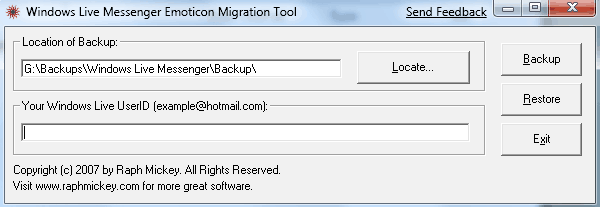
To backup messenger emoticons, simply do the same as above, but click on the Restore button instead. It’ll even maintain the same shortcut for every custom emoticon.
This is the simplest tool out there that I can find to backup windows live messenger emoticons easily and best of all, it’s free ;) You can download the tool here.



Comments are closed.