

ThirstyAffiliates Review – Managing affiliate links may not be easy in your blog, especially if you are recommending tons of products on a weekly basis (or even daily – hopefully they are genuine recommendations). You either have to log in to an individual affiliate program to grab your link over and over, or you can create a shortcut that is easy to remember on top of your head.
ThirstyAffiliates is a WordPress plug-in that does just that and more. Rather than having to remember the shortened links, ThirstyAffiliates also adds an extra icon on your WordPress text editor so you can simply do a click and search for all of your current affiliate links. Whether your intention is to hide or cloak your affiliate links, to make it easier to remember, or even to find out which affiliate products work well for you through looking at the stats, ThirstyAffiliates is worth having a look.
 ThirstyAffiliates Review – Hide/Cloak Affiliate Links
Some people have a mentality not to click on an affiliate link or to strip out any affiliate information from a link. I don’t know why, but it must be this mentality “I’m not going to make this guy any richer” even if you don’t actually lose anything, and even if you are actually going to buy the product. It may be a different story if you know the blogger or the one who gives the recommendation. But still, we are living in a weird society.
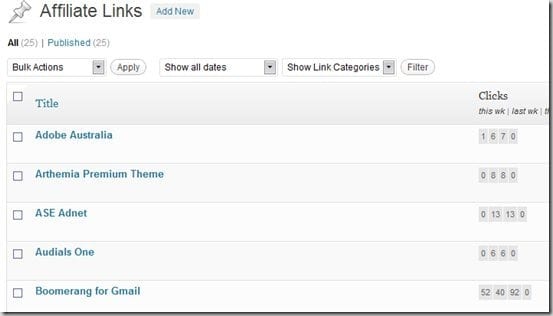
To protect your commission from this, even from your genuine recommendation, ThirstyAffiliates can cloak an affiliate link by having a shortened URL that you set-up through its easy to use control panel.
You can pick from a different recommended keyword such as “/go/” or “/recommends/” or even pick your own. This way, your link looks less spammy too. But of course, most bloggers already know this “trick”.
ThirstyAffiliates Review- Time Saver
ThirstyAffiliates adds an extra button on your WordPress text editor.

It works similarly to the default WordPress’ insert/edit link button. Highlight on a sentence (or words) and press the button. Search for your affiliate links from the pop-up window and select one to insert. Nice and easy! You don’t have to remember what links you set-up before as you can just search them easily through the interface.
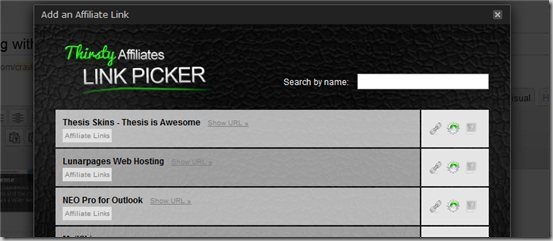
When an affiliate link is changed, you can simply edit the link through the control panel and it will be reflected to all of your posts. This way, you don’t have to edit your posts one by one and update your affiliate links.
ThirstyAffiliates Review – Stats, stats, stats
Stats are important – they measure how successful you are and which products (and posts) work best on your blog. With ThirstyAffiliates plug-in, you can view the number of hits of every affiliate link you’ve set-up: this week, last week, this month, and last month.
With these, you can find out which links are successful so you might want to promote that even more with new posts. Or with the unsuccessful ones, you might want to think of a different strategy to promote them further.
ThirstyAffiliates Review- Other goodies
- On the affiliate link picker, you can also choose to insert a block of code for your affiliate links. This way, you can create a nicer looking product image + description to be placed on your posts. Or you can just use the regular good-old text links. Choice is yours.
- It uses the default WordPress’ database tables and structures – less clutter
- Options to set all affiliate links to nofollow.
- If an affiliate link changes (happens from time to time), you can just replace it once.
ThirstyAffiliates Review- The Bad/Wish lists
- It doesn’t have an option to auto replace keywords with your affiliate links (no automation)
- Once you set the link prefix (go, recommends, etc), that’s it. You cannot mass-change unless if you go to your posts manually and change the links one by one.
ThirstyAffiliates vs Pretty Link Lite/Pro
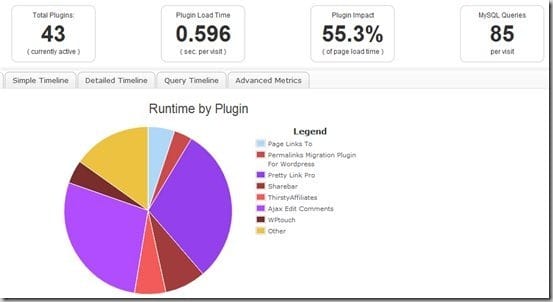
I was using Pretty Link Lite (and then upgraded to Pro) before, but I have ditched it for ThirstyAffiliates. It may not have the auto keywords replacement feature like Pretty Link Pro, but I find that inserting links and managing them are snappier in ThirstyAffiliates.
And if you read my previous post on the P3 Performance plug-in, I found that Pretty Link was quite heavy on resources somehow. ThirstyAffiliates looks to be more optimised and lighter, which is necessary if you are running a medium-large blog.
There may be updates in the future for more features (only time will tell) but managing plenty of affiliate links are easy, as well as searching and inserting them into your posts with ThirstyAffiliate.
ThirstyAffiliate (affiliate link, cloaked with ThirstyAffliate)





Comments are closed.