Why becoming a product reviewer is not as easy as you thought – Part 1

I had a bit of discussion with a friend of mine a few days ago. She said how lucky I am (because I’ve been getting those wonderful gadgets to try and review on) and how easy it is to review those “free” review products. I tried to defend myself and told her that it wasn’t [...]

Loving WordPress 2.6 Beta 1


by Michael Aulia on 28 June, 2008

in Application Reviews


WordPress 2.6 Beta 1I’ve updated my WordPress from 2.5 to 2.6 Beta 1 and I love it so far! If you are blogging using the WordPress platform and would like to know what has changed or what my impressions so far on the changes, please read on.

In one short sentence, it is worth to upgrade to WordPress 2.6 Beta 1, if you can stand a few bugs here and there.

Some WordPress 2.6 Beta 1 New Features:

Speedup / Google Gears

This is the first time I heard of Google Gears. WordPress 2.6 is utilizing it (mine was installed as a Firefox add-on) to speed-up the WordPress administration area by “caching” the files on your own local computer. It works as if the WordPress admin control panel is installed on your computer and not online.

You may not notice the speed improvement too much if you are on a lightning fast connection, but people have given good feedbacks over slow internet connection (dial-up or capped connection)!

The Speedup link is located on the top right of the Administration navigation bar. You need to install Google Gear and enable it first to use this new enhancement.
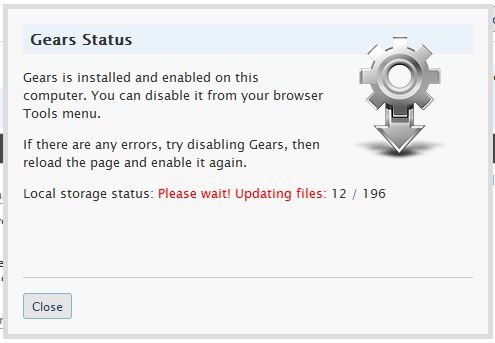
Google Gears WordPress

I’ve made a video comparison before and after enabling Gears, but since I’m on an ADSL connection, there are not much different, except when you try to link a post and upload images.

You can watch my video here:


Word Count

You can now see how many words have you written on your lovely post. I don’t usually care about it unless if I am writing for a sponsored post or a guest post with requirements. Nevertheless, it doesn’t hurt to have this feature on WordPress 2.6 Beta 1.

New Advanced Image Properties

I was trying to find where the image button has gone to from the toolbar. Found out that now you can simply click on an image on your post to bring up its image properties on WordPress 2.6 (an enhanced version of it too)
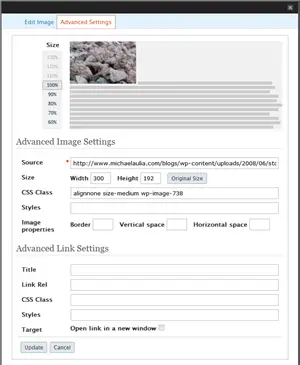
WordPress Image Properties

WordPress Image Properties

The new image properties

Wait, Don’t go first! The next page is even more exciting, I promise :)
Next Page: Auto-generated Avatars and other enhancements/bug fixes

Bookmark and Share

Pages: 1 2


Subscribe Now

If you enjoyed this post, feel free to subscribe to be notified of new posts at Craving Tech!

{ 10 comments… read them below or add one }

Yan@Blog for Beginners 28 June, 2008 at 3:00 pm

Wonderful! I’m kind of curious about this “Press This” thing. Are you saying we need to manually add the “Press This” link on the browser tool bar?

You make me want to do it now, you know? Perhaps I’ll wait for another week or so till they sort out some of the bugs.

Yan@Blog for Beginnerss last blog post..I Guess This Is When I Say “Thank You”

Reply to this comment

juler 28 June, 2008 at 5:37 pm

It is very funny really i just upload the 25.5 version on my wordpress blog then just to know that this beta version is out already… Again i will wait till this version is stable already…

julers last blog post..Hope I win this contest in Ez DIY Electricity

Reply to this comment

archondigital 28 June, 2008 at 8:25 pm

I’ll try to install it and hope it doesn’t mess up other plugins

archondigitals last blog post..Entrecard Top Ten – June 2008

Reply to this comment

sailor 28 June, 2008 at 9:57 pm

Mike, I agree with everything you have said here. I loaded it on my second blog and even with quite a few plugins I experienced no problems. I do miss the old button in the post area to add graphics to your post but I suppose I must just get used to the new way of doing things. For a long time now I have put off learning how the whole Media Library thing works, I must make a plan.

sailors last blog post..Firefox in your pocket

Reply to this comment

Michael Aulia 28 June, 2008 at 11:49 pm

@Yan: Yeah, I believe so. I don’t think I’m gonna use it though. I’ll just open my WordPress Admin link manually :)

@Sailor: Well, people don’t normally like changes, even if it’s for the better

Others: Have a go at it if you like to playwith the “latest toys” heh heh

Reply to this comment

Jacob Bager 29 June, 2008 at 6:40 pm

Ok one of my blogs is going to be a victim of this version..

Sounds like there are some cool features..

Thanks for the info

Reply to this comment

ameo 1 July, 2008 at 8:49 am

i installed it yesterday and it’s really really good and worth turning to

ameos last blog post..more opera addons extensions

Reply to this comment

Nihar 1 July, 2008 at 5:47 pm

Haven’t installed it yet.

Will install it right away and see how it is…

Nihars last blog post..Speed up your disk – Auslogics Disk Defrag

Reply to this comment

Michael Aulia 1 July, 2008 at 11:25 pm

Hope you guys like it :) Looking forward for Beta 2

Reply to this comment

Frank J 8 July, 2008 at 7:09 am

Not ready to be a test dummy yet, but I have been reading the WP forum.

Frank Js last blog post..Icahn and Ballmer Bullying Yang and Yahoo’s board

Reply to this comment

Leave a Comment

You can use these HTML tags and attributes: <a href="" title=""> <abbr title=""> <acronym title=""> <b> <blockquote cite=""> <cite> <code> <del datetime=""> <em> <i> <q cite=""> <strike> <strong>

CommentLuv Enabled

Previous post:

Next post:


ss_blog_claim=90a03beb48f2cae080e36591e278f2e0