
Razer Megasoma Review

Razer Megasoma is a hybrid of a hard and a soft mouse mat; If you love the softness of a soft mat but want to have the speed of a hard mat, Razer Megasoma delivers (this is debatable and I guess more like a personal preference). Razer Megasoma sits somewhere in between, combining the best [...]

Convert to whatever format you want


by Michael Aulia on 14 December, 2008

in Web Stuff Reviews


YouConvertIt

Some months ago, I made a post about a free online service converter called ZamZar that can convert files from one format to another (audio converter/mp3 converter, movie converter, and others).

There is also a similar site providing a file converter service, called YouConvertIt.

YouConvertIt offers variety format converter services: from mp3 converters, YouTube converters, mp4 converters, and so much more.

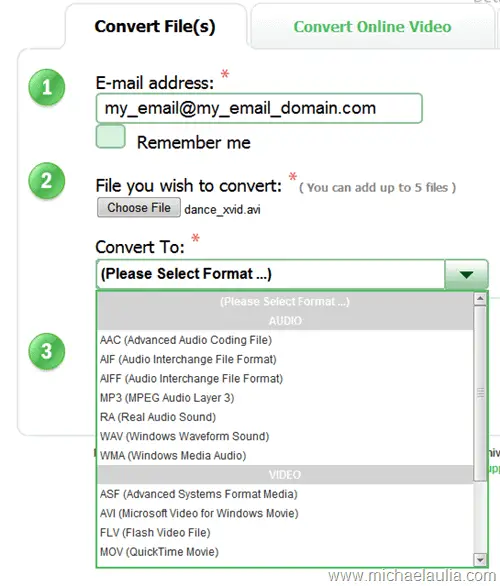
YouConvertIt provides a free service to convert files from one format to another. The steps are pretty simple:

  1. Insert your email address (Once converted, you will be sent a link to download your new file in the format you requested)
  2. You upload the file you want to convert to YouConvertIt.
  3. Select the new file format you want to convert into.
  4. Click the Convert It button.
  5. Check your email inbox afterwards (depends on the number of requests on YouConvertIt server, this may take a while)
convertVideo

You can also convert YouTube videos by entering the URL of the YouTube video you want to convert. Afterwards, you can download the YouTube video on the format that you prefer.

You can even extract an audio out of a video file. So technically you can extract MP3 out of an AVI/FLV file (I’ve tried this).
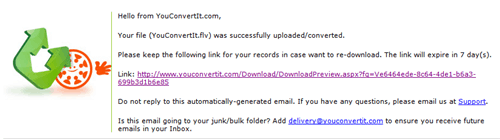
 

Took about an hour to get this email

Took about an hour to get this email

The site is a bit unresponsive though at times, although there’s a possibility that the server was busy when I accessed it to write this post. It’s a small price to pay for such a good free service. 

To give it a whirl, checkout YouConvertIt.com

Bookmark and Share


Subscribe Now

If you enjoyed this post, feel free to subscribe to be notified of new posts at Craving Tech!

{ 9 comments… read them below or add one }

ianimaru 14 December, 2008 at 10:37 pm

alright, this is what i need, youtube downloader and converter, thank anyway :D

Reply to this comment

Michael Aulia 16 December, 2008 at 12:48 am

You can also try vixy.net as an alternative to a YouTube converter and downloader :)

Nadeesha Cabral 14 December, 2008 at 10:40 pm

This is great! No more relentless painful searches for free file converters when they hit their evaluation expiry :)

Thanks a lot!

Reply to this comment

Michael Aulia 16 December, 2008 at 12:50 am

lol
I’d also suggest using Zamzar as the service is much quicker than this one

Ben Pei 15 December, 2008 at 1:54 am

Is that unlimited usage? Or only offered as free trial?

Reply to this comment

Michael Aulia 16 December, 2008 at 12:51 am

Unlimited and you don’t have to register a thing. It took about an hour for the result though last time I tried it (hence, why it’s free :) )

Nihar 15 December, 2008 at 6:41 pm

this was the post that you have as a screenshot in Behold Wordpress 2.7 post. Am i right?

Reply to this comment

Michael Aulia 16 December, 2008 at 12:52 am

Yeah :D Great observation skill you’ve got there, Nihar

srdha 13 April, 2009 at 7:54 pm

Here is a site that more use full than youconvertit.com download youtube videos on the fly,in any format http://youtubeddl.com dirict download from youtube server

Reply to this comment

Leave a Comment

You can use these HTML tags and attributes: <a href="" title=""> <abbr title=""> <acronym title=""> <b> <blockquote cite=""> <cite> <code> <del datetime=""> <em> <i> <q cite=""> <strike> <strong>

CommentLuv Enabled

Previous post:

Next post:


ss_blog_claim=90a03beb48f2cae080e36591e278f2e0