The Razer Huntsman V3 Pro Mini in White Edition is a premium 60% mechanical keyboard designed specifically for competitive gaming. Featuring Razer’s latest Analog Optical Switches Gen-2 with advanced features like Rapid Trigger, Snap Tap, and adjustable actuation, this keyboard targets serious gamers who want every possible advantage. After extensive testing, it’s clear this keyboard delivers on performance, though its compact form factor won’t suit everyone.
Packaging Contents


Build Quality and Design
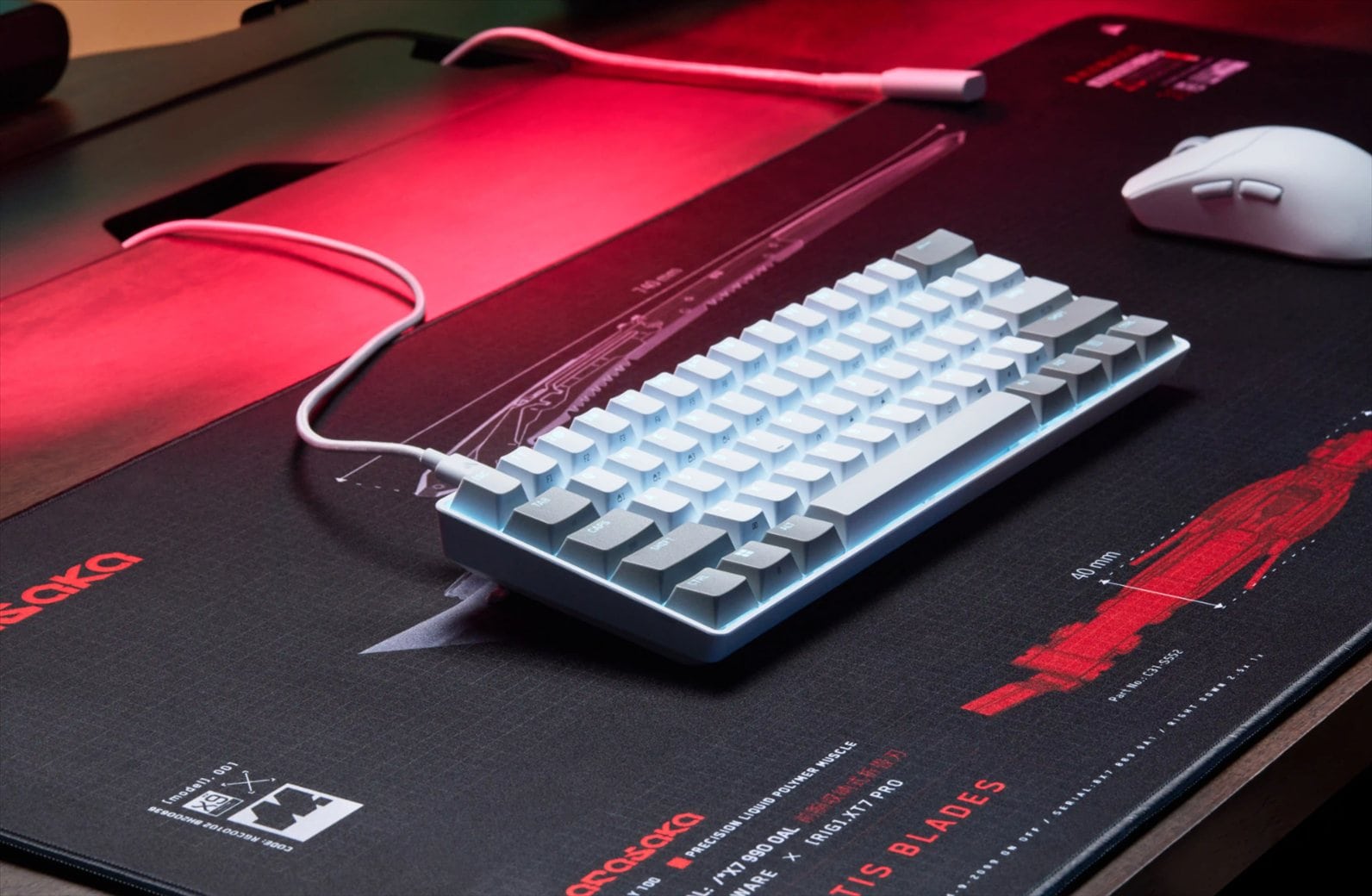
The Huntsman V3 Pro Mini feels exceptionally well-built for a compact keyboard. Despite its mini size, it has satisfying weight that keeps it firmly planted on your desk during intense gaming sessions. The aircraft-grade aluminum top plate with a smooth white finish contributes to both the durability and premium aesthetic.
Everything about this keyboard screams quality. The smoothness of the unit, the brightness and consistency of the RGB backlighting, and the exposed switches underneath all combine to create a premium look and feel. It’s a high-end keyboard that lives up to its premium positioning in the market.


The textured doubleshot PBT keycaps are more durable than standard ABS keycaps found on cheaper keyboards. Their shine-resistant design means they’ll maintain their texture even after months of heavy use. The side-printed secondary functions make it easy to remember function key combinations, which you’ll need frequently on a 60% layout.
The star of the show is Razer’s Analog Optical Switches Gen-2. These switches offer a 0.1 to 4.0mm adjustable actuation range and are rated for 100 million keystrokes. The 40g actuation force is lighter than many gaming switches, allowing for faster response times during gameplay.
For example, I like to set my W-A-S-D keys to have the fastest actuation possible for the most responsiveness in an FPS game like Overwatch but make sure that some keys would not be pressed accidentally. For example, you wouldn’t want to accidentally press an ultimate ability key because it’s too sensitive. So, the full customisation option is fully yours with this keyboard.
I found the switches to be on the stiffer side compared to some alternatives, though they provide a bouncier, more satisfying tactile feedback than the BlackWidow V4 Low-Profile Hyperspeed I was using previously. The feel is distinct and responsive, which matters when you’re making split-second decisions in competitive games.
Rapid Trigger Mode fundamentally changes how key resets work. Instead of a fixed reset point, keys reset instantly with an upward motion as low as 0.1mm. In practice, this allows for significantly faster repeated keystrokes compared to standard keyboards. The difference is particularly noticeable in games that require rapid direction changes or quick counter-strafing.
Snap Tap is another competitive feature that prioritises the latest input between two selected keys without requiring you to release the previous one. By default, it’s set up for the A and D keys, making directional changes nearly instantaneous. The feature is off by default and can be toggled via Razer Synapse or using FN + Left Shift.
For competitive FPS players, these features provide a measurable advantage and for those players, you need any advantage you can get.
The onboard adjustment system offers a powerful way to customise the keyboard without installing and opening Razer Synapse. You can adjust actuation height by pressing FN + Tab, test keys, and set your desired actuation using the number row. Similarly, FN + Caps Lock enters Rapid Trigger adjustment mode, and FN + Left Shift toggles Snap Tap.
These on-the-fly adjustments are quite intuitive once you understand the system. The visual aid from the number row makes it clear what you’re adjusting. For esports players who travel to tournaments or play on different systems, this onboard storage is invaluable.
That said, for most casual users, Razer Synapse provides a far easier setup experience with a proper graphical interface. I personally prefer using Synapse for initial configuration, but it’s reassuring to know the onboard adjustment options exist when needed.


One feature I discovered by surprise is the Dual-Purpose Modifier Keys. When enabled, the four keys at the bottom right corner function as arrow keys when tapped. This is a really smart solution to the limitations of a 60% form factor that typically sacrifices dedicated arrow keys.
I really wish every keyboard manufacturer would adopt this idea. It’s such an elegant workaround that provides essential navigation functionality without requiring you to hold down function key combinations constantly for a 60%-sized keyboard. You can also disable this feature if you don’t like the feel of it, so it doesn’t force a particular workflow on you.
The compact 60% size is great for practicality and ergonomics, allowing you to position your mouse closer to the keyboard for better arm alignment. It also looks incredibly neat on your desk, particularly if you’re working with limited workspace. However, the missing dedicated numpad, Home, PageDown, and other keys make this keyboard challenging for work purposes. If you frequently work with spreadsheets or code, you’ll constantly need to use function key combinations to access these missing keys. The Dual-Purpose Modifier Keys help somewhat, but they’re not ideal for productivity tasks that rely heavily on navigation keys or number input.
If you plan to use this keyboard for both gaming and serious work with spreadsheets or coding, you should strongly consider the TKL or Full Size variants instead. The 60% layout is optimised for pure gaming performance and portability, and using it for productivity requires compromise.
Again, the compact design is incredibly portable, making it perfect for bringing to offline tournaments or LAN events. It easily fits in a backpack without taking up much space though it does have some weight.
Razer Huntsman V3 Pro Mini Review Conclusion

The Razer Huntsman V3 Pro Mini White Edition is an exceptional gaming keyboard that delivers on its competitive promises. The Analog Optical Switches Gen-2 with Rapid Trigger and Snap Tap provide measurable response advantages that serious competitive players will appreciate. The build quality is outstanding, the white finish looks premium, and features like the Dual-Purpose Modifier Keys is a blessing in disguise.
For dedicated gamers who prioritise performance, portability, customisability, and have a separate keyboard for productivity, or those who can adapt to the 60% layout’s limitations, this keyboard is an excellent choice. The compact form factor enhances desk space and ergonomics for gaming setups.
The 60% layout and premium price point mean this keyboard isn’t for everyone. Casual gamers who also need a keyboard for work might find the missing keys frustrating (go grab the TKL or Full-Size instead), and the advanced features like on-the-fly adjustments are overkill for non-competitive play.
If you’re serious about competitive gaming and want every possible advantage including full customisation of pretty much everything (performance wise), the Razer Huntsman V3 Pro Mini delivers.
Razer Huntsman V3 Pro Mini White Edition retails for A$339.95 and is available now for purchase at retailers around Australia. Also at Amazon.

Disclosure: Razer Huntsman V3 Pro Mini White Edition review sample was supplied for reviewing
Razer Huntsman V3 Pro Mini White Edition Review
Overall
Summary
The Razer Huntsman V3 Pro Mini is an exceptionally built competitive gaming keyboard powered by Razer’s most advanced switches with full-on customisations
Pros
- Exceptional build quality with aircraft-grade aluminum construction
- Premium feel with consistent RGB backlighting and smooth finish
- Rapid Trigger and Snap Tap provide competitive advantages
- Highly adjustable actuation (0.1-4.0mm range)
- Innovative Dual-Purpose Modifier Keys for arrow key functionality
- Intuitive onboard adjustment system with visual feedback
- Durable textured doubleshot PBT keycaps
- Compact, portable 60% form factor ideal for gaming
- Satisfying tactile feedback from switches
- Onboard memory saves settings without software
Cons
- 60% layout is not ideal for productivity work requiring frequent number input or navigation
- Switches feel stiffer but this depends on users’ preference
- Premium price point
- Advanced features may be overkill for casual gamers