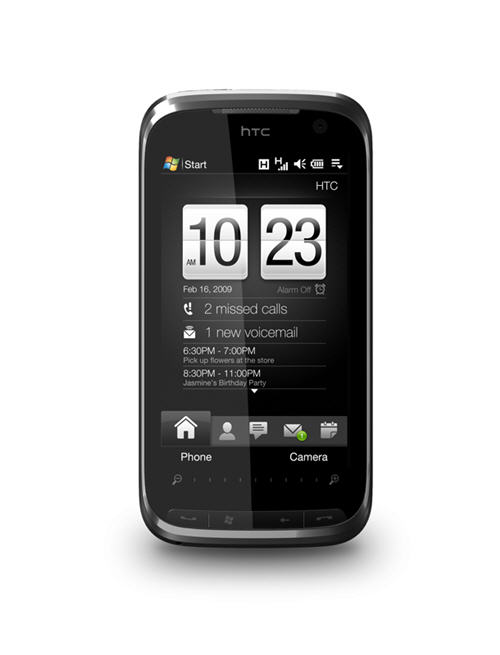
Tired of using your phone’s keypad or a stylus to send text messages from your mobile phone? It’s always faster to use a keyboard no matter how good you are with your phone pads or stylus. In the past, I usually used an SMS web service to send the text message to my friends (whenever I feel like using a keyboard to make it faster & easier for me). The problem is, I have to pay for the credits for these web services and I don’t like it especially when I still have plenty of credits left on my mobile phone’s plan for the month.
Just found out about a free application yesterday called Mobile Express by Efficasoft. Mobile Express lets you send text messages on Windows through your mobile phone’s carrier. It means that you don’t need to register or purchase credits online but instead can use the credits left on your mobile phone’s PLUS using your keyboard to type the text messages.
Unfortunately, this only works on windows mobile Smartphone or PocketPC devices. So if you are using a Nokia, Ericsson, or other mobile phones, then unfortunately it’s bad luck for you.
Mobile Express Features
- Manage Text Messages (SMS) and also synchronize them
- Send messages directly from your Windows via your mobile phone
- Organize Phone contacts (the application will retrieve your mobile phone contacts to the application)
Installation
You need to connect your mobile device to your desktop computer first before installing this program. During the installation, it will install a small application on your mobile device as well.
How to use Mobile Express to send text messages in Windows
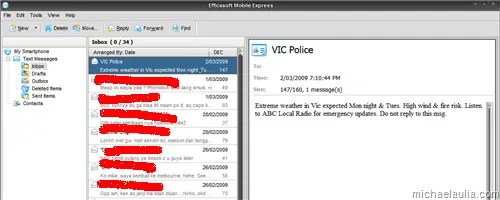
Once you start the program, you can see your text messages inbox straight away. These text messages will be the same as your mobile device’s. BE CAREFUL though. The software is set to automatically synchronize with your mobile, so if you delete a text message on the application, it will automatically delete the same message on your mobile device as well!
The main interface is pretty similar to a Windows mail client (like Outlook) so it won’t be too hard to figure out how to do things by yourself.
To send a message, click on the New button and you can then search for your contacts on the Phonebook (which will copy all your contacts from your mobile device).
You can search through the Phonebook and insert multiple recipients easily here.
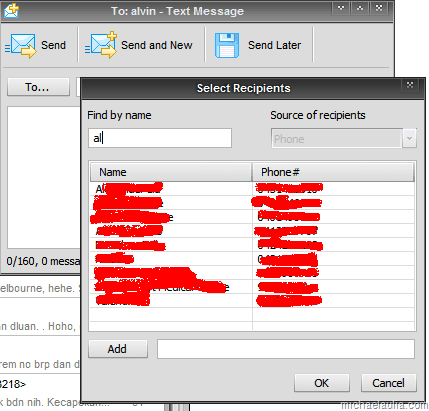
Type your message and press Send. It’s that simple!
MobileExpress is easy to use and it’s the best way to send a text message/sms using a keyboard on Windows. It will use the credits on your mobile phone’s plan carrier and not some extra credits that you have to pay online. You don’t even have to register for anything. The only drawback is that you need to keep your mobile device connected to Windows to be able to use the program.
Download MobileExpress and check it out yourself.
MobileExpress Pros:
+ Easy to use
+ Free
+ Utilize your mobile plan credits instead of using separate credits
+ You can manage your text messages like you manage your emails
+ It just works!
MobileExpress Cons:
- Need to have your phone connected to use it
- Can’t schedule when you want to send the SMS


{ 31 comments… read them below or add one }
nice application.. let me give it a try
“Unfortunately, this only works on windows mobile Smartphone or PocketPC devices.”
Aiks.. And I’m still using this 1208 nokia phone. -__-”
Btw, long time ago I used YM to send sms
Well back in 1997-1998, I used ICQ to send free SMS
This can be use for International Text Messaging Sir Michael?
Absolutely. It works through your phone. So the charge will be whatever your mobile carrier charges for International SMS
Oh, ok. I thought this is a flat rate (all SMS have equal price). Thanks for the information.
Actually I dont think I will bother because I already have a QWERTY keyboard in my cell and essentially the only real benefit of this is that you get to use a keyboard for texting if i am not wrong.
Yeah if you already have a QWERTY keyboard, then I guess you don’t really need this anymore. Unless if you hate your tiny keyboard on the phone
Nice guide, good post
Will check this out. Thanks. But not sure whether it will support all countries or not
Read my post again about what this software is actually doing
Nooooo, I’m an Iphone user and although the texting is not bad, you can’t send multimedia texts. At least from Gen 1 IPhone. I do have faith in technology… lol
dang, too bad i just bought a new nokia phone yesterday evening! (nokia 5800 touch, amazing!)
I’m still waiting for the HTC Touch Pro 2 or HTC Touch Diamond 2
Seems interesting. I have nokia N70, will it work with it ??
I’m not sure, you can probably give it a try but I think it’d need a Windows mobile O/S
“windows keypad” is alwys #better# than phone’s keypad or a stylus becoz no one has such precious time to waste on it,$$$$ TIME IS MONEY $$$$
lol but I guess if you have a big enough QWERTY Keyboard on your phone, that is okay too
HEy, i just tried it today.
Really thanks. i was really tired typing from my stupid mobile.
Great app.
why is just like <> ,better option buddy,i really with your option,great article!
oh! well tutorials about “mobile express”,it’s really very easy to use ,also you gave nice thoughts about “sms th’ window
s keyboard”,thanks buddY!
“windows-using-keyboard” what a cooly! opion this one especialy to send sms,really like onlineplay?
nice blog ..with the useful information ..how to send sms using windows keyboard..i will definitely download this…add it into my favorities…
“seriously” the future gadgets needs it by”demands’,to send sms$$
frankly saying in future we need these kind of tools and sites which will help us in reducing the cost and maintain the budges for an individual…these kind of free sms sites will help..
Very Good idea, i would want to download this software & use it….is it for free?….I really appericiate your ideas & i am totally with it.
I would reccomand this to you
Well if you really read my post, it actually says that it’s free
useful information which will help people in saving their money as everyone wants to send free SMS to their close ones and friends..
oh! well tutorials about “mobile express”,it’s really very easy to use ,also you gave nice thoughts about “sms th’ window
s keyboard”,thanks buddY!
hey nice blog….people will be benefited from this blog informaion as sending sms is very common and free sms will attract users towards your blog…
SENDING SMS THROUTH WIN. IS NOT BETTER THAN YAHOO MESSENGER SMS SERVICE,I THINK SO?