

Free Post It Notes for Windows – Are you still sticking your monitors with post it notes everywhere? Running out of space? Then you might want to reconsider trying Stickies for Windows, a free post it note for Windows. Not to mention that you are going to save some tiny trees for doing so.
If you are on Windows Vista or 7, you are lucky to have the built-in sticky notes’ gadgets. If you are on Windows XP however, then you need to install a third party software to start sticking your notes on your Windows Desktop. Some of them don’t come for free or simply are too complicated (scheduling, reminders, etc).
Stickies, a Post It Note for Windows, is simple to use and comes for free.
Stickies – Free post it notes for Windows
 After installing Stickies, you will see the icon on Windows System Tray. To create a new note, simply double click on the icon and an empty sticky note will be created on your Windows Desktop.
I’ve been trying to search for a good free post it notes for Windows application but either they look ugly, too complicated, or not free. Stickies is probably the simplest post it notes application that I’ve tried so far. You don’t need to specify where to save the notes. You don’t have to add reminder scheduling to it. It simply works out of the bat.
It does have some basic settings as you can see from the screenshot here:
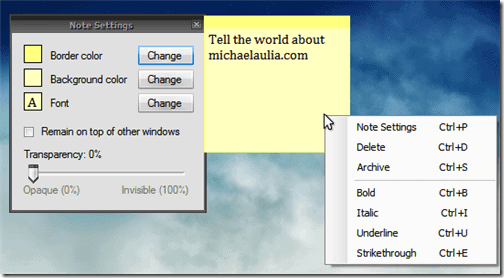
You can create as many sticky notes as you want on your Desktop and they will appear exactly on the same location when you restart your computer.
Stickies for Windows, a free post it notes for Windows, were made by Bret Taylor but the site, www.stickiesforwindows.com seems to be down. So if you want to download it, I’ve uploaded the Stickies setup file to MediaFire (the version is v3.0.7).
Have you got any other free post it notes for Windows that you want to recommend?


Comments are closed.