
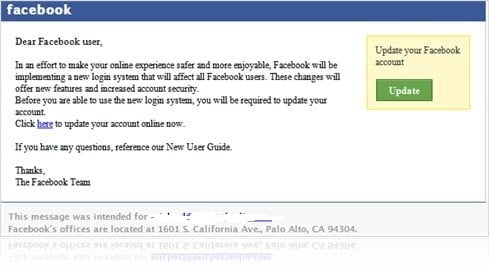
So I got this email today “from Facebook”. It looked very legitimate and real. You must have realized by now that there was a major update to your Facebook’s front page with the News Feed and Live Feed. This email might fool lots of people thinking that they really need to do something because of this change.
Why is this email a scam? How did I find out?
Just like on other email scams, whenever it asks you to go to a certain URL from the email, ALWAYS and I say again ALWAYS check the real URL by hovering your mouse’s cursor over the link. OR copy and paste the link to your browser but DON’T go to the site just yet (so don’t press your ENTER key yet). Check out the URL to see whether it’s a valid URL.
For example, the scam email that I got had this address as the URL:

As you can see, it doesn’t end with facebook.com/ but instead some dodgy URL at the end. You should always check the last URL part before the start of the /
Anyway, feeling brave, I’ve decided to test it out and go to the URL (I knew for sure that the page would look like a real Facebook login page and asked you to login). Before I could ever see the page, my lovely Firefox already warned me of the forgery:
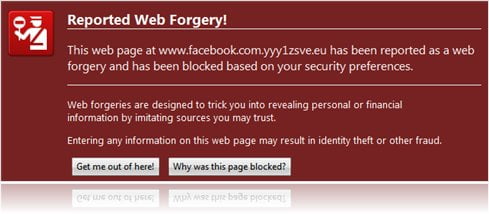
So please please please, if you are still using the old Internet Explorer versions (or older browser versions), please please update your browser now! Most browser nowadays have some sort of scam/phishing protection so please, update yours now.
In the meantime, be in the lookout for this email coming to your inbox. You know what to do by then. What? You’ve already fallen into this? Then quickly go to your real Facebook login and change your password, like, NOW.



Comments are closed.