Razer Megasoma Review

Razer Megasoma is a hybrid of a hard and a soft mouse mat; If you love the softness of a soft mat but want to have the speed of a hard mat, Razer Megasoma delivers (this is debatable and I guess more like a personal preference). Razer Megasoma sits somewhere in between, combining the best [...]

Stop those Trackback spam!


by Michael Aulia on 14 July, 2008

in Application Reviews


I recently changed my anti-spam plug-in on my WordPress blog, WP-AntiSpamFree, and replaced it with a CAPTCHA-style WordPress anti spam plug-in. Even though there has been no spam comments received, I do get a lot of trackbacks spam!

Even with Akismet installed, I still have to sort them out as I had an experience in the past where a genuine comment/trackback was tagged as a spam by Akismet!

I then found a plug-in called “Simple Trackback Validation“, that is simple, yet more effective than Akismet in combating trackback spam.
From the author’s site:

When a trackback is received, this plug-in:

  1. Checks if the IP address of the trackback sender is equal to the IP address of the web server the trackback URL is referring to.
    This reveals almost every spam trackback (more than 99%) since spammers do usually use bots which are not running on the machine of their customers.
  2. Retrieves the web page located at the URL included in the trackback.
    If the page doesn’t a link to your blog, the trackback is considered to be spam. Since most trackback spammers do not set up custom web pages linking to the blogs they attack, this simple test will quickly reveal illegitimate trackbacks.
    Also, bloggers can be stopped abusing trackback by sending trackbacks with their blog software or web services without having a link to the post.

Of course these 2 options are optional and can be selected/not-selected on the Simple Trackback Validation settings.

You can also decide what to do when Simple Trackback Validation plug-in tags a trackback as a spam:
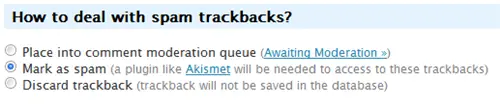
Simple Trackback Validation Plug-in

Not just that, you can even add an extra “[BLOCKED BY STBV]” to the trackback’s title so that you are aware that this trackback was caught as a spam by the Simple Trackback Validation plug-in.

I turned this on to evaluate how effective this plug-in is and whether it’s accurate. After a few days of trialing, I found 51 trackback comments spam waiting on my Akismet queue:
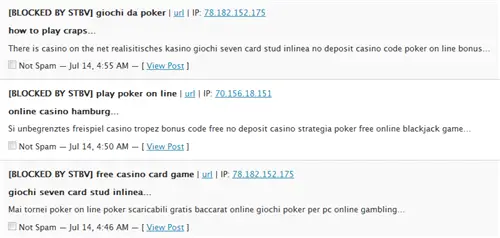
Simple Trackback Validation Plug-in

Gotta love seeing the "Blocked by STBV" tag


After observing the results, I did find a valid trackback (caught as a SPAM) because the IP address didn’t match (see what the plug-in did above). So I turned off that option but making sure that the trackback does point to my site:
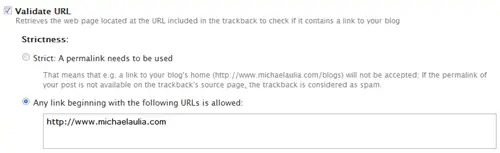
Simple Trackback Validation Plug-in

No linky to my blog? Go away!


I can now safely assume that if a trackback doesn’t link back to my blog, then it’s a spam. What I need to do, is to change the “How to deal with spam trackbacks?” setting to “Discard trackback”. This will save me so much time as I don’t need to check my Akismet spam queue anymore for these online casino and viagra trackbacks!

Simple Trackback Validation plug-in also logs the last 50 trackbacks if you are still skeptical about it and can be accessed from the WordPress’ Administration:
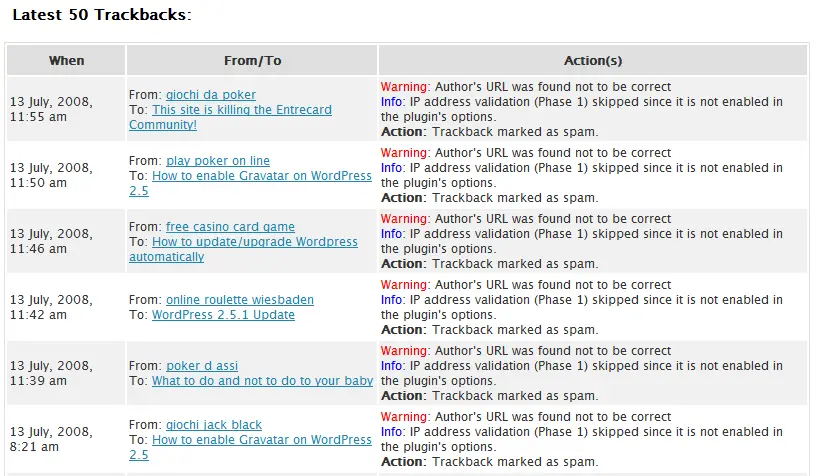
Trackbacks log

The plug-in says: "Don't believe me? Look at these reasons why I blocked it"

I still think, however, that my old plug-in, WP-SpamFree is the best WordPress plug-in ever in combating comment and trackback spam. However, many of my readers were having problems in commenting as this plug-in requires Cookies and JavaScript to be turned on.

A good blogger listens to his/her readers! (Although not always, lol)

If you are still checking your spam queue daily for these trackback spams, quit wasting your precious time and download the Simple Trackback Validation plug-in!


Bookmark and Share


Subscribe Now

If you enjoyed this post, feel free to subscribe to be notified of new posts at Craving Tech!

{ 16 comments… read them below or add one }

Nihar 14 July, 2008 at 6:38 pm

Great find michael. Will install it.

Nihars last blog post..Great Civilizations of Ancient World

Reply to this comment

bbrian017 15 July, 2008 at 1:06 am

The only way to confirm its real spam is too follow the trackback and see where it’s coming from!

Some people don’t allow any others do

It’s overall a personal preference.

Reply to this comment

Frank J 15 July, 2008 at 7:32 am

Nice post and I will also give it a test drive!

Frank Js last blog post..A New Blogging Record!

Reply to this comment

ameo 15 July, 2008 at 7:41 am

i hate these trackbacks ,
they always simply abuse your site .
they have a free content ,
they get a free link back
and might actually get some hits from your pages ..

p.s hope your new anti-spam doesn’t stab my in the back when i hit submit D

ameos last blog post..Book Review: Introduction to Linux Security

Reply to this comment

salwa 15 July, 2008 at 12:59 pm

oh there are so ANNOYING!
I will give this a try. Thanks!

salwas last blog post..Wordpress SuperBlog Theme Released

Reply to this comment

Michael Aulia 15 July, 2008 at 10:11 pm

I can barely see those annoying trackbacks anymore now.

Just 1 or 2 spam comments left here and there, which is fine. At least I don’t have to waste my time looking at my Akismet queue anymore to check whether a trackback is really a spam or not

Reply to this comment

Geoserv 16 July, 2008 at 12:36 am

STUMBLED!

Perfect, installing now, anything to cut down on some of the spam is good in my books.

Geoservs last blog post..Engage This!

Reply to this comment

Michael Aulia 16 July, 2008 at 9:39 pm

Thanks, Geoserv. Hope you can enjoy trackback spams free too

Can’t seem to find your stumble though, on http://www.stumbleupon.com/url/http://www.cravingtech.com/blog/stop-those-trackback-spam.html ?

Reply to this comment

Blog for Beginners 17 July, 2008 at 5:22 am

Thanks, Mike. Never heard of Trackback Validation before; will check it out in a while..

Yan

Blog for Beginnerss last blog post..Optimize robots.txt for Better SEO

Reply to this comment

Fool 18 July, 2008 at 6:38 am

This is worth a try for me also, I noticed since installing the sezwho I am having loads of trackback spam caught by askimet.

Fools last blog post..WOT, Wot, What? Firefox Add-on safe surfing

Reply to this comment

Michael Aulia 18 July, 2008 at 10:01 pm

Well most of them are gone now from my blog, except for just 1 or 2, which usually come from an auto spam blog kind of thing (they do put a link back to your post, so it’s ignored by the Simple Trackback Validation plug-in)

Reply to this comment

bloggista 24 July, 2008 at 1:30 pm

This is neat, Michael. Got tired of reviewing everytime which one’s valid and which one’s not. And I’ve noticed an increase in spam comments lately – even passing akismet’s validation. Will definitely try this out.

Reply to this comment

Benedichte 15 May, 2009 at 10:21 pm

why not just use a spam plugin such as SpamTask and WP-SpamFree? both eliminate normal spam and trackback spam. SpamTask is said to take 100% spambots.

Reply to this comment

Michael Aulia 15 May, 2009 at 10:28 pm

I’ve tried SpamFree before. It was great but the older version had a bug that prevented my readers to comment. I’m sure it’s been fixed now but I’ve used another anti spam for this blog. As for SpamTask, I haven’t heard of it but thanks for letting me know

Line 12 August, 2009 at 12:22 pm

have you tried SpamTask now? it just received a huge update with graph and no need to register anywhere nor use any sort of api. just activate and it works. :) way better than any such as Akismet. hasn’t let any spam through on my blog yet.

Michael Aulia 13 August, 2009 at 12:42 am

Thanks for the info. No I haven’t heard or tried SpamTask yet but I might give it a look :)

Reply to this comment

Leave a Comment

You can use these HTML tags and attributes: <a href="" title=""> <abbr title=""> <acronym title=""> <b> <blockquote cite=""> <cite> <code> <del datetime=""> <em> <i> <q cite=""> <strike> <strong>

CommentLuv Enabled

Previous post:

Next post:


ss_blog_claim=90a03beb48f2cae080e36591e278f2e0