Razer Megasoma Review

Razer Megasoma is a hybrid of a hard and a soft mouse mat; If you love the softness of a soft mat but want to have the speed of a hard mat, Razer Megasoma delivers (this is debatable and I guess more like a personal preference). Razer Megasoma sits somewhere in between, combining the best [...]

Unlock the unlockable


by Michael Aulia on 30 March, 2009

in Technology


unlock locked windows file

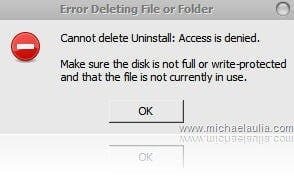
“Cannot delete (filename or foldername): Access is denied. Make sure the disk is not full or write-protected and that the file is not currently in use”

Familiar with the error status window above? It usually pops up when you:

  • Cannot delete a folder or cannot delete a file
  • Cannot rename a folder or cannot rename a file

Basically it happens because another process/program is currently accessing a file (and locks it). So unless you exit the application first, you won’t be able to do any changes to that file from anywhere outside of the application. At times, however, that is still not the case. Often you find that you still can’t make any modification to the file even though the application opening it has already been closed.

With the help of a free windows unlocking tool, this annoying problem is history.

The unlocking tool is called Unlocker. It has been around for years but I never publish a post about the tool yet on this blog.

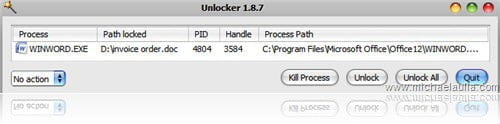
After you install Unlocker, you can right click a locked file on Windows Explorer and click on the “Unlocker” menu to access Unlocker. The Unlocker main window looks like:
no more cannot delete file error

It will tell you which application is currently locking the file, which is extremely useful. If you are sure that you have already close the file, then you can use Unlocker to either kill the process/application or use the “Unlock” magic button.

Unlocker gives you the power to unlock and delete locked files/folders in Windows (previously you have to restart windows to unlock the file/folder, which is quite annoying!). It’s free, it’s simple, and it works :)

Visit Unlocker official site to download.
Bookmark and Share


Subscribe Now

If you enjoyed this post, feel free to subscribe to be notified of new posts at Craving Tech!

{ 13 comments… read them below or add one }

Salwa 30 March, 2009 at 11:59 am

WoW thank you for posting this as I am currently having this same very problem with one of my laptop.

Salwa´s last blog post..Five Things You Should Know Before You Start Blogging

Reply to this comment

Wiehanne 30 March, 2009 at 6:55 pm

“Often you find that you still can’t make any modification to the file even though the application opening it has already been closed.”

Oh yes.. It’s so frustrating. I’ll need to restart the comp to delete it immediately.

Now, this Unlocker sounds so helpful. :D

Wiehanne´s last blog post..Rant of upcoming election – 9th April

Reply to this comment

Shanker Bakshi 31 March, 2009 at 2:34 am

On one of my computer there is this folder “shanker Bakshi” which am unable to delete or open. let me see if i can unlock that now.

Shanker Bakshi´s last blog post..TinEye – Search Engine for Duplicate Images

Reply to this comment

Steve Yu 31 March, 2009 at 12:05 pm

I have used this nifty tool for quite some time and definitely a must have application on every windows. :-)

Steve Yu´s last blog post..My Tech Quest Turned 1 Yesterday!

Reply to this comment

Jk 31 March, 2009 at 6:24 pm

Certainly this tool is one of the best in this category. I tried some tools like Killbox for deleting a folder named autorun.inf created by flashdisinfector from all of my drives, but failed. Unloacker instantly removed it. Thanks for this post.

Reply to this comment

My Life For Hire 1 April, 2009 at 6:11 am

unlocker is a very nice program…very useful !

My Life For Hire´s last blog post..Are you succesful in trading?

Reply to this comment

Megaphase.info 1 April, 2009 at 7:29 am

I have had this program a while, and it has saved me a lot of trouble.

Megaphase.info´s last blog post..Displaying recent Entrecard droppers as HTML using PHP

Reply to this comment

Quakeboy 1 April, 2009 at 4:15 pm

superb tool.. 1 suggestion..
the post title can be something else meaningful as it would help people who search in google

Quakeboy´s last blog post..Create your own Super Hero !

Reply to this comment

Michael Aulia 3 April, 2009 at 9:50 pm

Thanks Quakeboy. Well I use one of the SEO plug-in so you’ll see a catchy title on my blog, but the title will be displayed something else on search engines :) This way I can attract more attention with a catchy title (at least I’m trying to)

Tnomeralc Web Design Toys 4 April, 2009 at 12:38 pm

Please share that plugin Sir Michael. I wanna know it. Sounds like so useful to me.

Ron

Tnomeralc Web Design Toys´s last blog post..Tejeros Convention In General Trias

Nihar 5 April, 2009 at 10:38 am

This is a great tool… Good find…

WIll use this…

Nihar´s last blog post..Demonoid Private Torrent Tracker – Registrations are open!!

Reply to this comment

personal injury lawyers 6 April, 2009 at 10:49 pm

thanks buddy. i just really hate this message. its too irritating message for me. u have solved my problem.

Reply to this comment

Condos Florida 9 April, 2009 at 5:05 pm

m getting irritate and bother by this type of message you solved huge problem, would much helpful to maximum people.

Reply to this comment

Leave a Comment

You can use these HTML tags and attributes: <a href="" title=""> <abbr title=""> <acronym title=""> <b> <blockquote cite=""> <cite> <code> <del datetime=""> <em> <i> <q cite=""> <strike> <strong>

CommentLuv Enabled

Previous post:

Next post:


ss_blog_claim=90a03beb48f2cae080e36591e278f2e0