How to post to Google+, Twitter, and Facebook at the same time

by Michael Aulia on 20 July, 2011 in Technology

Sync Google Plus

How to post to Google+, Twitter, and Facebook at the same time – Being overwhelmed by the current social media yet? If you are on Google+ too, then you must have been wondering how to update your Google+, Twitter, and Facebook status simultaneously. I’m sure Hootsuite, TweetDeck, and other applications are going to add Google+ in, but with Agent G, you can simply add  “Agent G” on the “people to share it with” on Google+ to update your Twitter and Facebook status at the same time. It can’t get any easier than that and this way, you can control which status that you want to share simultaneously without having to install a browser extension or a desktop app.

How to post to Twitter and Facebook from Google+ simultaneously

  1. Go to http://gplus.sagg.im and sign in with your Facebook and/or Twitter account (if you want to post to both social networks, you have to sign in to both of them and do the next instructions for each)
  2. Just follow the instructions on the page (by sending the authentication key to Agent G on Google+, etc). Note that you need to send the Authentication to Agent G as a person (not as/in a Circle)

    Send message to Agen G
  3. Refresh that page and you should see the green ticks if you follow the instructions corretly (both on “Connected to Twitter” and “Connected to Facebook”)
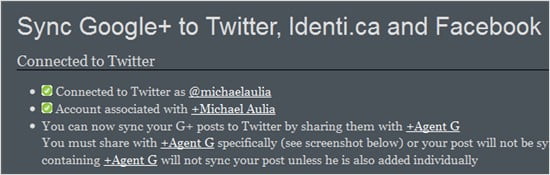
    Sync Google Twitter Facebook simultaneously
  4. To start posting status to the 3 social networks simultaneously, you need to add “Agent G” like you did earlier to authenticate. The status will then be passed on to your Twitter and Facebook at the same time.

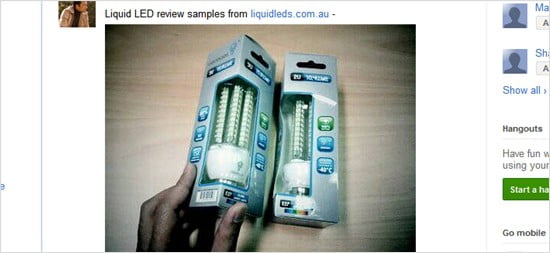
Here is an example. I posted a photo of the LED light bulb samples arriving today to be reviewed on my Google+. Unfortunately, sharing status works to all of the social networks but it doesn’t have the picture (or the link). So you may need to upload your pic somewhere else first if you want to share a photo to all of the social networks. Simple status message works fine though, just make sure it’s under 160 characters (Twitter’s limitation).

On Google+:
Google Plus

On Twitter:

Twitter

On Facebook:

facebook

It may take a minute or two before the status appears on Twitter/Facebook though so wait a bit.

Source: Read Write Web

Even though it hasn’t supported sharing photos yet, I think this is good enough when you want to share a simple status message on the 3 major social network at the same time. Syncing Google+ status with Twitter and Facebook is simple with Agent G after the set-up.


     

Don't miss out winning these great giveaways currently running at Craving Tech:

Handy Backup Giveaway


{ 25 comments… read them below or add one }

Techgravy July 20, 2011 at 8:29 pm

This is a new way.I use Google Chrome extension ‘Start G’ with same function.

Reply to this comment thread

Michael Aulia July 20, 2011 at 11:34 pm

Ah.. I guess as long as they serve the same purpose, it’s up to you on using a method that you like!

Chris Sasaki July 22, 2011 at 11:16 am

Great! Synced to both Facebook and Twitter. But, oops, now I don’t think I want to sync to both. How do I un-sync with Twitter? Thanks!

Reply to this comment thread

Michael Aulia July 23, 2011 at 1:52 am

Hi Chris.. hm.. sorry I didn’t know how to do this. Not even sure if it’s possible. If you can find a contact for the Agent G thing, you might want to ask there

Chris Sasaki July 23, 2011 at 9:42 am

No worries, I got it. In Twitter, I went to Settings > Applications. I simply “Revoked Access” to…hmm…now I forget, either “Google+” or “Agent G.”

Michael Aulia July 23, 2011 at 12:05 pm

Ahh..good point. Will make a note of that. Guess it will be a similar process if we want to stop it syncing to our Facebook account :)

Chris Sasaki August 3, 2011 at 1:07 am

I can no longer post to Facebook from Google+. I didn’t change anything so perhaps Facebook has done something to unsync from G+. Understandable, I suppose.

CraftyMummy July 22, 2011 at 5:13 pm

Thanks, Michael. I wondered whether there was a way to do this. I’d love to send the updates to my FB fan page rather than my personal FB page, but it doesn’t look like I can at this stage.

Reply to this comment thread

Michael Aulia July 23, 2011 at 1:53 am

Yeah, I wish there’s that option. For now, we can only hope that applications such as TweetDeck or Seesmic adds Google+ in soon

Steve Cattell July 27, 2011 at 11:38 pm

Lol. Google Plus already seems to be taking over the giants – Facebook and Twitter. I’ve always used the Google Chrome extension which is called something like “Start G” or something. Nice to know another method!

Reply to this comment thread

Michael Aulia July 29, 2011 at 11:02 pm

Yeah, it has so many millions of users in less than a week and they haven’t even opened up for public, I guess?

Good to see it’s not another of Google Wave’s failure

Ali Davut August 2, 2011 at 8:53 am

Best way to share posts from Google+ to Facebook or Twitter is http://plusist.com

Reply to this comment thread

Omar August 9, 2011 at 4:49 am

Great! is there a way to turn share on-off in mobile?

Drag August 5, 2011 at 6:45 am

Great! I was searching for something like that. Thanks for posting. :)

Reply to this comment thread

Abdulqader Kapadia August 6, 2011 at 10:52 pm

I was really thinking of developing a similar service. But Internet is so damn quick – you just think of an idea and it’s there available on the monstrous Web.
Abdulqader Kapadia recently posted..Enhance your Google+ experienceMy Profile

Reply to this comment thread

Abdulqader Kapadia August 6, 2011 at 10:54 pm

I was thinking of developing a similar service to share content among all social networks via one single spot. But the Internet is so damn quick – you think of an idea and it’s available on the monstrous Web. :(
Abdulqader Kapadia recently posted..Enhance your Google+ experienceMy Profile

Reply to this comment thread

Omar August 9, 2011 at 4:43 am

This work very good for web, thanks. Do you know how it works for mobile? The only way to share with Rob McGee is by circle in mobile and to make this work you have to share individually with Rob McGee. Best Regards

Reply to this comment thread

zipdrive August 16, 2011 at 9:53 pm

Hmmm… any way to do it the other way around? I mean, post something to Twitter and have it show up on my Google+ stream?

Another note is one should consider that since this is done through sharing with Rob Mcgee (of which there are several, BTW), your privacy has gone to hell.

Reply to this comment thread

rakesh kumar August 23, 2011 at 11:51 pm

Great tips micheal, but as i am using networked blog to update my profile on facebook and twitter, is it possible only to update google+ from wordpress.

Reply to this comment thread

Josh September 30, 2011 at 7:51 pm

This post is stupid. Why would you use some other guy’s site and share your information. No need for this. Just go to your facebook page and Twitter page and find out your personalized email address to send your status updates to. Then just add this to the status update email list on google+. It will do the same thing. What I would like to do is be able to post status updates on all sites WITH the pictures or youtube video. Otherwise, its’ just crap, and what’s the point.

Reply to this comment thread

chuck February 4, 2012 at 7:05 am

I know your post is old but I wanted to address it in case others see it right now. The problem is that facebook will detect that you posted to it in this way and wont always count it as a status update. Why is this a problem? Because if you have a friend who is subscribed to you, it wont notify them that you posted anything. I tried this and my wife was asking how come I hadn’t been on facebook for days, so I use tweetdeck for the time being so at least i can update twitter and facebook at once. It also does seem to count my facebook posts as status updates.

Lou Gonzalez November 10, 2011 at 3:41 am

is there a way to tweet and have it post to a facebook page

Reply to this comment thread

Fedil January 7, 2012 at 6:05 am
Aditya March 9, 2012 at 7:43 pm

I have this blog http://techilliterate.blogspot.com and its posts feed into twitter automatically. Now I want my tweets to go on Google+ automatically too, or the feeds o the Google plus page. Is there a way?

Reply to this comment thread

Carl April 14, 2012 at 5:44 am

Can I sync a Facebook page, twitter and Google+? I’ve linked Facebook page and twitter, so I know that part is possible

Reply to this comment thread

Leave a Comment

CommentLuv enabled.

  Subscribe to future comments on this post

Previous post:

Next post: