Razer Megasoma Review

Razer Megasoma is a hybrid of a hard and a soft mouse mat; If you love the softness of a soft mat but want to have the speed of a hard mat, Razer Megasoma delivers (this is debatable and I guess more like a personal preference). Razer Megasoma sits somewhere in between, combining the best [...]

Google Sitemap error – Network unreachable?


by Michael Aulia on 27 July, 2009

in Blog Related


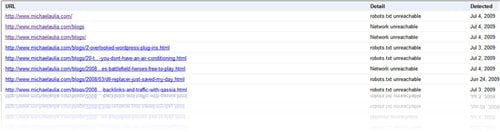
network unreachable sitemap error

I was frustrated last month after I made a title format change and applied it to all my posts. Previously, I had my post title formatted like:

Post Title – Michael Aulia’s Technology & Reviews Blog

After a few replies on a forum thread, I decided to change the title to just Post Title for SEO (please confirm this? :) ). Because of this, I logged on to my Google Webmaster Tools and realized that I’ve got lots of “Network unreachable” or “robots.txt unreachable” errors on my Google Sitemap. My traffic went down for several hundreds of visitors for several weeks this month as a result :(

After several weeks of frustration, I found the problem to these sitemap unreachable errors. Apparently, it’s not caused by changing the posts’ title format. It’s true that Google bots needed to re-index my blog again but they weren’t able to properly.

Oh, believe me, I’ve tried almost everything: rebuilding the sitemap file, trying to move the sitemap file, trying to write a few lines manually of my own, and even believed that maybe my server was down temporarily when Google bots visited my blog.

However, after a week or two, I was still receiving these errors so I realized something must be wrong. I found out a couple of bloggers having the same problem and it was because their web hosts blocked a Google’s bot. When I raised this concern to HostGator, the support guy confirmed that they didn’t block a bot and even gave me the IP addresses of the Google bots on their white lists:

# 216.239.32.0/19 # Googlebot
# 64.233.160.0/19 # Googlebot
# 72.14.192.0/18 # Googlebot
# 209.85.128.0/17 # Googlebot
# 66.102.0.0/20 # Googlebot
# 74.125.0.0/16 # Googlebot
# 66.249.64.0/19 #Googlebot

I believed the guy so I went on googling for hours and days trying to find every possible solution that I can think of. Then I stumbled into a blog post (unfortunately I forgot where it was :( ), saying that if the hosting said that they are not blocking any Google bots, ask again. So I did and then another staff replied apologizing me for what happened because he found a Google bot being blocked by them (it’s not on that list)! He fixed it and Google bots are celebrating and partying on my blog.

Conclusion: The XML sitemap errors (Network Unreachable or Robots.txt unreachable) can be caused by many things, but check that your web host doesn’t block one of Google’s spider bots! (and then after you try a few things, check again!)
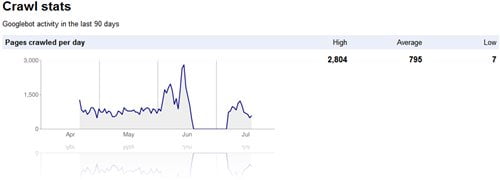

google bot crawl stats

Bookmark and Share


Subscribe Now

If you enjoyed this post, feel free to subscribe to be notified of new posts at Craving Tech!

{ 1 trackback }

Search Engine Optimization Dallas - Fixing my Google Sitemap Errors so I show up in the search engine results | Swanson SEO Services Blog
15 October, 2009 at 10:02 pm

{ 6 comments… read them below or add one }

Van 27 July, 2009 at 7:55 pm

I just wondered why HostGator suddenly blocks Google bot that they ever did before
Van´s last blog ..Make Vista Boot Faster So You Can Get Home For Dinner My ComLuv Profile

Reply to this comment

Megaphase.info 27 July, 2009 at 9:37 pm

Van, I think they weren’t trying to block googlebot, they just probably have a whitelist that they didn’t add it too accidentally.

Michael Aulia 28 July, 2009 at 10:08 am

Yes, sorry if I wasn’t being clear.

Google Bots can be treated as “spammer bots” due to their nature and it’s the responsibility of the web host to add them to their white lists.

Apparently HostGator missed 1 Google Bot IP to be included in the white list before.

Nihar 30 July, 2009 at 2:46 am

Thanks…

It is always nice to share the problem that we have seen and also solved it. It will help people who are looking for solutions to similar problems on the internet.
Nihar´s last blog ..Download Free Ashampoo Office 2008 with valid activation key My ComLuv Profile

Reply to this comment

diane 13 February, 2010 at 12:03 pm

I am so glad i came across this as this has now helped me to solve my problem. I thought that something major had gone wrong and then when i read this i then found out that this happened before and contacted my hosting company straight away to solve it.

Many thanks for the great advice

Reply to this comment

Michael Aulia 15 February, 2010 at 9:48 am

I was scratching my head too for days and I was pretty sure many others had the same feeling so I decided to write the post. Glad to know that it helps others too

Leave a Comment

You can use these HTML tags and attributes: <a href="" title=""> <abbr title=""> <acronym title=""> <b> <blockquote cite=""> <cite> <code> <del datetime=""> <em> <i> <q cite=""> <strike> <strong>

CommentLuv Enabled

Previous post:

Next post:


ss_blog_claim=90a03beb48f2cae080e36591e278f2e0