
 The Logo Creator by Laughing Bird Software does what it says; creating logos. The Logo Creator is a tool for Windows and Mac that simplifies all your needs to design logos, business cards, and banners.
With The Logo Creator, you don’t need to be a designer to pour out your creativity into reality!
I had The Logo Creator as part of free applications that I got from my hosting, LunarPages. I never know that this application is so easy and powerful to use, until recently.
I was trying to get my 125×125 banner to be re-designed by some friends (thanks to you who tried hard to contribute).
My old 125×125 banner was designed by Mark Lloyd last year:

Recently, I’ve managed to re-design new 125×125 banners by myself using The Logo Creator (2 of them):


PS: The magnifying glass was made by my friend, alia Josephine, though.
Hope you guys like my new banners (the one with the photo is more personal and I’m using it at the moment on Entrecard, the best community for bloggers. As for the other one, I’ll use it to advertise this blog on other blogs).
The Logo Creator – Powerful, simple, and you are in control
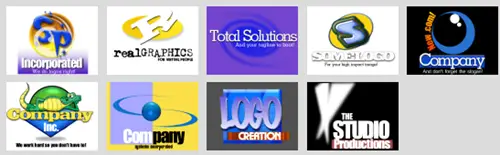
Simplicity is best and The Logo Creator is so simple to understand and use that I didn’t even need to read the help to do my stuffs. You can start designing from scratch or use some pre-made logos and modify them as you see fit (see below).
Every component on the canvas is an Object and it is clickable, modifiable, colorizable, and rotatable, you name it! No more dealing with layers (Photoshop, Illustrator) and confusing timeframes (Flash). You can easily change the properties (colour, position, etc) of an object by simply clicking on it and change it on the “Object Menu”.
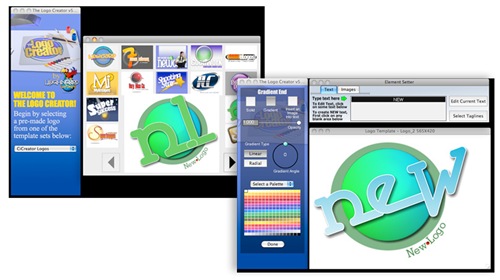
You can use objects from the library (that you can purchase separately, more on that later) and drag them to your canvas. You will then be able to modify them as you can see fit.
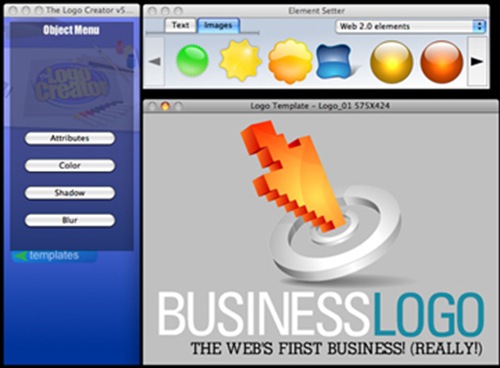
The Logo Creator also comes with some embedded fonts that you can use on your projects. Of course, you can also use the fonts on your own machine and they can be selected easily on The Logo Creator interface.
Texts also have different properties and effects available to them compared to Images.
Conclusion
The Logo Creator by Laughing Bird is no where Laughable. It’s a simple but yet very powerful tool, especially if you are not a top notch designer. It may lack the advanced customization provided by Adobe products such as the Adobe Illustrator, but for casual designers or people like me who don’t know much about designs, you can certainly create unbelievable designs!
The possibilities of the design are endless, thanks to the object properties panel in which you can modify basically almost everything about an object.
Although the software is named “The Logo Creator”, it certainly has the capability of creating banners, letterheads, and other design knick-knacks.
The Logo Creator is priced at $29.95. However, if you want to make it shine, you need to buy the object packs separately, called the Logo sets. The Alphabet, The Web 2.0, The Corporate, The Entertainment, The Mascot, The Sports, The Real Estate, The Spiritual, and The Travel and Leisure sets. Each pack costs $29.95 or you can get the whole sets called the “MEGApak” at $189.95. More on the Logo Creator packs here.
It may look pricey at first, but imagine that you can open your own Logo/Design business with this amazing product at that price, even though you are not a designer yourself. In fact, I’ve been looking around in some forums, trying my luck for some quick cash :D
All in all, The Logo Creator is one of the best applications that I’ve ever used so far! Thumbs up for you, Mr. Birdie!


Comments are closed.