“Redesign your blog/website” contest

The guys over at Buy Templates are nice enough to sponsor prizes for this contest. I know a few of you have just started a blog or a website, so I’m sure it’ll be great if you can win some good quality templates, logo, and banners for your new blog/site. Everyone who participates will also [...]


Some months ago, I was creating my first robots.txt. I even asked someone to help me make one. After a few months though, I’m a bit more confident in knowing WordPress and so I revisited my robots.txt again and start doing some more research to optimize my search engines traffic even further.

I found out that I still have a lot of duplicated contents that need to be filtered out to get a good SEO (Search Engine Optimization)!


If you don’t know what robots.txt is, it’s the file that search engine bots/crawlers will look first on their visits to your site/blog. The file tells them what to crawl/info to grab and what’s not.

The file robots.txt has to be put on your root site, even if your WordPress is installed on a sub-folder! So since my blog’s URL is http://www.cravingtech.com/blog/ , I still have to put the robots.txt under the http://www.cravingtech.com/blog/  (or your public_html/ folder).

Here is my new robots.txt file: (Feel free to comment about it)

# BEGIN XML-SITEMAP-PLUGIN
Sitemap: http://www.cravingtech.com/blog/sitemap.xml.gz
# END XML-SITEMAP-PLUGIN

User-agent: Googlebot-Image
Disallow:

# Google AdSense
User-agent: Mediapartners-Google*
Disallow:

# Internet Archiver Wayback Machine
User-agent: ia_archiver
Disallow: /

# digg mirror
User-agent: duggmirror
Disallow: /

User-agent: *
Disallow: /blogs/cgi-bin/
Disallow: /blogs/wp-admin/
Disallow: /blogs/wp-includes/
Disallow: /blogs/wp-content/plugins/
Disallow: /blogs/wp-content/cache/
Disallow: /blogs/wp-content/themes/
Disallow: /blogs/author/
Disallow: /blogs/archives/
Disallow: /blogs/trackback/
Disallow: /blogs/feed/
Disallow: /blogs/tag/
Disallow: /blogs/search-result/
Disallow: /blogs/smilies/
Disallow: /blogs/wp-au-backup/
Disallow: /blogs/category/
Disallow: /blogs/page/
Disallow: /blogs/2007/
Disallow: /blogs/2008/

———-
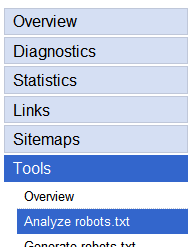
Google Webmaster Tools


NOTE:
If you want to copy my robots.txt to your WordPress blog, feel free to do so, BUT! This only works if your permalink structure is similar like mine (www……./%posttitle%……. IF your permalink structure has the year or category on it, it will be blocked by this robots.txt configuration! (i.e. the Disallow: /2008/ part)

As always, check whether your posts are accessible by using Google Webmaster Tools.

Once there, go to Tools-Analyze robots.txt.

You should then see your robots.txt contents there. If you’ve just updated your robots.txt file, you may still see the old one. It will be refreshed on the next Google’s crawl which may take a day or two.

Then, test if the crawler bots can access your actual content and can’t access the duplicated contents:
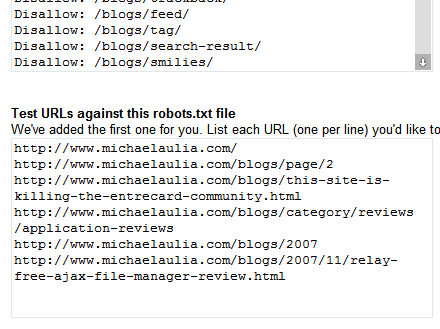
Crawl Test

Then, look at the results to see if the bot can access only the actual content.

Crawl Results

As you can see, the bot can now only access the actual post content and not the posts on archives, feeds, navigation pages, etc.

Have you re-visited your robots.txt? It’s very important for search engines, especially Google, that you get it right and optimized!

 Redesigning my robots.txt file. Have you done yours?

Bookmark and Share


Subscribe Now

If you enjoyed this post, feel free to subscribe to be notified of new posts at Craving Tech!

{ 20 comments… read them below or add one }

ameo 4 June, 2008 at 7:41 pm

nice , i love the files to be ready to copy and paste :)
i’ll see if my blog support blocking robots or not ,

ameos last blog post..manage passwords / arting ads [ firefox ]

Reply to this comment

Nihar 4 June, 2008 at 7:52 pm

very good post. my perma structure is year/month/articlename.
i think you are using sitemap plugin. I am using the same. I don’t have any special instructions in robot.txt
Let me know if i can put like you have done with the same perma structure?

Nihars last blog post..Get FREE Kaspersky Internet Security license key

Reply to this comment

Chessmaster 4 June, 2008 at 11:27 pm

Nice post, I always knew they existed but never had the time to verify the file, with your post i’ll be sure to give it a look today.
I’m in the same situation of Nihar for the permalink structure, I will have to read on how to configure my robot file.

Thanks!

Chessmasters last blog post..Too Many Money Blogs

Reply to this comment

Michael Aulia 4 June, 2008 at 11:40 pm

Hmm I guess having a year/ on the permalink is a bit tricky for the robots.txt. Worst to worst, don’t put the
Disallow /YEAR/ parts…

You’ll still get a duplicate content though because I can go to your
http://www.YOURSITE.com/2007 to see all of your 2007 archive posts..

Reply to this comment

iCalvyn 5 June, 2008 at 2:03 am

I did not disallow those admin content too, you are right, I should follow your way too

but i did not edit robots.txt over my root, i just edit the subdomain’s robots.txt

Reply to this comment

Steve Yu 5 June, 2008 at 4:12 am

I just realize that my blog doesn’t have robot.txt file. So gotta create one now.

Steve Yus last blog post..Quickly Adjust the Volume of Your Speaker with just a Mouse Scroll

Reply to this comment

Regretful Morning 5 June, 2008 at 2:30 pm

Great tip – I would never have have even know about this if it wasn’t for your post.

Regretful Mornings last blog post..Wingman of the Year

Reply to this comment

Michael Aulia 6 June, 2008 at 12:20 am

Wow, I didn’t know that most bloggers don’t have robots.txt yet. Glad to help out. Now hopefully more search engine visitors will come more to your site!

@ICalvyn: I’m not sure how web crawlers work for subdomain, but if they’ll grab the robots.txt under the subdomain, then I guess you don’t need the root anymore

Reply to this comment

Yan@Blog for Beginners 6 June, 2008 at 2:28 am

When I relook at my robots.txt file, I realize I allow the robot to access to my yearly archive.

How important it is to disallow the yearly archive? If I leave it as it is now, are you suggesting that there will be duplicate content issue?

Yan@Blog for Beginnerss last blog post..Optimize Your URL For Search Engines

Reply to this comment

Squeaky 6 June, 2008 at 11:16 am

Micheal,

Having a good robots.txt file really helps with SEO and search engine traffic. Mine has improved a lot since I started cleaning up my robots.txt file.

You may want to validate your robots.txt file because there are some errors in it. I use this free online robots.txt validation for my site and it works very good. http://tool.motoricerca.info/robots-checker.phtml

I am working on my robots.txt file and still haven’t quite figured it all out but for the most part it is better. If you get a chance, would you look at mind and see what you think. If you need some ec credits, let me know.

Thanks……

Reply to this comment

Michael Aulia 7 June, 2008 at 11:20 am

@Yan: Yeah, it is. If you type http://thoushallblog.com/2008, you’ll see all of your posts in 2008. It’s kind of duplicate, don’t you think?

@Squeaky: Thanks Squeaky! My goodness, there are so many errors on mine :| It’s weird because I’ve got some of the configurations from some blogs on the web (I can’t remember wehere now, planning to give them some link love :( )

Reply to this comment

Squeaky 7 June, 2008 at 2:23 pm

I have been working on Madmouse robots.txt for a few days now, and the Google crawl cycle is getting better. I have used the robots checker tool on many of the big bloggers sites and found lots of errors.

I am error free now, but I am sure that I have some items to address yet. But, for the most part it is better than what I had.

Once you get things to validate, it will be interesting to see if you notice any results as far as SEO, etc.

Squeakys last blog post..Stop! Blog Scrappers with the RSS Footer, WordPress Plugin

Reply to this comment

Yan@Blog for Beginners 8 June, 2008 at 4:02 am

@Michael: Yup, you have your point. It’s time for an update. Anyway, I don’t understand why Disallow: /*?* is an error. I had that on my robots.txt file too after some advise by I-can’t-remember-who.

Yan@Blog for Beginnerss last blog post..If You Have Adsense, Use Section Targeting

Reply to this comment

Michael Aulia 8 June, 2008 at 9:24 am

Is there another tool that achive the same thing? It’ll be good to check whether the tool/checker itself has no bug whatsoever :)

Can never trust application 100% these days

Reply to this comment

Yan@Blog for Beginners 8 June, 2008 at 5:03 pm

Since we create robots.txt file mainly for Google, I would place my trust on the big G to analyze it using Webmaster Tool. You have used that too, haven’t you, Michael?

Yan@Blog for Beginnerss last blog post..If You Have Adsense, Use Section Targeting

Reply to this comment

Michael Aulia 10 June, 2008 at 12:58 am

@Yan: Yeah, but honestly the Webmaster Tool doesn’t really analyze your robots.txt file in detail.

It’s probably worth researching again if you got errors, and see what other SEO experts say about the error, though.

Reply to this comment

Yan@Blog for Beginners 10 June, 2008 at 1:51 am

Thanks for the advise. If you do find any useful tool online to analyze robots.txt, do let us know.

Reply to this comment

Arnold Aranez 21 July, 2008 at 11:23 pm

Michael, help me write mine robot.txt files :)

Reply to this comment

Michael Aulia 22 July, 2008 at 12:01 am

I’ve just updated this post with my latest robots.txt after following the web checker posted by Squeaky earlier

I think it’s a very good tool to analyze your robots.txt file. I’ll probably post something about it soon

@Arnold: You can copy paste my robots.txt and change the paths to match your blog :D

Reply to this comment

iPod 12 February, 2009 at 4:30 am

Good piece.

Reply to this comment

Leave a Comment

You can use these HTML tags and attributes: <a href="" title=""> <abbr title=""> <acronym title=""> <b> <blockquote cite=""> <cite> <code> <del datetime=""> <em> <i> <q cite=""> <strike> <strong>

CommentLuv Enabled

Previous post:

Next post:


ss_blog_claim=90a03beb48f2cae080e36591e278f2e0