Razer Megasoma Review

Razer Megasoma is a hybrid of a hard and a soft mouse mat; If you love the softness of a soft mat but want to have the speed of a hard mat, Razer Megasoma delivers (this is debatable and I guess more like a personal preference). Razer Megasoma sits somewhere in between, combining the best [...]

Gmail’s inbox multiplied


by Michael Aulia on 7 February, 2009

in Other Tech News


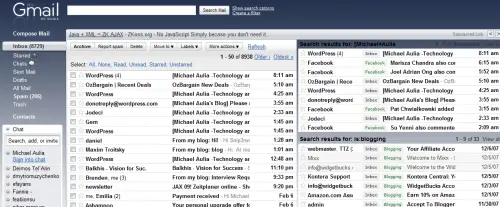
gmail inbox

The Gmail dev team has just released its newest lab feature called Multiple Inboxes. When I first heard it, I thought they mean multiple tabs in Gmail. Now, that’d be cool, or so I thought. I was wrong. The Multiple Inboxes actually means that you are now able to display and see multiple inboxes at the same time, depending on the set of filter that you use.

So if you are an extremely organized person (a little bit like me :) ), then you can set another inbox to show only the emails from a particular label.

To turn this feature on, go to your Gmail settings on the top and then go to Labs. Find “Multiple Inboxes” on the Gmail Labs list and Enable it.

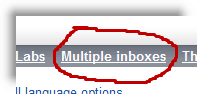
enable gmail multiple inbox

multiple inbox settings

Don’t forget to save the settings.

Now, head off to your Settings again on the top and you should be able to see the new Multiple Inboxes option

That’s it. You can add more inbox on the settings and even customize the labels or the emails that you want to appear on a particular inbox. The features are still limited though, so it’s best to have a look in Gmail’s Multiple Inboxes forum for further discussions and questions.

After trying it, I don’t think I need this feature (Well, I do most of my email correspondence through my Windows Live Mail anyway). I’d love to see tabs though so that it’s easier to open a few emails at the same time on one screen. Perhaps one day.

Bookmark and Share


Subscribe Now

If you enjoyed this post, feel free to subscribe to be notified of new posts at Craving Tech!

{ 9 comments… read them below or add one }

Acoustic Guitar Player - Ant Wakefield 7 February, 2009 at 1:41 pm

Hey Michael,

This is really handy. I’m a bit of a gmail freak myself, it’s amazing how similar our inboxes look. The amount of email i get a day is silly, however labels help out the process.

Thanks for covering this, i was wondering how to get this feature working.

Anthony.

Reply to this comment

Michael Aulia 7 February, 2009 at 10:09 pm

Well as long as you are checking your email every few hours, getting lots of emails shouldn’t be a problem now, should it? :)

Lyndi 7 February, 2009 at 5:24 pm

I never manage to pick up on these new nifty features. Fortunately you always bring them to our attention. Something else to go and play with. Thanks for the info.

Reply to this comment

Wiehanne 7 February, 2009 at 6:59 pm

Tried it but don’t really like to have a few boxes in one screen. Tabs feature would be better. :)

Reply to this comment

Ann Arbor Web Design 9 February, 2009 at 12:55 pm

Hey thanks for that information; it is amazing how google is able to guess what we want and put it in place before we even realize we want it!

Reply to this comment

Karthik 9 February, 2009 at 9:23 pm

That will be a handy feature for people like me,receiving a number of emails.I don’t think there is any mail provider that can match google :)

Reply to this comment

Ruby 9 February, 2009 at 11:59 pm

It will make navigating through your mail, especially if you have multiple accounts, easier.

Reply to this comment

Nihar 10 February, 2009 at 12:51 pm

Thanks for the info.

I didn’t check this feature. Will enable it.

Reply to this comment

Web-Betty 19 February, 2009 at 6:43 am

I just cleaned out my inbox to reduce the number of emails I see. Now you’re showing me how I can see more at a time. :P

This might actually help me with my to do list. Thanks for pointing it out.

Reply to this comment

Leave a Comment

You can use these HTML tags and attributes: <a href="" title=""> <abbr title=""> <acronym title=""> <b> <blockquote cite=""> <cite> <code> <del datetime=""> <em> <i> <q cite=""> <strike> <strong>

CommentLuv Enabled

Previous post:

Next post:


ss_blog_claim=90a03beb48f2cae080e36591e278f2e0