
 I haven’t even finished writing about the new facial recognition feature from Picasa 3.5 and now Google has confirmed another exciting service called the Google Sidewiki. At first I thought, “What? Not a Wikipedia clone, please!”. Thankfully I’m mistaken. Google Sidewiki is not the same as Wikipedia.
What Google Sidewiki does in a nutshell, is allowing you to view (and add) information to a specific part of a page or the entire web part of a site. Think of it as a “mini” Wikipedia (information contributed by web users). But instead of having all the information hosted on a site, they are being held on your browser’s sidebar whenever you go to a certain page or a website.
This is more useful in my opinion, because you don’t normally go to Wikipedia unless when you want to research on a specific piece of information. With Google Sidewiki, there can be “surprising” information waiting for you when you don’t expect one.
It also means professional users can mark a site or a content of a page as misleading information! Something that you can’t find clearly when you are reading a web page.
How to enable Google Sidewiki
Well, you need to install Google Toolbar on either your Firefox or Internet Explorer browser (the only supported browsers when this post was written) to enable Google Sidewiki.
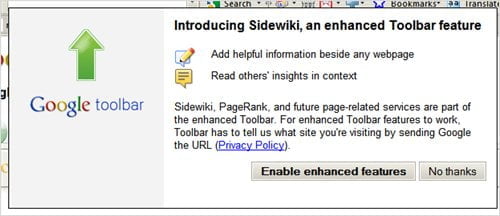
Just click on the “Enable enhanced features” when you want to enable Google Sidewiki on the Google Toolbar.
Google Sidewiki in Action
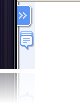 When you browse to a web page, you will see the Google Sidewiki icon appearing on the left sidebar of your browser when there is information available.
If you can’t see the icon, that means there aren’t any Google Sidewiki for this page yet and you are free to add yours if you want to by clicking on the “Sidewiki” menu on your Google Toolbar.
Or you can add to an existing Google Sidewiki entry by clicking on the “Write an entry” link at the bottom of the Sidewiki sidebar.
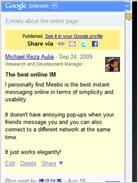
For example, here is a Google Sidewiki entry that I added on DealExtreme site:

Google Sidewiki looks like another new winner service from Google, however I can see some problems with this:
- Subjected to spammers.
Even though you need to have a Google account to be able to comment, registering for one is fast and easy. Thankfully, Google has a good anti-spam measure and you can also rate any Google Sidewiki, so it can be flagged quickly if it’s a spam. - Google Toolbar must be installed.
Not many people know what Google Toolbar is or want to install an extra Toolbar on their system. Sometimes you are on a very restrictive workspace that you are not allowed to install anything! I remember having a client where they weren’t even allowed to update their Flash player unless they notified the head of the IT department yadda yadda! - Require contribution from the community.
To be successful, Google Sidewiki relies solely upon us to contribute. Imagine Digg.com without people submitting any articles. The site is as good as dead. So do Google Sidewiki. - Takes time to mature.
Even when people contribute, it’ll be some time before you can see Google Sidewiki on major internet pages.
Here is the official video from Google:
Source: Google Official Blog about Google Sidewiki release




Comments are closed.