
This is a Sponsored Post written by me on behalf of 123 Media Max. All opinions are 100% mine.
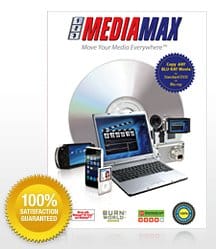 Blu-Ray discs are no where easier to backup than a conventional DVD especially because of the massive filesize they have. You can’t simply copy the files over to your hard drive too because of the protections. 123 Media Max is the software from CopyDVD that allows you to backup a Blu-Ray disc into a DVD easily.
Qualities of course will be toned down but amazing HD quality is still ensured by CopyDVD. The backups are also promised to be playable on Blu-Ray & DVD players, as well as the PS3 console.
123 Media Max offers a Blu-Ray Copy Breakthrough as well as other features such as:
- Copy/Backup any DVD movies to another DVD or to your PC
- Copy any DVD or movie files to smart phones, iPhone, iPod, PSP, PS3, XBOX360, Zune, and many more.
- Convert DVD to Divx.
- Burn videos from online services such YouTube and Metacafe to a DVD.
- Create a DVD from video and audio files.
- Many other features on the product page!
I remember having to buy another “The Negotiator” DVD simply because it couldn’t be played any more and I love that movie so much :( Unfortunately I couldn’t find an easy way to backup my DVD at that time and ripping it to files took several programs and impossible settings to remember (codec settings, passes, encoders, etc). You might want to check whether 123 Media Max satisfies your requirements to back up your favorite movies.





Comments are closed.