Razer Megasoma Review

Razer Megasoma is a hybrid of a hard and a soft mouse mat; If you love the softness of a soft mat but want to have the speed of a hard mat, Razer Megasoma delivers (this is debatable and I guess more like a personal preference). Razer Megasoma sits somewhere in between, combining the best [...]

Work. Together. Anywhere.


by Michael Aulia on 5 June, 2008

in Web Stuff Reviews


Adobe Acrobat Beta

Work. Together. Anywhere. That’s a new service by Adobe at Acrobat.com, still in Beta (what’s with this “Beta” tag everywhere, these days?)

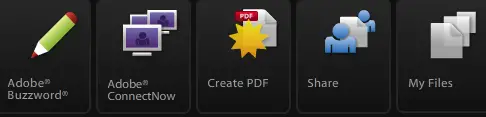
The new online Acrobat currently has 5 different services:

  • Adobe Buzzword
  • Adobe ConnectNow
  • Create PDF
  • Share
  • My Files

Sign up is required (name, email, and password only) and also Flash Player 9 to be installed on your system (browser). No fuzz here.

Acrobat.com is heavily developed in Flash (or Flex?), so the interface is intuitive and seamless. Some may hate it but personally (since I’ve been a Flash Actionscript developer for several years), I like it a lot. Interface may not be everything, but honestly, a good intuitive interface will affect the way you see and use an application.

Each service in Acrobat.com is related to one another. So if you create some documents on Adobe Buzzword, you can use the “Create PDF” service to convert all of them at once to PDF files. If you go to Share, you can then select multiple files that you’ve just created (or from your own computer) and then share the permissions to some of your friends or co-workers using a drag-and-drop Flash-style.
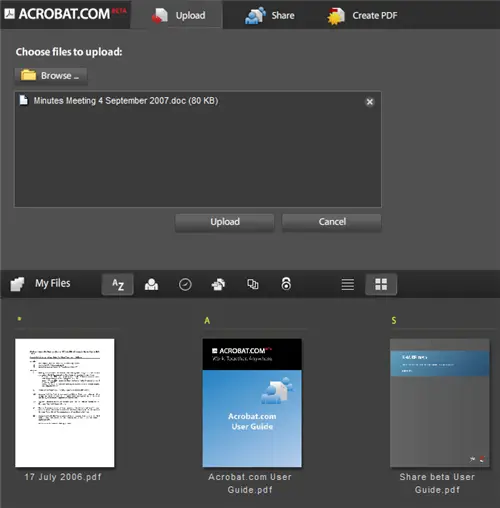
Adobe Acrobat Files

The interface is kept the same throughout each service, which is good. However at times, you’ll have trouble finding how to exit from a service to go to the other ones. Sometimes you just have to re-type acrobat.com again on your browser’s URL to exit from a service. A universal “Close” or “Exit” button is a welcome change.

Acrobat.com is worth having a look because:

  • Allows you to convert your files to PDF free online
  • Allows you to embed your document straight to your website! (not the link but the actual document in which your readers can interact with it!)
  • Share your documents and files (although we’ve got a lot of this service already out there)
  • Design your document wherever you are, without using OpenOffice or Microsoft Word
  • Make changes to your document, together, live! (using the Adobe ConnectNow). It’s a nice Microsoft NetMeeting alternative!

That’s it for now. In order to make my posts as concise as possible, I’ll try to take a look at these services one by one and post my personal review/impression on separate posts. I’ve already had a look briefly on each service and man, they are awesome!!

Work. Together. Online. They’ve got it right at Acrobat.com!

Are you interested to see me post an impression of each service one by one in the future, though?
Bookmark and Share


Subscribe Now

If you enjoyed this post, feel free to subscribe to be notified of new posts at Craving Tech!

{ 7 comments… read them below or add one }

Kristie 6 June, 2008 at 10:00 am

Hey there!

Just stopped on over to say thank for being one of my EC top droppers!

Thanks
Kristie

Kristies last blog post..My Top Drops Are In

Reply to this comment

Wenbin 6 June, 2008 at 1:33 pm

Yup, whats with that beta…

Wenbins last blog post..Entrecard Self Improvement Drop List

Reply to this comment

Quakeboy 6 June, 2008 at 2:05 pm

Cool Mike !!!
You are a flash action script developer too ?

Quakeboys last blog post..CNET Top Rated ‘InMotion’ Hosting gives excellent offer !

Reply to this comment

Steve Yu 7 June, 2008 at 12:57 am

Cool service from Acrobat. :D But I prefer to use service that don’t require registration to convert the pdf for free.

Steve Yus last blog post..Convert Your Image to Icon Directly from the Web With Bradicon

Reply to this comment

ameo 7 June, 2008 at 1:42 am

nice features , although i’m not the fan of anything that related to acrobat including their Pdf format but most of the times i try some other things to get the job done

ameos last blog post..blogger.com fans v1.0

Reply to this comment

Michael Aulia 7 June, 2008 at 11:18 am

@Wenbin: I think it’s good for an excuse if something goes wrong, then you can say “Hey, it’s still in Beta, what do you expect?”

@Queakeboy: For almost 4 years now lol (we use Actionscript + Perl for the monster software we’re building hehe)

@Steve: Haha yeah, I know. Well it’s not just for converting PDF, though. I’ll knock up some reviews on the following days/week

@Ameo: Well unfortunately the PDF format is the most industry standard at the moment. It’s as good as screenshots as in, you see what I see :)

Reply to this comment

bloggista 9 June, 2008 at 3:46 pm

Gotta try this out. Probably a good tool for project collaboration eh? I always use PDF when submitting documents to my client. However, with the Adobe getting popular, securing documents may be a problem.

bloggistas last blog post..Blogging Sexy Ana Ivanovi?

Reply to this comment

Leave a Comment

You can use these HTML tags and attributes: <a href="" title=""> <abbr title=""> <acronym title=""> <b> <blockquote cite=""> <cite> <code> <del datetime=""> <em> <i> <q cite=""> <strike> <strong>

CommentLuv Enabled

Previous post:

Next post:


ss_blog_claim=90a03beb48f2cae080e36591e278f2e0