Razer Megasoma Review

Razer Megasoma is a hybrid of a hard and a soft mouse mat; If you love the softness of a soft mat but want to have the speed of a hard mat, Razer Megasoma delivers (this is debatable and I guess more like a personal preference). Razer Megasoma sits somewhere in between, combining the best [...]

Behold! WordPress 2.7 Coltrane!


by Michael Aulia on 11 December, 2008

in News


WordPress2_7

To those who are using WordPress as their blogging platform, WordPress 2.7 has finally reached final and available as you are reading this post!

I’ve been using WordPress 2.7 since Beta 1 until today and one thing that I can tell you: Upgrade now if you are still using WordPress 2.6 or older! You will never ever ever regret it, trust me! Since I’ve been using it from Beta 1, the release is not as exciting for me as some of you may feel. However, I’m still excited about it, I dunno why!

Let’s check out what’s new and what are my favorites WordPress 2.7 new features!

WordPress 2.7 Features
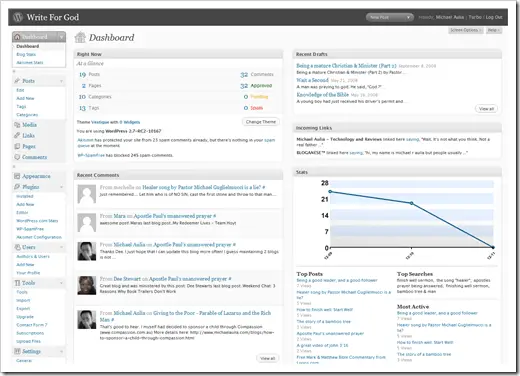
WordPress_Dashboard

Unfortunately, there are just too many to mention here! New changes to the user interfaces & layouts (for the better, of course), new set of icons, totally customizable dashboard and post area, a sticky post feature, built-in threaded comments support, auto updating your WordPress version, replying comments through the admin interface, more AJAX on the administration to provide a smoother management experience, and many many more! Feel free to watch the introduction video to WordPress 2.7 on the official WordPress 2.7, codenamed “Coltrane” blog.

Stop reading this post now and download WordPress 2.7 now! (and ahem, of course don’t forget to come back to this blog and read my other posts though :) Or subscribe to my feed to get the latest updates from this blog).

Still on Google Blogger?? Come on. Move, already! Come across to the other side heh heh :)

Some Screenies of WordPress 2.7:
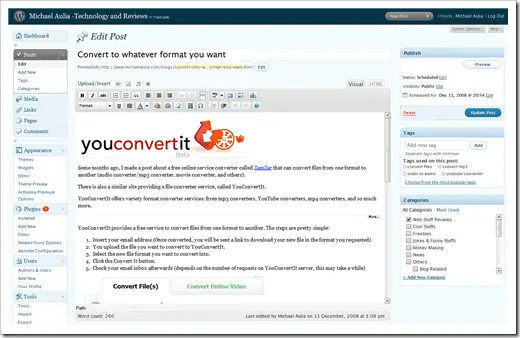
WordPress 2.7 Coltrane - Post Interface

New customizable and better Post management interface

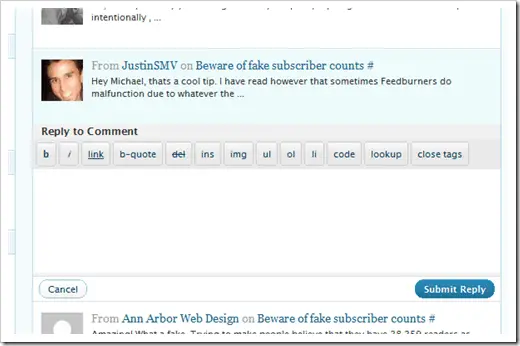
WordPress_threadedComments

Threaded Comments

WordPress 2.7 Coltrane - Reply Comments from Admin

Replying comments straight from the Admin interface

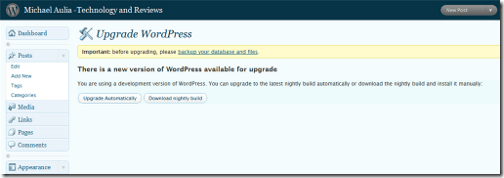
WordPress 2.7 Coltrane - Auto Upgrade

Upgrade WordPress version with a single click

Bookmark and Share


Subscribe Now

If you enjoyed this post, feel free to subscribe to be notified of new posts at Craving Tech!

{ 22 comments… read them below or add one }

Ben Pei 11 December, 2008 at 10:47 pm

Hey Michael,

I know its kinda stupid to ask this but I have not upgrade my wordpress before. Will I lose my info if I upgrade and how to go about doing it?

Reply to this comment

gynciuz 11 December, 2008 at 11:55 pm

Be sure, you will not lose any info, but maybe you will have some bugs with plugins.

Michael Aulia 12 December, 2008 at 12:59 am

Hi Ben, you shouldn’t. From which WordPress version did you upgrade from? If you are in doubt, download the WP-Backup plug-in first and backup your WordPress’s blog.

As to how, you can refer to the WordPress’ official how-to or try downloading a plug-in called WP-Automatic upgrade if you are not into updating it manually

nazham 11 December, 2008 at 10:50 pm

I can’t wait to upgrade :)

Reply to this comment

Lyndi 12 December, 2008 at 1:43 am

I have been downloading the nightly builds of the development version onto my test site for a while now. I am therefore also quite used to the new features. People will just have to remember that some of the new features e.g. the threaded comments will not work in the older themes. The themes themselves have to be tweaked to make the new features work. I am sure articles on just how to do this will be springing up all over the show.

Overall, I think the long wait was worthwhile. The new features have, in my opinion, opened the door for some major changes the next time around. Mark my words, 2.8 or whatever the next version is going to be called, is going to be just great.

Reply to this comment

Michael Aulia 12 December, 2008 at 6:00 pm

Yeah, it’s kind of a pain to modify the theme to support threaded comment, though

WordPress 2.8? Oooh.. can’t wait.. although we should let the developers take a breather :D

Downloader 12 December, 2008 at 2:46 am

Still on Google Blogger?? Come on. Move, already! Come across to the other side heh heh

- help me how to transfer to WP Sir Michael. you influence me to do so. hehe…

Reply to this comment

Michael Aulia 12 December, 2008 at 6:04 pm

lol that’s a good question. I migrated from Blogger to WordPress long ago. As to how, I think you can read some instructions on Paul’s blog here on how to migrate from Blogger to WordPress. I haven’t read the post series though but I’m sure it should be a good guide ;)

Arun 12 December, 2008 at 3:18 am

The look and feel is great. As Lyndi pointed, the Threaded comment feature is not supported on my theme! :(

Reply to this comment

Nihar 12 December, 2008 at 1:54 pm

@Arun, Don’t worry, i have made some changes to the theme to support the Threaded Comment feature. I will come up with a post soon.

@Mike, I am happy to see that there are lot of new Features in wordpress 2.7.

Michael Aulia 12 December, 2008 at 6:05 pm

Yeah :( Well happy modifying! Just make sure you do it with a theme preview plug-in so it doesn’t go live without you properly testing it

Ben Pei 12 December, 2008 at 3:48 am

Alright guys.. Thanks for your input!

Reply to this comment

ianimaru 12 December, 2008 at 6:16 am

very interesting, i’ll try it :)

Reply to this comment

Matt Helphrey 12 December, 2008 at 7:35 am

Thanks for the post. I was not aware it was ready yet. The benefits look great, cant wait to get it up and running!

Reply to this comment

Marlene 12 December, 2008 at 10:21 am

Cool! Cool! Looks more pro than the 2.6.x versions. Can’t wait to explore it. But I must try it in my local wordpress first and see if my theme can go with it.

Reply to this comment

Michael Aulia 12 December, 2008 at 6:07 pm

That’s a wise decision, Marlene :) I just couldn’t be bothered and prayed that everything went fine lol

Steve 12 December, 2008 at 12:19 pm

I definitely am transitioning to the other side for 2009, remaking my whole blog, and self-hosting with WordPress. Will I lose my Alexa ranking by doing so? Just curious.

Reply to this comment

Michael Aulia 12 December, 2008 at 6:14 pm

I think there’s a way to “migrate” your PageRank on your old domain to the new one, but unfortunately I’m not sure about this. Hope other SEO experts can answer your question :(

Anthony 12 December, 2008 at 9:27 pm

Hey Michael,

Thanks for the review on Wordpress 2.7, always love reading your posts.

Cheers mate,

A.

Reply to this comment

Michael Aulia 12 December, 2008 at 10:23 pm

Thanks, Anthony. Glad you like my posts and hope to still see you around!

Toronto personal injury 3 April, 2009 at 8:39 pm

Sharing is important in the internet. Using nofollow tag is a little bit selfishness i think. Thanks for sharing this post ;)

Reply to this comment

Michael Aulia 12 December, 2008 at 6:15 pm

It makes you can’t wait for 2.8. eh? hehe :D

Reply to this comment

Leave a Comment

You can use these HTML tags and attributes: <a href="" title=""> <abbr title=""> <acronym title=""> <b> <blockquote cite=""> <cite> <code> <del datetime=""> <em> <i> <q cite=""> <strike> <strong>

CommentLuv Enabled

Previous post:

Next post:


ss_blog_claim=90a03beb48f2cae080e36591e278f2e0