Razer Megasoma Review

Razer Megasoma is a hybrid of a hard and a soft mouse mat; If you love the softness of a soft mat but want to have the speed of a hard mat, Razer Megasoma delivers (this is debatable and I guess more like a personal preference). Razer Megasoma sits somewhere in between, combining the best [...]

Beware! Your new theme can kill you!


by Michael Aulia on 13 August, 2008

in Blogging


Or I should say, kill your blog :)

So you found this new theme. It looked classy and you fell in love with it straight away. You’ve decided to ditch your current theme and use this new theme. If you then tweak the theme files to further suit your taste, then you are one of the lucky bloggers who knows how to tweak CSS and HTML codes. If you are not, then your new theme can actually backfire on your own blog!
That first paragraph happened to me. I saw this new theme, it looked classy, it looked perfect (almost perfect), and I could see straight away what I need to change (design-wise) to further suit the new theme to my taste. After tweaking it for days, I was satisfied (Thanks to your feedback too).

After a while, I noticed a drop from my search engines traffic. I wasn’t sure what caused it (people say it’s probably just Google acting mad), but I decided to look at my new theme to make sure that it isn’t one of the culprits.

Surprised, I found these lines on the Header file:
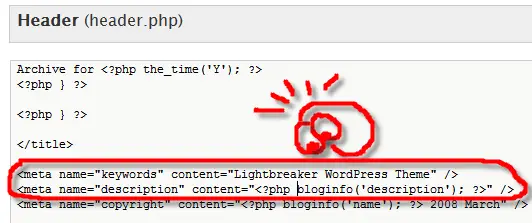
WordPress Theme Header

"What the?"

The theme, by default, put its own name as keywords to your blog and your posts! This is bad for search engines as the blog should have put your blog/posts’ keywords instead for a better search match. Although having the SEO-All-in-One WordPress plug-in helps, some bloggers may not be so lucky.

I also found out on my older theme (not this one), that by default, the theme put all posts’ title on an <H3> HTML tag. Now, if you have been following some SEO tips about post titles, everyone recommends you to put your posts’ title on an <H1> tag. It lets search engines know that it is one of the most important “keywords” on your posts. Luckily, I spotted this and made a change straight away on the theme file!

Whenever you are thinking to make a theme change, make sure that you double check the new theme, whether it has been optimized for search engines. It may not be fully optimized, but it needs to have at least the basic needs for search engines above! You are welcomed to share more SEO basic tips on the theme files here with us.

Reflection: Have you checked your new theme for basic SEO optimizations?

Bookmark and Share


Subscribe Now

If you enjoyed this post, feel free to subscribe to be notified of new posts at Craving Tech!

{ 1 trackback }

links for 2008-08-25 | www.thebloggersblog.org
26 August, 2008 at 6:23 am

{ 14 comments… read them below or add one }

Margaret 14 August, 2008 at 3:17 am

WOW! Thanks, Mike! I’ll have to check this out! You da man!

This could really break a blog, couldn’t it? Every trick in the SEO book needs to be utilized to get out there and be seen.

ê¿ê

Reply to this comment

Petitehye 14 August, 2008 at 3:24 am

Thanks Mike, I often change my blogger templates every time I see a new cool template and after the change I really find drop in my traffic. I will double check my code and see if everything is okay. I am not yet expert in HTML or CSS but at least I understand it. Thanks again.

Petitehyes last blog post..Michael Vick in UFL: United Football League 2008

Reply to this comment

supermom 14 August, 2008 at 5:51 am

I appreciate the effort to pass on all the info. Well done. Thanks!

supermoms last blog post..Vaccines and your newborn

Reply to this comment

Blog for Beginners 14 August, 2008 at 2:35 pm

This is the reason why All-In-One SEO is so indispensable but as you have said for those not in the know, it’s just a plain luck.

Good advise on the use of . By the way, haven’t you moved to Platinum SEO, Michael?

Yan

Blog for Beginnerss last blog post..Why You Should Invest Your Time or Money For A Custom Wordpress Theme

Reply to this comment

Nihar 14 August, 2008 at 4:56 pm

Nice catch. From now whenever looking to switch to a new theme have to be careful and look for the above tags mentioned…

Reply to this comment

Lloyd Lopez 14 August, 2008 at 5:06 pm

Embedded keywords is just one thing. Sadly, some are distributing their themes with ads sometimes even their RSS link embedded on it.

This means possible lose of revenue and subscribers.

For us who customize their blog, this won’t be much of a problem. We simply “clean” it out before we use the theme. Unfortunately, this is not the case for most users.

That’s why I’m always careful on a new theme before I used it. Customize it, test it several times and look for any unnecessary codes. These are just a routine before I implement a new theme on my blog.

Lloyd Lopezs last blog post..Free ZoneAlarm ForceField Today!

Reply to this comment

bloggista 14 August, 2008 at 8:16 pm

You never fail to give out great tips, buddy. Yeah, there’s something not so nice about free themes and one of them are the things you mentioned. By the way, the new theme looks cool and techie. Need to get mine dressed up too. :-) But its real hard to find one good free template that’s SEO friendly.

Reply to this comment

Michael Aulia 14 August, 2008 at 10:17 pm

Thanks, guys. I hope this servers as a good reminder for all of us, even when we think that we know everything about SEO :)

@Yan: I haven’t heard of Platinum SEO plug-in until you mentioned it here. I’ve decided to switch to it. Looks more decent! Thanks

Reply to this comment

Blog for Beginners 15 August, 2008 at 12:36 am

@Michael: Yeah, it’s the successor to All-In-One SEO and what I like about it is the ability to set noarchive, noidex to individual post.

Yan

Reply to this comment

www.forfreedownloads.com/ 16 August, 2008 at 8:18 pm

Hey mike I saw your post at entrecard, i am interested in advertising here and also after reading this post I was wondering if you could take a quick look at my template code and tell me how to re-add google adsense inbetween post I cant figure it out on this new template for the life of me! thanks for the great post I dugg it for you as icandiggit2 and stumbled as peanutbuttertoes.

Please email me back, Thanks alot

Reply to this comment

Michael Aulia 16 August, 2008 at 11:04 pm

@Yan: Thanks. I don’t know why I don’t want a post not to be indexed by Google, but I guess it’ll help those who want to keep a post a secret.

@fortressdownloads.com: Download my theme (it’s called Lightbreaker) and check out the code. It puts a custom PHP code and shows you on how to put the adsense between posts

Reply to this comment

Steve Yu 17 August, 2008 at 12:48 pm

That’s the basic SEO optimization that I’ve applied when my blog changed to a new theme.

Steve Yus last blog post..Add Tab Browsing Feature to Windows Explorer with QTTabBar

Reply to this comment

VMOptions 18 August, 2008 at 10:56 am

Good thing that you discovered those problems so quickly. I’ve encountered a number of problems with various CMS. Sometimes its just better to test/edit in a safe environment before the SE’s catch the new unoptimized design.

Reply to this comment

Feabionsu 19 August, 2008 at 5:44 am

*diggs it and comments!* Scary! I don’t download any themes, I made my own, but thanks for the warning anyways! That is bad, bad business… :( Glad you fixed though!

Feabionsus last blog post..Fantastic Contest Gives A Free Domain Name!

Reply to this comment

Leave a Comment

You can use these HTML tags and attributes: <a href="" title=""> <abbr title=""> <acronym title=""> <b> <blockquote cite=""> <cite> <code> <del datetime=""> <em> <i> <q cite=""> <strike> <strong>

CommentLuv Enabled

Previous post:

Next post:


ss_blog_claim=90a03beb48f2cae080e36591e278f2e0