

When I logged on to my Twitter on the web a couple of days ago, I noticed a new message on the top of the page (screenshot above) about the new Twitter feature called the Twitter Lists. What are Twitter Lists? How do you use them?
If you’ve been using TweetDeck, DestroyTwitter, Seesmic Desktop, or any other Twitter client, you must have already understood the concept of “Groups”. You add some of your Twitter friends to the group so that you can follow them easier.
The Twitter Lists feature has a similar concept like a group, but this time, you can actually share your group/list to others, if you want to.
For example, I add a Twitter List called nuffnangAwards2009 so I can follow my new friends from the blog awards last week. This way, I can still keep in touch with them by looking at their tweets.
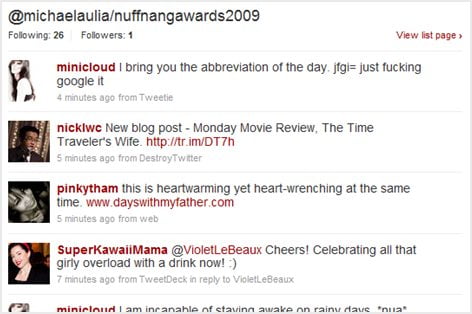
To create a new list, simply click on the “New List” link on your Twitter’s sidebar. Then, go to a friend’s twitter profile page to add him/her to your list.
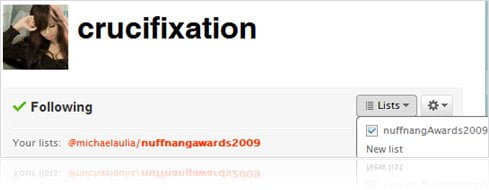
You can also categorize your Twitter friends to more than just 1 list. So you may have a friend who’s in 2 or 3 Twitter Lists. Your call.
You can also see who have added you to their Twitter Lists (which is quite a cool feature):
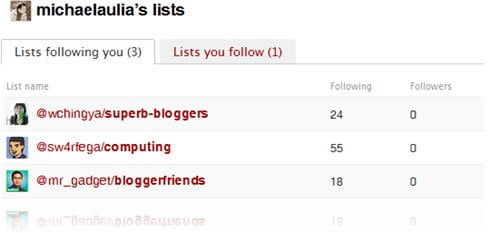
It’s simple and I love the fact that you can share your Twitter Lists (if you want to) to the public. If you are following a chocolate lover, for example, there will be a high chance of him/her creating a list of all chocolate lovers
Even if you are already using a Twitter client and using Groups, creating a Twitter List is good too so that you can share it to the others!




{ 12 comments… read them below or add one }
OHAY. I see my tweet there. This is friggin useful. especially when I follow random celebrities.

Arissa´s last blog ..Outfit Post: Macarons and me [Black Outfits]
I don’t really understand it, but several people have added me to their list already. I guess that is a good thing, right?
Ms. Freeman´s last blog ..About My About Page
The lists are basically like bookmarks in your Browser
So if someone add you into their bookmark lists, that’s good
Twitter just keeps on adding something new to the website everyday. Though IMO, it’s still a little complicated. Or maybe I’m just really bad at this microblogging-thing.
Hey Michael, hope you remember me from Entrecard days. Great looking blog, we have to get on each others’ Twitter lists: I’m @teasastips, I will look you up later today. Take care.
Teasastips´s last blog ..Spamming Facebook? No way!
Hey
I guess you’ve left Entrecard since I can’t find the widget on your blog anymore
I have been using Twitter lists and I think they are great. Today it was announced that Brizzly has incorporated their groups in with Twitter lists. If you haven’t tried Brizzly you should check it out. You can see images and videos without clicking the links and you get details to explain the trending topics. If anyone needs an invitation code just let me know.
Thanks for the post.
@ileane
Brizzly? Never heard of it. I’ve tried DestroyTwitter, Seesmic Desktop, TweetDeck, and Blu. Will have a look at Brizzly later when I have the time. Thanks ileane
i am trying to increase real followers. can u suggest some way to get decent followers and get the best from twitter ?
I had known about this but didn’t really start paying attention until I was on some lists, then I wanted to know what it was, you explained it so easily.
Thank you for the compliment
I should have made more posts like this