
If you have been active on the blogosphere, then you’ve probably found that lots of big and small blogs are using a theme called Thesis. Some of you decided to purchase and use it but some of you may not have the luxury to pay $87 for a WordPress theme.
Vigilance, although not necessarily designed to fight one on one with Thesis, does give a free alternative to Thesis at a price of a backlink on the theme (like other free themes do). A cut down version of Thesis, if you really want to think of it that way.
If you were here on this blog when I switched my theme because of a high CPU usage issue a few weeks ago, then you already had a taste of the Vigilance theme.
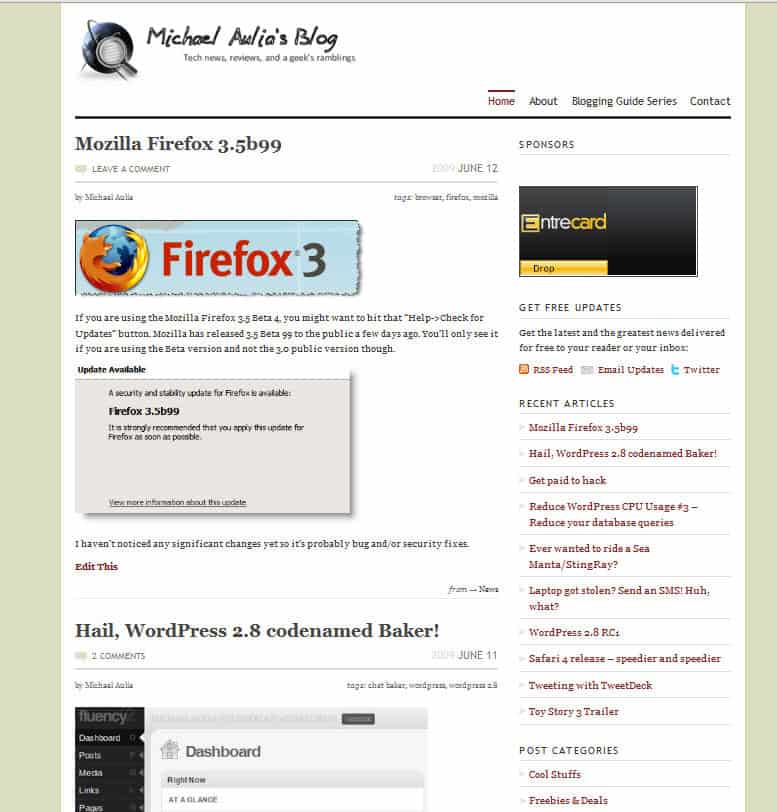
Vigilance Theme Overview
My blog’s look with Vigilance Theme:
Vigilance Theme features
Vigilance SEO Optimizations out of the box:
- Dynamic <h1> tags.
All good bloggers know that the H1 tag is very important for SEO. It adds a big point when search engine bots are crawling your site. Vigilance Theme automatically puts the <h1> tag dynamically, depending on the page. On the main page, the blog’s title will be displayed between the <h1> tags and post/page’s title on a post/page. - Non-Indexed Archive pages.
The Vigilance Theme will automatically set all archive pages as no-index, meaning you don’t need to manually tinker your robots.txt to do this anymore. If you are not comfortable modifying the robots.txt file, then you should probably get this theme to do it for you automatically. - Tags on top of each post.
I’m not sure what effect this will make or whether it’s gonna make you ranked higher on search engines’ result pages.
Other Vigilance Theme features:
- Flexible banner images.
You can set them to static or even rotating. If you constantly get advertisers and needed a rotating banners’ feature, then the theme is perfect for you. - Nice font and CSS styling.
I enjoy looking at my posts when I used Vigilance because they are styled nicely.
Stars as bullet points - Highlight Box.
Cool looking highlight box at your disposal to attract your readers’ attention.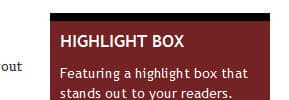
Cool lookin' highlight box - Multiple Sidebar alternatives with widgets support.
It’s probably the first time I ever used Widgets on a WordPress blog. Normally I coded the features I want manually. With the Vigilance Theme, there is no reason not to use a widget. It’s so easy to do and you don’t need to code manually if you want a double sidebar or a single wide sidebar on your blog. - Sleek looking archive pages (including search results).
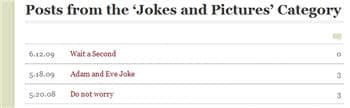
Simple, clean, and elegant - Feature box (or Alert Box)
Simply turn it on under Vigilance theme options on the administration control panel, enter your title, and the texts. It will be displayed on top of your blog’s main index, pages, and also on every post.
A very handy feature
Vigilance Theme is not as perfect as it sounds though. Out of the box, it’s quite plain to look at, just like the Thesis premium theme. You need to touch it up a little yourself so some modifications on the theme files are required. It is also important to do to make your blog unique compared to other blogs.
Vigilance Theme also has a PRO version priced at $39.95 for a lifetime membership. By paying for the PRO version, you’ll have access to its forum with great technical support and other tips to tweak the Vigilance Theme. If you don’t know much about tweaking PHP or CSS files, then you probably want to join the PRO membership to get the support.
You are not forced to pay anything though because the Vigilance theme is free as it is unless you require further support. The support is great though when I looked at the forums and questions were answered in acceptable time frames. One of the guys behind the Vigilance Theme, Drew Strojny, is also a great guy (I’ve communicated with him a few times through emails) and he is always there to answer your questions and issues that you are having.
Vigilance vs Thesis
Although I haven’t tried Thesis personally, here are my thoughts based on blogger reviews and videos:
- Both are SEO optimized.
- Thesis has more customization flexibilities compared to Vigilance (although you need to understand the concept of Hooks, etc).
- For an easier theme update, Thesis separates your customization codes with the core codes internally. Vigilance does the same with the Child theme WordPress feature.
- With Thesis, you know exactly where you need to put your codes without the need of understanding WordPress theme codes (“After the Post”,
- Both looks great in terms of CSS styling. Although I personally love Thesis’ styling a bit more than Vigilance.
- Vigilance is much “lighter” compared to Thesis (in terms of file sizes).
So who wins? Unfortunately I can’t give any answer to that because I haven’t tried Thesis myself before so I can’t be biased :)
Closing Words on Vigilance
I was actually thinking to switch this blog’s theme to Vigilance permanently but I decided to go back to my Arthemia Premium theme. I’ve fallen in love with the magazine look because it gives a more professional look and feel to this blog. I need it to pitch some private advertisers and the big guys like Microsoft and other companies. Vigilance has a more personal touch to it compared to a magazine theme.
I do however, miss Vigilance styling and overall look and feel on this blog after I switched back to the Arthemia Premium theme. However, since I’m using it now on my other blog, Write for God, I guess I don’t miss it that much anymore :)
Why don’t you try the Vigilance theme yourself before you decide whether or not to buy Thesis?




Comments are closed.