This is one of the must have for your PocketPC phone. If you haven’t installed any programs whatsoever that handles your task and appointments, then I’ll seriously reconsider you to try this application. By default, the Today screen will show you "How many tasks that you have at the moment" and also list the "Upcoming appointments" that you have there. I’d say the "task" display is quite useless, as you will need to click that area to show you what the tasks are.
This PocketPC freeware, TodayAgenda, will display both the tasks and appointments on your today screen. Also, they are fairly minimal (tight separation between lines and you can customise how many days in advance that you want to view your tasks/appointments list).
While PocketBreeze (a very popular one) does the same and many more, it’s not free and most of us (well, me) only wants to be able to quickly view the list of tasks and appointments on a simple manner. PocketBreeze adds too many features (that I’ll probably won’t use anyways) and can bloat your today screen pretty quickly (even though they have tabbed interface).
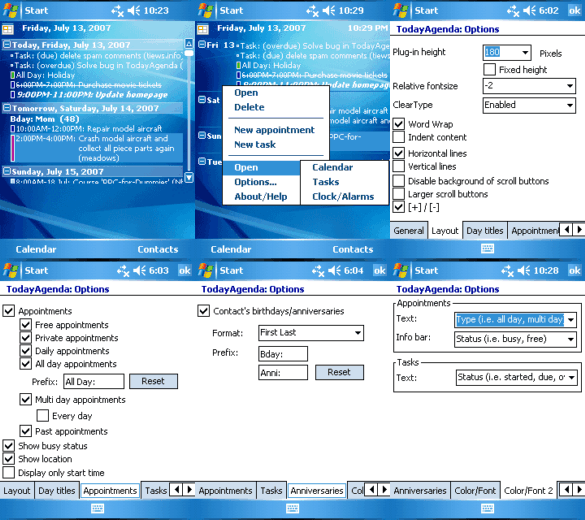 TodayAgenda is fairly small in memory and provides a simple solution for your tasks/appointments display management. It does have a drawback of the updates. When you add a new task/appointment, it will take a while for the software to update itself to show your new added task/appointment. Most of the case, a soft reset will do, but it’s not always necessary.
Despite of this drawback, I’m very happy to use this nifty application in my PocketPC. If you want more power and features, I’d suggest to look at PocketBreeze instead. But if you don’t want to pay for it, I’d suggest you give this freeware PocketPC application a try!
Also, keep their site for updates, as this app is constantly updated. The site: TodayAgenda