
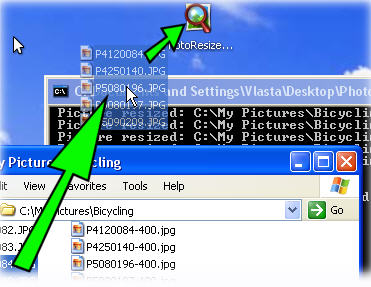
 This is probably the simplest and easiest way to resize your photos/images ever!
You download only ONE executable file anywhere on your computer (say to your Desktop), you drag your image files (single or multiple files) to it, and it will create your new resized images!
It only takes a few seconds to resize your images and you don’t even need to install anything! There’s no easier way than this! And of course, ahem, it’s free!
The application is called Picture Resizer and it has become my most favorite freeware now :) (Especially that I have to do resizing every now and then for this blog!)
The application file comes with its default setting (the resolution size) but of course, if you want to tweak it further, you can.
For example, when you download the application, it will automatically resize your image files to 400 pixels. If you want to resize them to 1024, simple rename the application file from PhotoResize400.exe to PhotoResize1024.exe! Nothing can be as simpler as this!
It will preserve the quality and also the dimension of the image. If you want to manually set the dimension, simple rename it to PhotoResizeWxH.exe where W is the width and H is the height!
If you take a lot of photos often and like to upload it to your blog, site, or online photo albums, I’m sure at some point you’ll have to resize it to smaller sizes or else the uploads can take forever!
I usually set my camera to take photos in 2Mb-ish resolution but resize my photos to 1600×1200 when I want to upload them online. Imagine the pain of opening Photoshop/GIMP/Other photo tools, resizing them, and resaving them again.
Of course if you always edit your photos before you upload them, then this software is not for you. However, if you constantly have to deal with images and resizing them, there’s nothing else out there that can beat the simplicity and the power of this freeware! (if there is, please let me know!)
Go to Photo Resizer’s site and try it yourself.





Comments are closed.