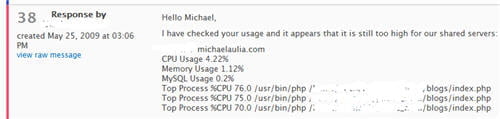
After a never ending 38 support tickets from my hosting support team, LunarPages, I decided to switch to a simpler theme temporarily. I’ve been trying to find out why my blog eats up the CPU on the shared account for weeks. I’ve tried several optimizations and cleaning ups, to no avail.
The last thing to do is to switch to a simpler theme, here is why.
According to my Google Analytics, I get around 1000 unique visitors a day. It’s not much, right? So I’ve been ignoring a suggestion to upgrade my account to a dedicated hosting on EVERY ticket reply from the support. There’s no way I’m paying $100 a month for just a thousand visitors a day.
Feeling curious, I checked on another traffic analyzer called “Webalizer” on my account’s control panel (cPanel). According to Webalizer:
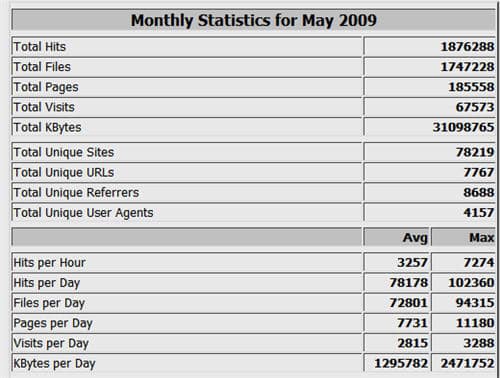
That figure shocked me O_o I’ve heard that Webalizer includes bots, crawlers, and users with disabled JavaScript (compared to Google Analytics) so it will include every hits to a file/page. If I’ve been getting 78000 hits a day (bots, crawlers, real visitors, spammers, you name it), I can certainly understand why I’ve been “framed” of hogging my server!
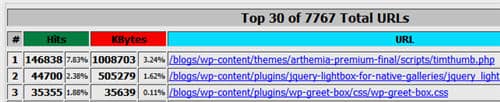
To make matter worse, my previous premium theme, Arthemia Premium, uses a script called TimThumb which dynamically generates thumbnails. A closer inspection from Webalizer shows how many times the TimThumb.php is being called this month:
![]()
146,838 hits in May alone. Since it’s the 25th today:
146,838/25 days = 5873 calls to the script a day or 244 calls/hour. Although the TimThumb script has its own caching, a PHP call is still needed to validate the cache and this is still considered “utilizing” the server resources.
This new finding made me try switching the theme to something simpler (and a bit boring). I’ll wait for another day or two and check out with my hosting again whether the CPU load has been decreased. I sort of like the theme but there are too many whites on the screen for my poor eyes ^^ If the server is happy with the change, I might touch up this theme further and use it as my default. I only did half an hour of tinkering before I made it live today. Browsing for THE theme that you like is never easy and I hate to go through the process again *sigh*
I’ll keep you updated and I’ll still write my optimization/cleaning up series posts that I’ve promised earlier, even when they don’t seem to solve my issues completely, lol. I’m sure they are still pretty useful somehow.



{ 2 trackbacks }
{ 32 comments… read them below or add one }
Wow, your stats are high. Maybe think of moving to another hosting company if $100 is to much.
I just bought the Thesis theme as my previous theme support came to a halt and I just did not like that at all. Support from theme developers as well as hosting company, play an important role for me. If I’m not happy then I move on, can’t be pushed around by people who take your money, but give no or little support.
I hope you find a decent theme out there
George Serradinho´s last blog post..Using Thesis Theme now
Well since my income is only around $100-200 mark, I don’t really wanna go for a dedicated hosting yet. I was thinking to get a Thesis too just like everybody else but hesitated with the price lol.
Vigilance (this theme) looks like a good alternative to Thesis although it may not have all the bells and whistles
Well I can’t say this theme looks better than the other theme, with a little bit of a touch up this should be fine for you. I’m only interested in the content. I’d come to view it even if it was plaintext.
Also, ask your host if you could have sort of tool that will show cpu usage so you can tweak your site as much as possible. If that doesn’t work, try setting up a WAMP server and see what you can do with that.
Thanks, man. I might touch up this theme a little more if my hosting has confirmed it with me.
They don’t have that sort of tool unfortunately (I already asked). It’d be easy if I can see a real time CPU usage and then turn off the plug-in one by one to find out
The difference between Google and Webalyzer seems to be very high, I would love to know what is causing this discrepancy. TimThumb is known for being heavy on resources but I never thought it could be that heavy. This theme most certainly loads quickly and it is actually not bad at all, I quite like it.
Lyndi´s last blog post..Installing WordPress – Part 1
Webalizer is running on the low level (O/S area) so it’s supposedly more accurate than Google Analytics. It counts the exact number of hits of the files being served. So 1 visit from you might constitute 10 hits (10 files being served: the css files, WordPress index.php, etc)
Lunarpages support sucks. This is the reason why – http://techpp.com/2008/12/09/sequence-of-events-leading-to-account-suspension-after/
I do not know if you agree with me, but once they start bugging you to upgrade, they never stop and they just don’t help you to understand the reason for memory hog or resolve it either.
Raju´s last blog post..Top 5 Ways to Exclude Posts from Your Wordpress RSS Feed
I can’t agree more with Raju. I’ve been through such awful experience with Lunarpages. Now I am very happy with my new webhost.
Steve Yu´s last blog post..How to Create Password-Protected Hard Disk Partition?
Yeah, I left a comment on your blog post today, Raju. I’ve also heard Steve’s horror stories a few weeks earlier when he moved to a different hosting.
I’ve been with for years and have extended for another 5 years. It won’t be that easy asking for a refund.. but we’ll see
I think you shouldn’t give too much importance to Webalizer stats… those hits include lots of unnecessary stuff. Google Analytics is more reliable. If you can do away with that dynamic thumbnail generation script, your old theme should work fine.
Abhinav Sonkar´s last blog post..Guitar Chords: Soniyo (From the Heart), Raaz 2, The Mystery Continues
Apart from disabling the script, there is probably no other way (I need to hack the codes to display in 1 column mode without the thumbnails, etc). Might as well go for another theme
But if the Webalizer stats are true, then that script is most likely be the one that’s causing the constant high CPU
Webalizer counts hits for individual files i believe, so when i load your main page i generate multiple hits.
Yes, that’s the reason hits were never a reliable source for gauging traffic.
Abhinav Sonkar´s last blog post..Guitar Chords: Soniyo (From the Heart), Raaz 2, The Mystery Continues
But it’s a reliable source for gauging a CPU usage, I guess
Odd man; I would have thought caching the output of the plugin would have sped it up. Try replacing tomthumb in the theme with static thumbnail pics.
Don´s last blog post..Windshield Replacement Cost
An easier move would be to switch to another theme, like what I’m doing now
but good suggestion
I faced the same problem few months ago. It is super frustrating since I have around 10 sites along with my boyfriend one. When one site is settled, the stat shows that another site is causing the excessive usage. Even a blog with around 20 visit and so little page view also can cause problem. It is so weird cause everything is just fine all the while.
The LunarPages support staff also pointed your ‘wp super cache’ post to us. We installed it to the sites, it reduced the usage but not low enough. The problem lasted for a month or so, before we moved to other hosting. But still leave 1-2 not-powered-by-Wordpress site with LunarPages, cause we still have another 4 years with them.
Ugh. Enough of my ranting. Hope you can settle it soon.
And, this theme is not bad, although too much white space.
Wiehanne´s last blog post..Sunday-ing
“The LunarPages support staff also pointed your ‘wp super cache’ post to us”
Wow, didn’t know that the post is very popular that they use it for their support.
I guess here is another unhappy customer of LunarPages lol.
I’m not really a design expert
I’m pretty sure it’ll look lovely (and pinky hehe) if you are touching it up
According to me arthemia is a very simple theme and I don’t think the serve load is because of the theme.
Check for any installed plugin which might be running lots of queries…
IN wordpress codex there are awesome tutorial on optimizing the database ..
Though I go with George and you should consider moving to another hosting…
If this is the only blog you are hosting, Even shared hosting on Dreamhost, bluehost or Hostgator will take care of it…
Harsh Agrawal´s last blog post..LoLApps : Create social network applications without any programming.
Some people in the Arthemia Premium also had the same problem but I’m not sure if they are hosted at LunarPages. I knew one of them didn’t.
But yeah, let’s see what the support team says now after the theme was changed. I’m still waiting for their reply.
I advice you to change the hosting service. I don’t think theme is the problem.
I agree with Harsh and George.
Nihar´s last blog post..How to Block Visitors from specific IP using .htaccess hack
Thanks, Nihar. Will most likely do if changing theme doesn’t make them happy.
Yea, after thinking about it more, your CPU usage could be really high because their servers have really crappy cpu’s too. Ask them about more stats, such as how many people use it, their percentages, what processors do they have, etc.
I was thinking of this too because my account was fine before and I didn’t change anything drastically. I did mention whether there is a possibility of other users in the server hogging it and I take up the blame. They didn’t say anything on that when I asked it
I love to face this problem anyway.
I always love to face any problem which is a results of huge traffic, high hits, high CPU usage.
Gimme dat
-Shanker Bakshi
Make Money from Blogging´s last blog post..Learn Internet Marketing from the Professor Shoemoney
Huge traffic, high hits, high CPU Usage -> Yes I’m fine too
Same traffic, same hits, high CPU Usage < - this I have a problem with
awesome statics man congrats,
Thanks for the tips on why my wordpress is slowing down. I am not happy that my hosting company BLUE HOST throttle my account for using up resources. I am going to find out what it eating all the resources.
regards,
Mark
I know you’ve long since solved your hosting problem, but your story is very similar to my own. Back in 2007 I had terrible problems with Lunarpages. Actually for about a year prior to them suddenly suspending my account I’d had several outages and slow downs then one day they shut down all of my sites and told me that I was using too much CPU.
If you read the post that I’ve linked to you’ll see that at the time I had just under 20 websites and blogs (more now!) and as you know, Lunarpages does nothing to help you pinpoint which of your sites is having the problem – they just shut everything down. On top of that they strong armed me into getting a VPS account and charged me for a two year contract, all without my permission! I did get a refund for that but not for the two years of shared hosting that I’d already paid for.
Like you I moved to Hostgator and I’ve been with them for about 2.5 years now with very few problems. I did have one CPU over usage problem about a month after I changed over to them, but at least they only shut down the domain with the problem and not the WHOLE account. In the end we determined one of my sites had been being attacked and it was back online within a few hours of the cpu overusage problem and I really haven’t had any big problems like that with hostgator since that time.
Thanks for the great comment. You must have got great traffic to hog Hostgator’s server. So far I haven’t been able to get more than 0.2% CPU usage on their server
Hi,
I always like to keep my options open. The unfortunate thing is that although there are plenty of “hosting review” sites out there. The information nearly always looks spammy.
I would be great is a reputable blog / site could do a review of their experience, and then allow qualified confirmed guests to do the same!
True. It’s hard to get good genuine honest reviews on web hosting. I can tell you that my review on HostGator is completely genuine. Don’t use my affiliate link on the post. Just type hostgator.com <- this shows you how sincere my opinion is towards HostGator.
But of course, my old web hosting was the best too. So hopefully HostGator stays true to their words