Sexify your GMail and GCal (Google Calendar)
Are you getting bored of looking at your plain Gmail and GCal (Google Calendar)’s look? Looking for some Google Calendar and/or Gmail skins and themes?
For some people, the default user interface is good enough but for others, it looks plain and boring.
Globex Designs’ nice themes are made for both Gmail and Google Calendar. The themes will “sit” on top of the applications using a Firefox Extension called Stylish, therefore, there are no modifications to the actual Google applications.
To sexify your Gmail and GCal, you need:
- Mozilla Firefox as your browser
- Install an extension called “Stylish“
- Get the Gmail and Google Calendar CSS styles from Globex Designs website.
- Apply it (read the installation instructions on the pages)
- Enjoy the new sexy look (or hate it!)
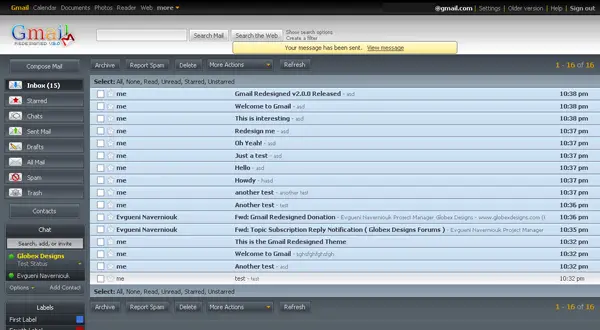
The new look of Gmail:
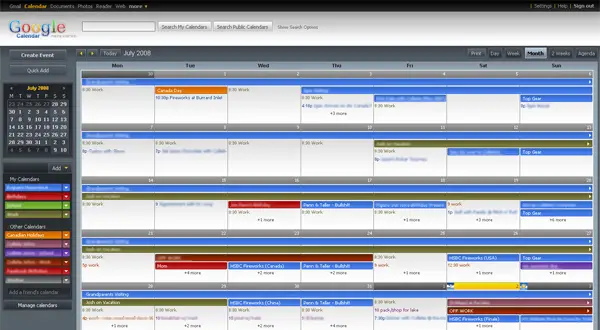
The new look of Google Calendar:
I personally love the new looks and currently using them on both my Gmail and Google Calendar. If you are accessing these applications on a daily basis and you are a type of person whose eyes liked to be pleased, then you should give it a try
Of course, once you get bored with them, you can always revert back to the default ones.
|
To get the latest posts on this blog, subscribe via your favorite RSS feed reader (What is RSS?) or by entering your email address on the form below: |


I like this. GMail’s look is becoming a bit boring. I am going to download this lot and give it a try. Thanks for the tip.
sailors last blog post..Add a Different Default Avatar in WordPress
isn’t it cool? “sexify”.. it is my first time to hear these word actually..but can gmail be any sexier..or google for that matter? I think the company’s motto is: ’simplicity is beauty’…?? whattcha think?
i will try how to sexify my gmail and gc then… but i do not use gcal..i use a calendar of vista where there are lots of designs around… i think it has been sexified already my microsoft.
Ciao Mike!
Wanderer…s last blog post..Travelling Is Simply Amazing!
Mike,
Nice tip. It really gives a new look to gmail and google calender
Nihars last blog post..Abhinav Bindra wins Gold Medal at 2008 Beijing Olympics
Yes, it’s nice ! And i found it’s a good idea, looks more better.
)
Can sexify google-search now !
MingNois last blog post..Avant que nuitée m’étreigne pour de bon éternel baiser me réveillâ.
It’s pretty cool, Michael. I just installed it — very simple to do so — and took a look. Thanks for the info.
Jason Booms last blog post..Micro-blogging Olympics Day Three
Just got back from the movie, and I’m still not feeling that well but I just wanted to say YAY! for this. Thanks for sharing! I ? THIS!!
Sexifying gmail was fun and easy. It looks better now. Thanks for this tip.
watsaps last blog post..The Beijing Olympics, in pictures
Thanks for the tips Mike but honestly I don’t use Gmail, only in Yahoo. Which do you prefer Yahoo or Gmail. I am just wondering because a lot of people are saying Gmail is better. Just wanna know your opinion, thanks ;0
Hey Mike,
I’ve been using this style for awhile now and love it. What got me though is the need to always update the style. Now these guys have their own Firefox plugin which does this for you. Check it out here:
http://www.lifehacker.com.au/tips/2008/08/11/google_redesigned_facelifts_gmail_and_gcal-2.html
LayGuys last blog post..Jamendo – Free Music!
Glad you guys like the skins. Some people in the forums hate it though, lol.
@LayGuy: Hey! Thanks for sharing that one. I’m gonna ditch the Stylish extension and use this instead. I’d recommend everyone to use the extension too. That way, if there is an update to the style, you’ll get notified automatically and easier to update too!
Woah! Cool new look for Gmail! (I don’t use Google Calendar). However, I’m quite happy with it’s simple, organized look – at least it’s not as bland and ugly as Knol! Urghhh… I remember being excited about that when they first announced it a long time ago – now I’m not even bothering to sign up! Wikipedia, though it has spam and stupid people, is still much better!
However, I am using the Firefox extension “Better Gmail” now and then, and there you can also change the look of the Gmail a bit. For example, you can make the whole interface any color you want, like green, you can add HTML to your messages and images – the only downfall is that it has to be used with the “Older Version” of Gmail. It seems the author doesn’t want to upgrade it for the newer one.
Still, for me it’s enough and it’s definitely worth it to click the “Older Version” link every time just to make “Better Gmail” work. Did I tell you how it lets you make HTML signatures too, without the two annoying dashes (–)? Trust me, it’s pretty cool. You should check it out everyone!
Perhaps then the author will feel the need to upgrade!
Feabionsus last blog post..Fantastic Contest Gives A Free Domain Name!