Have you ever experienced a time when someone sent you a compressed file (.tar, .rar, .7z, etc) and realized that you don’t have the application to open it? I know some of you don’t know how to open a .RAR file or never even heard of a program called WinRAR to extract RAR files.
Anyway, usually you have 2 choices when a scenario like above happens:
- Ask your friend/client to re-send you the file on a zip format (which you can simply double click on Windows to open it)
- Download the required program (WinRAR, 7-Zip, etc) to open and extract the files
Well, not anymore! If you don’t want to clutter your Windows with unnecessary once-off program, simply go to WobZip to get your file extracted.
At this time, WobZip supports extracting compressed file in this format: 7z, ZIP, GZIP, BZIP2, TAR, RAR, CAB, ISO, ARJ, LZHCHM, Z, CPIO, RPM, DEB and NSIS.
WobZip is still in beta, so don’t be scared if you encounter any bugs.
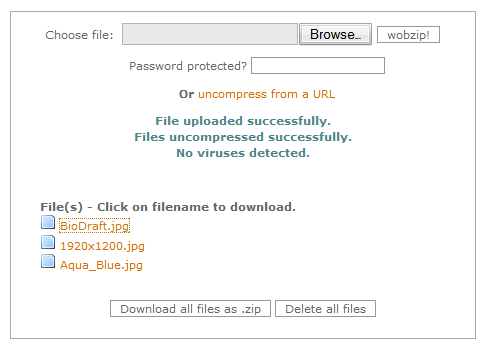
I made a test of uploading a 2 Mb RAR file, containing 3 of my wallpaper files.
Simply browse for the compressed file and click on the upload button, err I mean, wobzip! button.

If the compressed file is password protected, you need to enter the password as well so that it can be opened & extracted.
Afterwards, the list of files inside the compressed archive will be displayed, and you can either download selected files one by one, or download the whole lot of them as a ZIP file.
Easy, eh? Now every time my friend asks me how to open a RAR file or anything, I’ll simply forward them to WobZip to extract the files online, instead.
This also comes in handy if we need to extract a file to someone else’s computer but he/she doesn’t have the program to extract it. I’ll simply go online (who doesn’t have an internet connection nowadays?) and extract the files there.
Thanks to yorke who introduced me to WobZip.


{ 15 comments… read them below or add one }
That’s funny I just ran into this problem. Thanks for giving everyone the heads up!
Blah, nice, but 7-Zip owns!
[if we need to extract a file to someone else’s computer but he/she doesn’t have the program to extract it.]
This is the only use for this, though I would gladly install 7-Zip onto their PC and teach them how to use it. XD
Michael,
I always use winrar program…
But nice find…
Nihar
Nihars last blog post..Watch 1000 Plus live TV channels on your PC with Digital TV for PC
Oh..that’s good info! everybody can tell me what’s your favorite compress software ?
Vans last blog post..How to burn a Microsoft Windows Vista install DVD for your self
i always liked zip format as it opens by windows defaults ..
but what i liked most on this service is the ability to get certain files from compressed files hosted online . and that is really cool and save some time
ameos last blog post..Social Networks Stress
Thanks for sharing this application
By the way, I’ve got little EC Contest going, hope you could check it out.
Mind to link ex by the way? I’ll be waiting for a return comment^^,)
Pinoy Teens Onlines last blog post..4,000 ECs for July! – Comment Feast
Nice Review i will try this aps thanks for sharing
Well not everyone wants you to install software in their computers (myself included), hence why you can use this online service so that you don’t have to install WinRar, 7-zip or whatever in your friend’s computer
GENIUS! I am SO needing a program like this – I hate WinRar, and it bothers me that I have to install it on every new computer I buy! Not anymore!
I still don’t even understand why people don’t just use WinZip for everything. What’s so much better about WinRar anyways?
Feabionsus last blog post..Another Domain Name, Another Chance
I heard that it’s giving a better compression than a zip file.
But again, with hard drive size and internet speed nowadays, why bother?
At work with rar files i often use this tool-fix currupted rar files,my friend was enjoyed about it,tool is free,program permits to analyze and unpack damaged files with rar extension,compatible with Windows Me, Windows 98, Windows 2000, Windows Vista, Windows XP and Windows XP SP2,fixing rar files will not always be able to extract all files of rar format, your archive may be seriously corrupted, when fixing corrupted rar files tutorial.
Thanks for sharing it. I did remember to have broken rar files in the past. It’s kinda annoying because you can’t extract working files out of a corrupted rar
great! this is what i’ve been looking for to extract my .tar.gz file. and it supported so many extension, from .zip to .tar, .gz. wow!
to Feabionsu, winrar is better than winzip because winrar could extract both .rar and .zip file, but winzip couldn’t extract .rar.
[cmiiw]
Actually, I use 7-zip on all my systems. That is what wobzip uses at its backend so with 7-zip installed I don’t have to worry about any archives ever as it opens almost all of them without any problems.
When i had similar problems I used this tool-extract corrupt rar,it helped me very good,program is free,application extract corrupted RAR file helps, despite the reason of data corruption, it may be download errors, unstable Internet link, viruses, power failures or something else,program scans the needed file and makes a decision, whether it is possible to save the data or not,compatible with Windows XP, Windows XP SP2, Windows 2003, Windows 2000, Windows 98 and Windows Vista.