
I am. At the moment I’ve found that some of my categories are too broad, especially the “Personal Blog” and “News” categories.
I’ve started splitting my “Personal Blog” category to sub-categories, as you can see on the right side area of my blog. So why should you care about organizing posts into right categories and what tool is available to organize them easily?
Why bother organizing posts into sub-categories?
Well, apart from me being a perfectionist-neat-organized kind of person, your readers actually care about post categories. After they finish reading your post, their eyes will automatically crawl around your blog/site to find out what other interesting bits can they read/click (hopefully your ads, lol)
Of course, if your blog is already cluttered with so many ads, images or long blog posts on the front page, chances are they might leave your blog in less than a minute. By organizing your blog posts into the right categories, readers can easily check other posts of their interests.
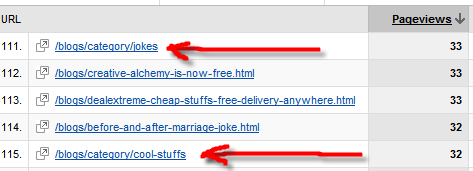
For example, from last month’s statistics, I found some portion of my readers actually clicking on my categories links as you can see below:
Now there are advantages and disadvantages in sub-categorizing your post categories.
The advantage of sub-categorizing your posts:
- Readers can easily see a place of their interests on your blog and can quickly go to them. For example, I’m sub-categorizing my “Personal Blog” category to “Blog Statistics”, “Blog Related”, etc. This way, an advertiser can quickly identify what he/she must look for to evaluate the value of advertising on my blog -> “Blog Statistics”.
- Your blog looks neater and more organized.
The disadvantage of sub-categorizing your posts if it’s too much:
- Long list of categories on your blog will discourage readers to go further.
- It removes the “curiosity” part away from your readers. For example, I put “Cool Stuffs” as one of my category. Now if I sub-categorize that into “Cool Stuffs on Blogging” and “Cool Stuffs on Tennis”, readers who are not bloggers and playing tennis won’t ever click that link. So, try to balance ;) You want to keep your readers curious but at the same time giving them a chance to try reading your posts that may not seem to interest them at first.
- It’ll increase the bounce rate level on your blog. Once people know that there is no more area of interests left on your blog, they will leave. Keeping them navigating around your blog is good. It increases the chance for them to like your blog, to bookmark your blog, to increase your Alexa Rank due to low bounce rates (I think – please confirm).
How to manage post categories or mass edit your post categories
If you have blogged after some period of time, you may find the necessity of re-categorizing your posts or sub-categorizing your categories. If it’s only a few posts, then you can get away with editing every single post, changing their categories, and re-saving them.
How about twenty posts? Fifty? Luckily I found a WordPress plug-in called Admin Management Extended. It’s a plug-in where you can mass-edit your post categories easily, rather than categorizing your posts manually.
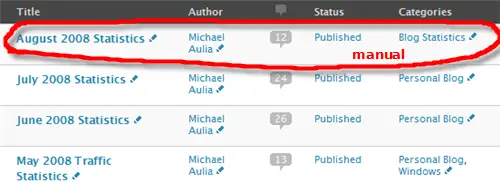
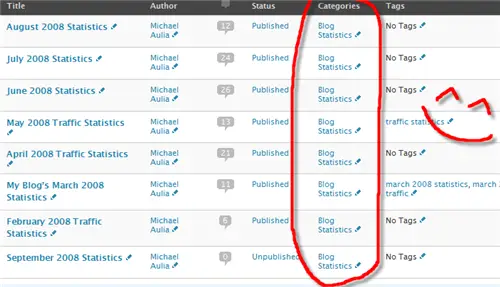

The Admin Management Extended adds extra options/buttons on your Manage Posts screen. It also uses Ajax interface, so you don’t have to leave your Manage Post screen to change your post categories, authors, tags, etc.
It’s a nice all around plug-in to basically manage your posts without having to go to them one by one and make the changes manually. Just don’t forget to de-activate the plug-in once you’re done. It slows down your Post Management screen a bit.
Besides, making an update to your published posts is bad. I read somewhere that once you re-save your published post, it will be re-pinged to the Pinging Update Service. If you do this too often, you can be falsely accused as spammers, and banned. Whether this is true or not, I don’t know as I’ve never tried saving my post 10 times in a minute after it’s being published :)
Why you shouldn’t re-categorize your published posts
This is important! If you use your category as part of your permalink URL structure (or your post URL), then please CONSIDER NOT TO! By changing your post categories, you are changing your posts URL too!
For example if your posts’ URL is: www.myblog.com/post_categories/post_url/ ,then don’t do it as it will be considered as a different URL when you change your post categories!
My blog is pretty much safe, because I don’t include the category on my URL permalink structure. The reason is because the URL will be too long and also because of this reason. I’m pretty sure my blog will “evolve” and more categories/sub-categories will be needed in the future. Think ahead ;)
Happy organizing!
PS: Any suggestions on sub-categorizing my “News” section? Something like “Software Update”, “Upcoming Beta”? or should I keep it as News for the ultimate curiosity? lol.




Comments are closed.