Razer Megasoma Review

Razer Megasoma is a hybrid of a hard and a soft mouse mat; If you love the softness of a soft mat but want to have the speed of a hard mat, Razer Megasoma delivers (this is debatable and I guess more like a personal preference). Razer Megasoma sits somewhere in between, combining the best [...]

Make Notes & Annotate the Web with WebNotes


by Michael Aulia on 3 December, 2008

in Web Stuff Reviews


webNotes Logo WebNotes is a free online tool that allows you to highlight web pages and put sticky notes on them. Not just that, you’ll then be able to share the page (with the annotations + notes) to anyone.

An example of an annotated + sticky noted page can be seen here.

To be able to highlight and start making notes, you’ll need to install the WebNotes Toolbar.
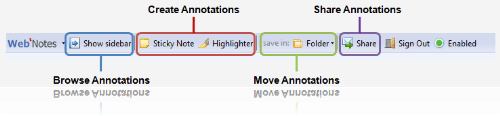
overview

Once installed, annotating web pages and putting sticky notes on them are as easy as walking in the park. You simply go to a web page like you normally would using your browser and you can then use the toolbar to annotate texts on the page that you are visiting or put sticky notes on it.

The sticky notes are drag-able across the screen and every time you visit that page, the notes will be displayed automatically, as long as you still have the WebNotes toolbar installed. This is handy to serve as a reminder whenever you visit a specific site. If you are a blogger and on the Entrecard community, you can also use WebNotes to write notes about the site that you are dropping.

WebNotes is highly useful if you are doing lots of research on the net. For example, let’s say that you are researching on Triglyceride (the amount of fat level in your blood). You can then highlight important sentences of web pages related to your research.
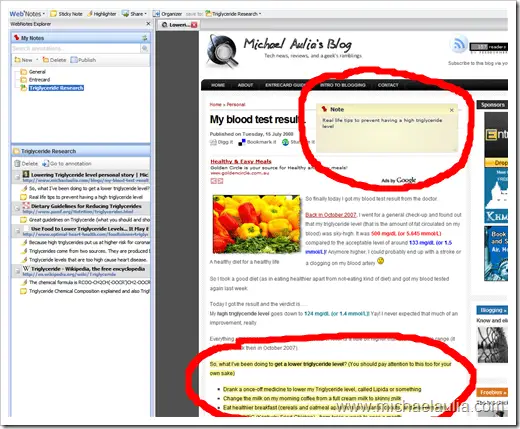
annotate_notes

You can also choose to display the Sidebar that will display all of your annotations and sticky notes (the WebNotes Explorer/Organizer). It includes the annotations, texts, and also the web page URLs.

WebNotes_organizer

You can easily organize notes and annotations into folders (meaning, you can categorize them to whatever you want).

As shown earlier on my introduction paragraph, you can then share your annotations & notes. If you are in a group of researcher (or even on a university group assignment), then this feature will come in handy.

WebNotes is still in Beta and therefore, expect a few problems to occur. So far, the only complaint that I had is the loading time of the notes, annotations, and the organizer. It’s not slow, but it’s not really that fast either. Hope that they can optimize it a bit further during the track.
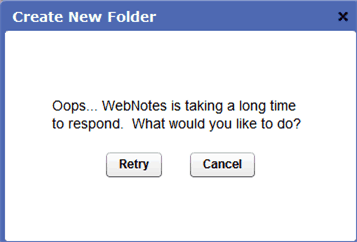
Webnotes_Loading

If you are interested in trying WebNotes, I have 25 free invitations for you. Simply post a comment here and I’ll invite you in!


Bookmark and Share


Subscribe Now

If you enjoyed this post, feel free to subscribe to be notified of new posts at Craving Tech!

{ 26 comments… read them below or add one }

Tim 3 December, 2008 at 11:32 am

Sounds perfect — I do a lot of web research, this would be great for me — any chance of an invite?

Reply to this comment

Feabionsu 3 December, 2008 at 12:05 pm

I use Firefox’s extension called Scrapbook – not EXACTLY the same as WebNotes, but certainly as effective and does the job for you just as well. Allows you to highlight, save copies of the web page on your hard drive (and they look exactly the same too) and more stuff… Check it out – maybe you’ll blog about it. xD

Heh, Firefox is so awesome – I can almost find an extension for every toolbar and free browser service out there (adblockers, stuff like webnotes, monitoring web pages for changing [i use updatescanner] and so much more…)

Reply to this comment

Michael Aulia 3 December, 2008 at 6:56 pm

Scrapbook? Hmm..never heard of it before. You do find lots of good extensions for Firefox :D

Lyndi 3 December, 2008 at 5:15 pm

I have been sitting here wondering if this is something that I could use when reviewing sites. I could annotate all my stuff while I am browsing through the site and when I am ready to write the actual review I will have all the relevant info at my fingertips.

Reply to this comment

Michael Aulia 3 December, 2008 at 6:43 pm

Good idea, Lyndi. You can probably put notes on the main page and redirect your readers to the shared notes. It’s easier than taking bunch of screenshots on the selected areas that you want to talk about.

I’ve send an invitation to you anyway in case you want to give it a go

Lyndi 3 December, 2008 at 8:06 pm

Thanks for the invite, it works great. I do however experience a small problem, when this add-on is enabled Google Reader does not open (this is in Firefox). This is strange but true. I think it is this add-on that somehow clashes with the Google Reader Watcher add-on. I will however work around this, I will only enable this one when I want to do a review. Thanks again.

Reply to this comment

Michael Aulia 5 December, 2008 at 12:41 am

Hm a weird bug. Seems like a hassle though as you need to restart firefox whenever you enable/disable an add-on

Bennett 9 December, 2008 at 5:21 am

Hi Lyndi,

I just wanted to let you know that we fixed the issue with Google Reader on Friday, so you shouldn’t have to enable/disable WebNotes anymore. Hope that helps!

Lyndi 10 December, 2008 at 11:15 pm

Thanks Bennett, that is very nice to know. I have only used WebNotes once for a review and it worked like a bomb. Now I will be able to activate it and leave it activated. Michael, my thanks to you as well.

Michael Aulia 3 February, 2009 at 1:27 am

Thanks for letting us know, Ben

Mixer Reviews - Melinda 4 December, 2008 at 3:31 am

I’m was wondering how is webnotes different from google note? I’m being using google note firefox plugin for sometime, so far so good.

Reply to this comment

Michael Aulia 5 December, 2008 at 12:43 am

I’ve never heard about Google Note before, apart from Google Notebook, so unfortunately I can’t give any answer on this one

Feabionsu 4 December, 2008 at 11:12 am

Hey, can you send me an invitation too? :D Just so I can try it out?

Reply to this comment

Michael Aulia 5 December, 2008 at 12:46 am

Invitation sent :D

Beth 7 December, 2008 at 6:52 am

As a personal tool, I also think google Notebook is a lot more useful. Webnotes also falls short if you need to do serious web research, organization and group collaboration. For that, I found Diigo quite useful.

Reply to this comment

Michael Aulia 7 December, 2008 at 8:47 pm

Thanks for sharing that, Beth. I’m using Google Notebook to store important informations

David 2 February, 2009 at 12:16 pm

this looks just what I’ve been looking for have tried several other simular ones to this going of what I’ve seen from here it looks great would love to try it out.
Thanks
regards DG

Reply to this comment

Michael Aulia 2 February, 2009 at 11:57 pm

Great to know if it’s gonna work for you. The feature is a bit too much for me (since I rarely do annotations)

David 3 February, 2009 at 1:03 am

could you please send me a invitation to try it out. Thanks

Reply to this comment

Michael Aulia 3 February, 2009 at 1:27 am

Invitation sent! Sorry, I didn’t realize that I was meant to send an invitation lol

joel 20 February, 2009 at 2:18 am

Nice blog Michael, think I will return to check it in the future =)
I would like to try out WebNotes (if you have any invites left that is…)
Thanks

Reply to this comment

Michael Aulia 21 February, 2009 at 3:20 pm

Thanks, Joel. I’ve sent the invitation to your email

ondicz 25 February, 2009 at 4:55 am

can you send me a invitation? thanks

Reply to this comment

Michael Aulia 25 February, 2009 at 10:15 am

Invitation sent

wundernett 28 March, 2009 at 4:27 am

is there an invitation left? or someone else – that would be great

thank you so much (and sorry for – you know – false english… :D )

Reply to this comment

Michael Aulia 28 March, 2009 at 7:36 am

Hi, invitation has been sent to your email address :D

Leave a Comment

You can use these HTML tags and attributes: <a href="" title=""> <abbr title=""> <acronym title=""> <b> <blockquote cite=""> <cite> <code> <del datetime=""> <em> <i> <q cite=""> <strike> <strong>

CommentLuv Enabled

Previous post:

Next post:


ss_blog_claim=90a03beb48f2cae080e36591e278f2e0