
 Not many people know the existence of Google Notebook. Most people (believe this or not) ever only thought the word “Google” is identic to the search engine. Sometimes when I tried to explain Google AdSense, Analytics, Docs, etc to my friends, it got complicated lol.
Sometimes I have a piece of important information. It can be a great URL that I found, a list of items that I need to buy much later, an event, or simply any piece of information that I have to remember. Some people write these piece of information on their arms, some on their mobile phones, and some email the info to their own email address as a record (I was on this category, unfortunately).
So how does Google Notebook help?
Majority of web users nowadays usually have a Yahoo ID, a Google Account, and/or a Windows Live ID. If you are using Gmail as your primary email, then you technically have a Google Account, which you can use on every Google’s services, including Google Notebook.
Google Notebook is another great web application by Google, in which you can create notes and simple documents online. It is a “scaled-down” version of Google Docs and it’s focused on creating bookmarks and “simple” notes.
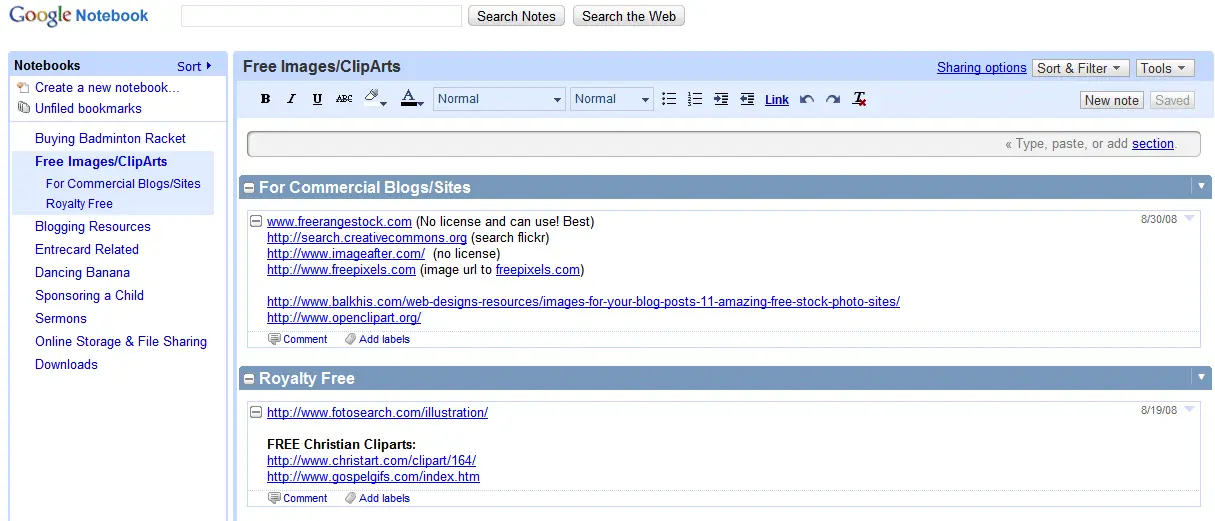
Don’t be fooled when I meant “simple”. Google Notebook has features that are no way simple. You can label, export, and even share the notes to the whole world.
Google Notebook is useful when you:
- find an interesting URL using your office computer and want to access it later at home (Some of you have probably used internet bookmarking service or Firefox extensions to synchronize your bookmarks on different computers)
- have to write notes on important information. For example I had to buy 4 badminton rackets for my friends and myself last week. I then wrote down the type of racket that everybody wants on Google Notebook.
- want to bookmark a category of important URLs. For example I have on my Google Notebook a group of good site URLs giving free high quality images. If I bookmark them on my browser, I won’t be able to access the URLs when I’m on a network cafe or a friend’s house.
- have friends who always borrow stuffs from you: DVDs, Games, Books, etc. If you haven’t written down “who borrows what” from you, chance is that you may never get all of your items back. Trust me on this lol.
- writing your username and passwords of any kind! It’s not encrypted and you shouldn’t put that kind of information on the web, even though it looks secure.
- writing your grocery items to buy on your way home after work. Unless if you are a pure geek who goes to supermarket and accesses Wi-Fi just to check your list of items :)
- writing any piece of secure information ever.
Conclusion on Google Notebook
Google Notebook is easy to use and you should be able to grab the concept and features pretty quickly. It is simple and quick, just like Gmail. Google Notebook also has the ability to clip information easily from a page that you are visiting to your Google Notebook. Check the video demo here from Google.
If you are using Google Chrome, you can read this to find out more on how to clip the information to your Google Notebook.
Another thumb up for Google!




Comments are closed.