

Here is a plug-in for WordPress that is going to add more international visitors’ numbers to your traffic statistics. Please note that I’ve tried this plug-in for a month but decided to remove it :( This post will inform you about the plug-in and how it affected my blog last month but my next post (in a few days) will be about how to uninstall Global Translator plug-in from your WordPress blog.
The Global Translator plug-in slowly translates your existing posts automatically using the free translation services (Google’s, Yahoo’s Babelfish, etc) and stores them into your sitemap. This basically allows Google and other search engine bots to crawl these pages and index the translated posts. It means more international organic traffic and it’s all good. But…
How Global Translator Plug-in Works in a nutshell
First, let’s explore what this plug-in is actually doing. Global Translator Plug-in will connect to free online translation services to translate your blog posts one by one at a certain interval time to avoid you for being banned (for spamming these services, obviously). You can specify this setting should you want to play safer.
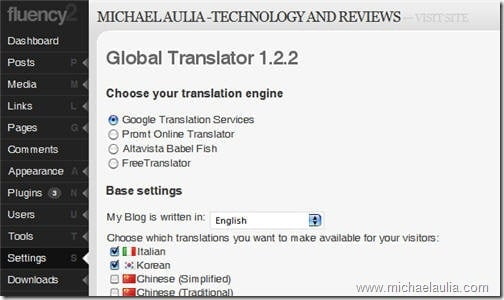
You can specify which translation engine that you want to use, although most people would definitely go for Google Translation Services (it provides the most possible translated languages & some say it provides more accurate translations).
The posts will then be translated according to the interval one by one and these translated posts will be accessible through your main blog’s url + “/THE_LANGAGE_ACRONYM”. So if I have Japanese translated posts, it will be available on my http://www.cravingtech.com/ja/.
The translated files will be stored physically under your wp-content/gt-cache folder.
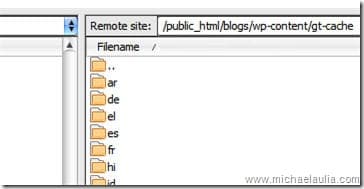
The Global Translator plug-in also has an option to add the translated posts URL to your sitemap which will make it even easier for search engine bots to find these new posts.
“Global Translator Plug-in boosts traffic”. Is it true?
Yes, it is true. Since people without any English background would probably search the internet using his/her own language as the keywords, having translated posts will give them keywords’ matches. For example, I received hits from Spanish keywords such as “itext salto de pagina”, “palabras que utilizan los hombres”, whatever they mean :)
I investigated which translated post contents got hits in March 2009 (when I decided to give a trial to this plug-in) and here are some statistics:
- 106 unique visits from Dutch keywords
- 77 unique visits from Spanish keywords
- 33 unique visits from Italian keywords
- 40 unique visits from Japanese keywords
- and a few more from other foreign keywords.
They are not huge numbers, but since not all posts have been translated yet, the number is still quite a good number of visitors gained from foreign search engines (and foreign sites linking to the translated posts) using Global Translator Plug-in.
Global Translator Plug-in Issues
Okay, before you all get excited because of this post, there are some things that you need to consider before you decide to install and use Global Translator plug-in in your blog.
Issue #1: It’s against Google Translation Service policy to keep the translated pages for more than 15 days (thanks to Digital Inspiration blog to bring this up). You can also read a bit of discussion on a Google group thread.
Note: So far, none of the blogs have been banned or penalized (at least officially) when they are using this plug-in. I’ve been in contact with the plug-in author and even the plug-in site has not been banned for providing such services (even have a nice PageRank). If you really want to take the risk, some say to keep the cache only for 15 days and let the plug-in re-generates it. This is more like a TOS cheating than a workaround though.
You can also use the other translation services if you are scared of upsetting Mr. Google. But you may upset them and the other services are only offering certain languages (much lesser than the Google’s one)
Issue #2: If you put AdSense on your posts, then not all languages are supported and it *may* be against Google AdSense TOS if you include AdSense in the non-supported languages’ posts.
Note: According to Google AdSense TOS regarding the languages:
Please also be aware that placing the AdSense code on pages with content primarily in an unsupported language is not permitted by the AdSense program policies.
It says content “primarily” in an unsupported language. Now, since our primary content is an English language blog, it’s unclear how this TOS applies to translated posts. I’ve searched the AdSense forum for this issue but the answers were not definite. Some say it’s ok but others didn’t comment at all. So, it’s your call. But if you really want to be safe and still want to use this plug-in, disable the unsupported countries from ever being translated by the Global Translator plug-in.
Issue #3: Unreachable URLs on Google Webmaster Tools.
Note: Since it’ll take some time for the pages to be translated, you’ll get unreachable URLs error periodically reported by Google. Whether this will affect anything, I’m not sure but it does sound bad. For example, I have 989 unreachable URLs reported while waiting for the posts to be translated and saved to the server.

Issue #4: High CPU usage/server load when pages are being translated.
Note: Why you should care? Because your hosting cares. If your site is eating the server’s CPU usage, you will be warned and you might get banned in an extreme case. I never had this problem because I use WP-SuperCache plug-in. I’d recommend you to use a caching plug-in, if you decide to install Global Translator plug-in.
Issue #5: Some bloggers reported of a change in Google’s search results (in a bad way)
Note: Duplicate contents, having too many new posts all of a sudden, etc were the possibilities. But again, some bloggers also said that duplicate contents don’t affect anything, etc. So hopefully some of you can debate them here.
Conclusion
So! The conclusion…… is that it is unclear whether we all should use this plug-in or not. I have read these issues from other blogs before but since it attracted quite a nice traffic without the need of doing anything, I decided to keep the plug-in.
However, a few days ago, I decided to just ditch this plug-in away. There are too many uncertainties and unclear risks that this blog has to take. Since this blog mainly gets its visitor from search engines, it may as well be closed down if Google penalizes it.
Global Translator plug-in really boosts traffic as it promised. However there are other factors that you may want to consider. Even though the problems haven’t been confirmed 100%, they are real enough for you to worth thinking about. On my next post in a few days, I’ll be posting how to uninstall Global Translator plug-in completely, step by step.
Whether you decide to use this plug-in or not, it’s entirely up to you. But you may want to read other bloggers who have decided to uninstall the plug-in too: Harsh Agrawal and Clement Nyirenda.
Visit Global Translator plug-in official site if you are willing to take the risk.




Comments are closed.