
 BurnAware is a free alternative tool for Nero, Roxio, Ashampoo, or whatever commercial burning software available on the market (unless if you need the Home or the Professional Edition)
Depend on your needs, BurnAware may or may not be the perfect freeware.
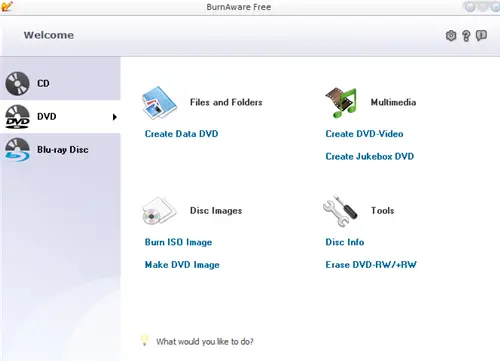
BurnAware Free Edition includes:
- Creating Data CD/DVD/Blue-ray Disc
- Creating Audio and Jukebox CD/DVD
- Burning ISO image to CD/DVD/Blue-Ray Disc
- Make an image out of CD/DVD/Blue-Ray Disc
- Erase a CD/DVD/Blue-Ray Rewriteable Disc
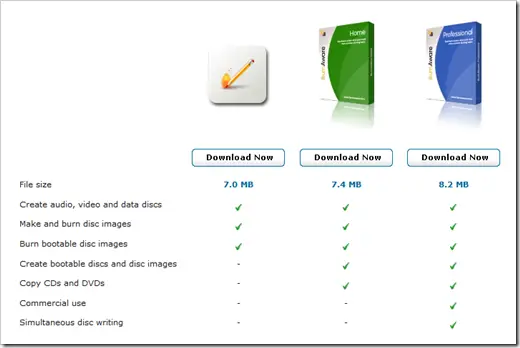
One thing that is missing from the items above is the “Copy” feature. Making a duplicate (usually for a backup purpose) is supposed to be the most basic feature of every burning application out there. Unless of course, that’s the whole point of it being Free. It’s to lure you in buying the other BurnAware editions. In order to get the copy feature (among other features), you need to upgrade your edition to either Home (for USD $29.95) or Professional Edition (for USD $39.95).
The BurnAware “Non-Free” editions come with a few more features that can be seen below.
BurnAware Free vs Home vs Professional
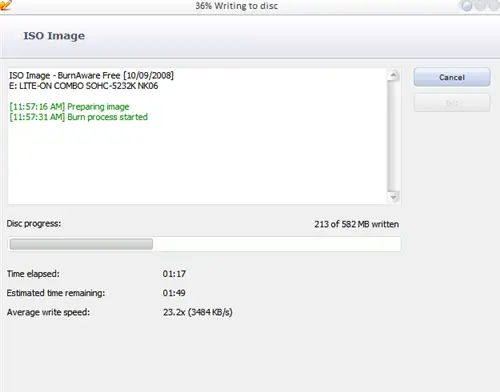
As for the usability, BurnAware Interface is pretty straight-forward and focusing on what it does, burning files to your media.
Final Thoughts on BurnAware
Unlike some other burning applications, BurnAware is not bloated. It’s created solely to burn data onto a media. No sound editing tools, video editing, and other mumbo jumbos.
So if you are looking for a freeware to burn your image files or data files, look no further than using the BurnAware Free Edition. If you need more power for your burning needs, I’d suggest to get Ashampoo Burning Studio (which I’m using at the moment), Nero burning ROM or Roxio CD Creator.



Comments are closed.