Feature your blog posts.. in style!

by Michael Aulia on 1 August, 2008 in Blogging

Featurific LogoI hope some of you notice that I have put an eye-catchy “Featured Post” on my sidebar. If you didn’t notice it, please let me know. That means I have to put it somewhere else on my blog!
That eye-catchy thing is called “Featurific” and yes, there is a plug-in version for your lovely WordPress blog. If you don’t use the WordPress blogging platform, I’m pretty sure you can install Featurific on your Blogger or other platforms as well. I don’t know how, though. You have to look for it yourself on this page here.

What is Featurific?

From the site: Featurific is a Flexible Featured Item Flash Gallery. We could have called it FFIFG for short, but decided that Featurific is more fun to say.

In my own words, Featurifc is a way to feature your blog posts sexily with style!

Is Featurific Free?

Featurific is both FREE and Commercial. The Commercial version adds so much more to the free version (more customization, no featuric logo trademark, more effects, etc). The Free version, however, is good enough, unless you are thirsty for more! :)

Featurific for WordPress

The WordPress plug-in really makes life easier if you want to use Featurific on your WordPress blog. Simply install the plug-in and you’ll see it working straight away! Of course, some tweaking is necessary if you want to utilize it to its fullest!
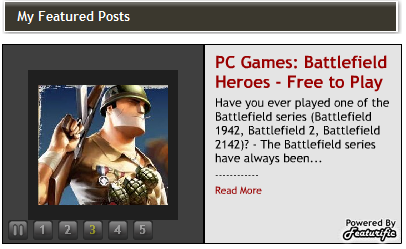
Featured Posts in Style

Featured Posts in Style

The default will:

  • Assign you to its default Template (Yes, you can select different templates and even modify them!)
  • Show your most recent posts on the widget.
  • Display the widget on your main index (your front page, on the top)

How to change Featurific Default Settings

Q: How do I display Featurific on the sidebar like yours, Michael?
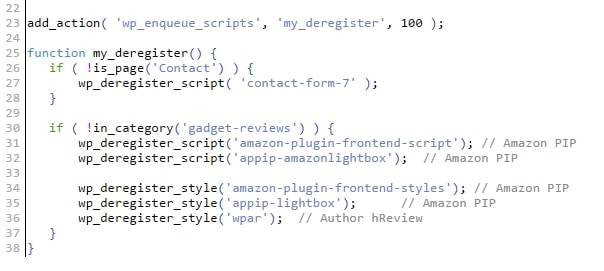
A: Every time you activate the plug-in (this includes upgrading it), a code snippet will be inserted automatically to your Main Index Template file (index.php or home.php). The code will look like this:

<?php
//Code automatically inserted by Featurific for WordPress plugin
if(is_home())                             //If we're generating the home page (remove this line to make Featurific appear on all pages)...
 if(function_exists('insert_featurific')) //If the Featurific plugin is activated...
  insert_featurific();                    //Insert the HTML code to embed Featurific
?>

Simply move the file on your Sidebar or anywhere you want it to appear!

Q: I don’t want it to display my most recent posts!
A: Go to its settings on the Settings-Featurific menu of your WordPress Administration Control Panel. Have fun with tweaking it. You can also assign specific posts that you want (like I did) or make it random if you are too lazy changing it every now and then.

Q: I hate the CSS default colors on the Template!
A: Me too. You can actually change it on the Template xml file (colors, font sizes, etc). After making the changes, don’t forget to re-select the template and save on the Featurifc Setting to update it.

Q: How to….? What if….? Can I….?
A: The best answer is to read the guide yourself, rather than keep asking me for questions :)

Have fun!


Don't miss out winning these great giveaways currently running at Craving Tech:

Handy Backup Giveaway


{ 11 comments… read them below or add one }

Hye Munar August 1, 2008 at 10:39 pm

Nice tool. Thanks for sharing it Mike, I am sure this is great to feature blog post and increase traffic as well.

Hye Munars last blog post..iPhone 2.0 Jailbreak: Unlock iPhone 3G

Reply to this comment thread

rinogo August 2, 2008 at 1:28 am

Hi Michael,

This is Rich, the author of the Featurific for WordPress plugin. Thanks for the nice writeup and brief (but quite helpful) FAQ. I’m glad you’re pleased with the plugin. I’ll be monitoring this post for any questions, comments, or suggestions left by your readers.

Have a great day, and happy blogging! :)
-Rich

Reply to this comment thread

Leet August 2, 2008 at 2:50 am

Hi …
You have nice site
I want to introduce my site, the content about painting
If you don’t mind you can visit my blog and give the comment about my painting
If you interested to be painted, you are welcome ?

Leet Gallery
http://leet-gallery.blogspot.com

Leets last blog post..The Smile

Reply to this comment thread

Jeremy Newton August 2, 2008 at 5:51 am

Hey Mike I thought I would let you know now that you have it on your sidebar but its not showing anything under the category.

Reply to this comment thread

Michael Aulia August 2, 2008 at 11:42 am

@Rich: Thanks for dropping by here! I know what I said on the “FAQ” are all on your guide page, but some people are just too lazy to browse through the guides :D

Jeremy: I selected the posts myself through the settings (by entering the Post IDs). Or you mean, you couldn’t see them?

Reply to this comment thread

Nihar August 3, 2008 at 4:41 pm

Mike,

I noticed it as soon as you had put it and also jumped on to that site and had glanced through it.

It is a nice feature to add on the blog..

Nihars last blog post..Try Performancing Ads instead of Direct Private Advertising

Reply to this comment thread

Michael Aulia August 3, 2008 at 9:44 pm

Ah.. I thought I should have put it on the main page. Glad if people actually see it.. you actually reminded me to change the featured posts on the widget :)

Reply to this comment thread

rinogo August 5, 2008 at 5:32 am

@Michael: Thanks for having me! :) I’ve enjoyed following this post and the comments on it. Please let me know if you have any more comments and/or suggestions. (rich at featurific dot com)

Reply to this comment thread

Ed August 5, 2008 at 3:41 pm

Hi Michael..I had to link your post without your permission but it will be up in my new blog (please-entre.blogspot.com) for a week. Hope that helps..I plan to feature your posts and some of the others there til next Tuesday..Nice blog:)

Eds last blog post..Cities with the Most Expensive Cups of Coffee

Reply to this comment thread

Michael Aulia August 5, 2008 at 8:49 pm

@Rinogo: My pleasure!

@Ed: Hey, why would you need a permission for linking a post? It’s the dream of every blogger :) Thanks for coming

Reply to this comment thread

jeflin August 10, 2008 at 5:58 pm

This is a beautiful and looks really elegant. I already have a featured posts section but I will certainly use this plugin on my other blogs.

Reply to this comment thread

Leave a Comment

CommentLuv enabled.

  Subscribe to future comments on this post

Previous post:

Next post: