“Redesign your blog/website” contest

The guys over at Buy Templates are nice enough to sponsor prizes for this contest. I know a few of you have just started a blog or a website, so I’m sure it’ll be great if you can win some good quality templates, logo, and banners for your new blog/site. Everyone who participates will also [...]


Forbidden

I was in a panic mode for a few minutes after getting a Forbidden error message while trying to write up a post. It caused my blog inaccessible too. I was playing around with a server’s settings to protect image hot-linking (which I’m going to post about next) and I thought that caused instability to the server’s settings!
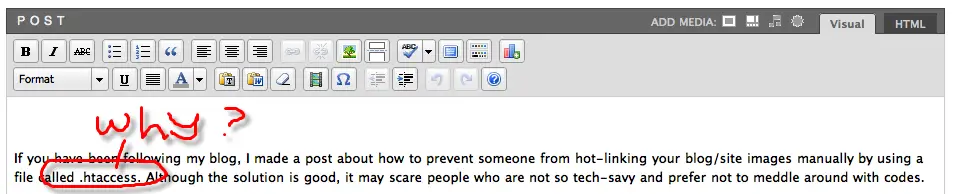
HTACCESS not allowedI found out that if you have a [dot]htaccess on your post’s body, it will cause this weird anomaly (replace [dot] with .). Does it happen to you too? 

Bookmark and Share


Subscribe Now

If you enjoyed this post, feel free to subscribe to be notified of new posts at Craving Tech!

{ 6 comments… read them below or add one }

Deimos Tel`Arin 28 April, 2008 at 4:22 pm

I am not that techie enough to be playing around with stuff that you mentioned. O_O

So, no, I did not encounter such problem. :)

Reply to this comment

Michael Aulia 29 April, 2008 at 9:36 am

Haha! You just have to write a post with the word [dot]htaccess, save it, and see if it crashes your WordPress :P

Reply to this comment

Vincent Isles 1 May, 2008 at 12:43 am

It doesn’t on my private Wordpress server (I don’t have a public one; Blogger is free :-) ). It might be some configuration issue.

Vincent Isless last blog post..Remove date from Blogger URL

Reply to this comment

Michael Aulia 1 May, 2008 at 8:31 pm

Hmm.. weird it’s possibly a glitch on the hosting or the configuration somewhere.

Thanks for trying it out, O Brave One!

Reply to this comment

shanker Bakshi 5 May, 2008 at 1:59 pm

It happens Many time, I pulled my hair sp many time over these kind of problematic stuff offered by WP time to time. Akismat never allowed me to delete or approve Not A spam comment thru Admin panel and i am struggling with this problem since inception.

Reply to this comment

Thompson 8 February, 2009 at 12:46 am

You have done, thank you for your time and effort.

Reply to this comment

Leave a Comment

You can use these HTML tags and attributes: <a href="" title=""> <abbr title=""> <acronym title=""> <b> <blockquote cite=""> <cite> <code> <del datetime=""> <em> <i> <q cite=""> <strike> <strong>

CommentLuv Enabled

Previous post:

Next post:


ss_blog_claim=90a03beb48f2cae080e36591e278f2e0